How Shopify Handles Database Backups at Scale
Explains Shopify's three-layer backup model—replication, snapshots, offsite archives—and why restore speed and RPO/RTO matter.


Shopify’s backup model comes down to three layers: replication for uptime, snapshots for restore, and offsite copies for worst-case loss. That mix helps protect 10+ petabytes of data, keep data loss near zero for core systems, and cut restore time from hours to under 30 minutes.
If I strip the article down to the main takeaways, here’s what matters:
- Replication is not backup. A standby region can keep stores live during a region outage, but bad deletes and corrupted data can copy over too.
- Snapshots are the main restore tool. Shopify moved away from file-based MySQL backups because they were too slow at this size.
- Restore time matters as much as backup coverage. During peak periods, even short data loss can mean lost orders.
- Sharding limits blast radius. Problems stay inside one pod instead of spreading across the whole platform.
- Retention and offsite copies fill the gaps. Short-term snapshots help with recent mistakes. Offsite archives help with region-wide loss.
- RPO and RTO should come first. Backup design starts with how much data you can lose and how long you can be down.
A few numbers make the point clear:
- Shopify processed $6.3 billion during Black Friday/Cyber Monday 2021
- A single merchant can hit 8,000 orders per minute
- Shopify runs 100+ database shards
- Ghostferry shard moves can keep downtime to under 10 seconds for most stores
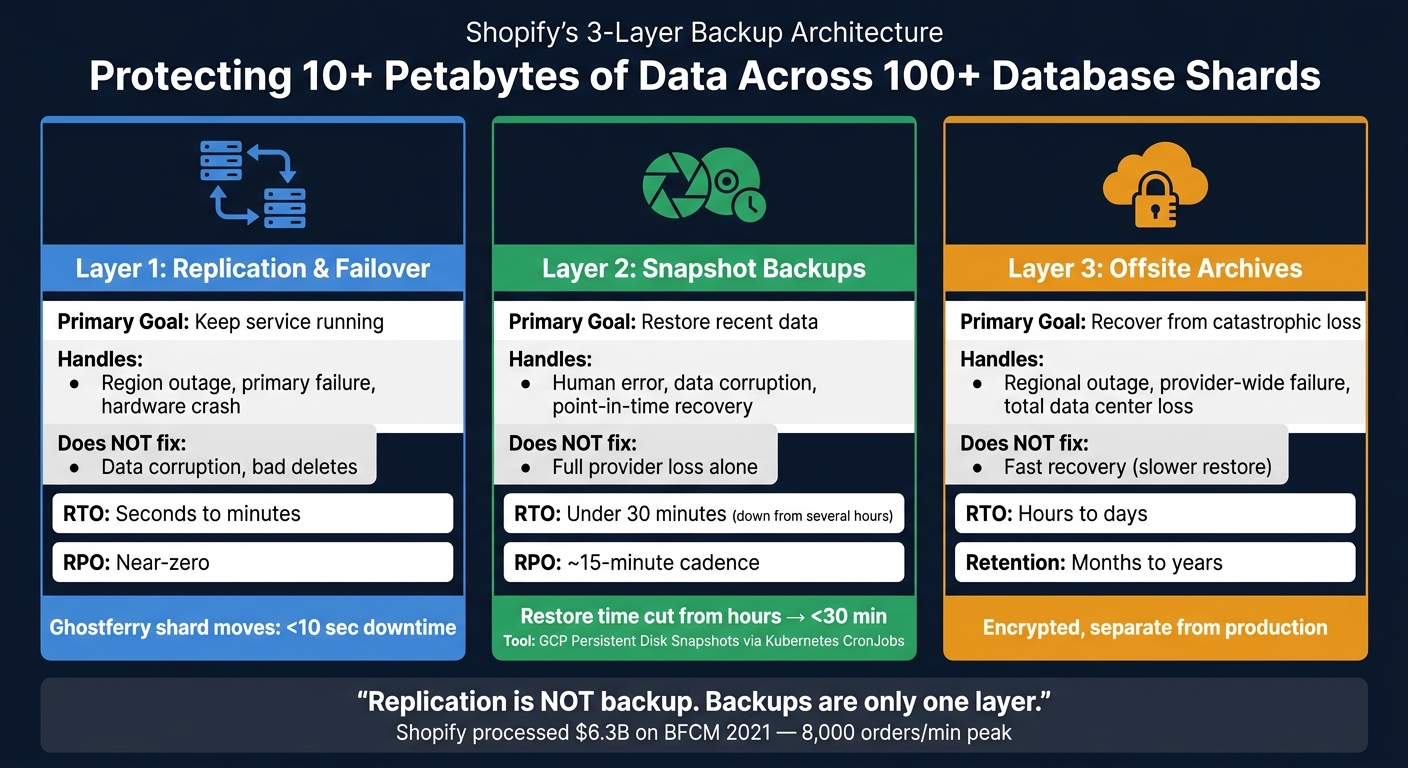
Shopify's 3-Layer Backup Architecture: Replication vs. Snapshots vs. Offsite Archives
Quick comparison
| Layer | Main job | Handles well | Does not fix well |
|---|---|---|---|
| Replication / failover | Keep service running | Region outage, primary failure | Corruption, bad deletes |
| Snapshots | Restore recent data | Human error, data corruption, point-in-time recovery | Full provider loss on their own |
| Offsite archives | Recover from large-scale loss | Region-wide or provider-wide failure | Fast recovery |
So if I had to sum up the article in one line: Shopify treats backups as part of system design, not just storage hygiene. The lesson for any ecommerce team is simple - set your recovery targets first, then choose the mix of replication, snapshots, and offsite copies that fits them.
sbb-itb-61169e3
How Shopify Uses Snapshot-Based MySQL Backups

To meet those RTO goals, Shopify needs restores to finish FAST. At this scale, backup coverage alone isn't enough. Restore speed matters just as much.
Why Shopify moved away from file-based backups
Shopify once used file-based MySQL backup tools like Percona XtraBackup. That approach can work fine on smaller systems. But at petabyte scale, it runs into hard disk I/O limits, and restores can stretch into hours. For a platform the size of Shopify, that recovery window is simply too long.
So Shopify moved to Google Cloud Persistent Disk snapshots. Snapshots operate below the filesystem, take a full disk image once, and then save only changed blocks after that. That incremental approach keeps backup time and storage costs under control, even across more than 100 database shards (pods) [2][1]. Just as important, restore times dropped from several hours to under 30 minutes [5].
That kind of speed depends on one key idea: backup jobs can't be tied too tightly to the database host.
The backup workflow: Persistent Disk snapshots and orchestration
Shopify's backup flow is built to run apart from the database host itself. It uses Kubernetes CronJobs to start snapshots on a schedule and calls GCP APIs directly. In plain English, the backup system doesn't need to lean on each individual database machine to do the work.
Shopify also adds application-aware coordination so every snapshot lines up with the correct shard, region, and database role. That's a big deal. Without that extra layer, a snapshot might be fast but still messy to restore when time is tight. With it, even large shards can be brought back inside the recovery window.
Snapshot backups vs. file-based backups: a comparison
| Feature | Snapshot-Based (GCP Persistent Disk) | File-Based (e.g., Percona XtraBackup) |
|---|---|---|
| Backup Speed | Near-instant | Moderate |
| Restore Time | < 30 minutes | Several hours |
| Operational Complexity | Low | High |
| Storage Cost | Efficient (incremental blocks) | High (often requires full file copies) |
| Consistency | Application-aware coordination needed | Built-in via redo logs |
| Fit for Multi-TB Databases | Excellent | Poor |
In Shopify's sharded MySQL setup, snapshots prevent backups from turning into the thing that slows recovery down.
Retention, Offsite Copies, and Disaster Recovery
Fast restores fix one part of the problem. Retention rules and offsite copies cover the rest. If a snapshot lives in the same region as your production database, it won't do much good if that entire region goes dark. That's why retention planning and offsite backup matter.
How Shopify manages short-term restore points without storage bloat
At Shopify's scale, retention has to balance recovery depth against storage cost. A tiered policy is a smart way to do that. Frequent snapshots cover the near term. Daily and weekly snapshots push recovery points farther back.
This stays cost-efficient because snapshots store only changed blocks. You also want lifecycle deletion in place, so older restore points expire on schedule instead of piling up.
The next step is deciding how long those restore points should stick around. A practical setup uses frequent short-term snapshots for recent issues, daily copies for deeper recovery, and a longer archive window for compliance or audit needs.
How offsite backups protect against regional or provider-wide failures
Retention helps with recent mistakes. Offsite archives help when an entire region fails. Replication can speed up recovery, but it is not the same thing as backup. As Bart de Water, Payments Team Manager at Shopify, explained:
"A Shopify pod is active in a single region at a time but exists in two with replication set up from the active to the non-active region. We can failover an entire pod to another region if need be." [1]
That setup is useful, but replication alone has a weak spot. If bad data gets replicated before anyone notices, both copies can end up damaged. That's the problem. Offsite archives guard against the kind of failure that snapshots and regional replication can't absorb. Keep those archives encrypted, separate from production, and test restores on a regular basis.
Short-term snapshots vs. long-term offsite archives: a comparison
| Feature | Short-Term Snapshots | Long-Term Offsite Archives |
|---|---|---|
| Use Case | Rapid recovery from recent corruption or accidental deletion | Catastrophic recovery from regional or provider-wide failure |
| Restore Time | Fast, usually minutes to hours | Slower, often hours to days |
| Storage Cost Profile | Higher per GB; managed with incrementals | Lower per GB in cold storage, but with transfer and egress costs |
| Retention Horizon | Days to weeks | Months to years |
| Disaster Scenario Covered | Operator error, bad code deploy, or single-instance failure | Regional outage, provider-wide outage, or total data center loss |
Snapshots are built for recent recovery. Offsite archives are there for the nightmare scenario.
Replication, Sharding, and Failover: What Backups Do Not Cover Alone
Backups bring data back. Sharding, replication, and failover keep Shopify up when something breaks. That’s the key idea here: backups are only one layer. Day-to-day uptime depends on the layers ahead of them.
How shards and replicas contain failures and speed up recovery
Shopify splits its infrastructure into pods - isolated groups of merchants, each with its own MySQL databases. If one pod has a database problem, the damage stays inside that pod. Other merchants on other pods keep running.
"In case something goes wrong with a certain pod, like an overloaded MySQL instance, this does not affect the other pods or the shops that are hosted on there." - Bart de Water, Insights and Reporting Team Lead, Shopify [1]
That setup matters because tenant-based sharding stops one issue from spilling across the platform. In plain terms, it keeps many incidents small enough that Shopify doesn’t need to do a full restore.
Each database table includes a shop_id. That gives Shopify a way to group merchants into shards and move them between pods when needed. To handle those moves, Shopify uses Ghostferry, which copies rows while tailing the MySQL binlog. The result is short downtime during shard moves: less than 10 seconds for most stores and under 20 seconds for the largest ones [1][3].
Inside each pod, a shard usually has:
- one primary writer
- multiple replicas for read traffic
- replica capacity that can take over fast if the primary fails
That mix helps in two ways. It spreads read load, and it gives Shopify a path to switch over fast when the main writer goes down.
How multi-region standby databases reduce downtime before a restore
A standby region gives Shopify a way to fail over an entire pod during a regional outage. That’s about uptime first. If one region has a bad day, traffic can move to the standby instead of waiting for a long restore process.
But replication and backups do different jobs. Replication helps keep the service live. Snapshots protect data quality.
Here’s the catch: replication copies data fast, whether that data is good or bad. If corrupted data or a bad delete reaches the standby before anyone spots it, the standby now has the same problem. At that point, backups become the last safety net.
Replication-based failover vs. snapshot-based restore: a comparison
The split between the two is pretty simple:
| Feature | Replication-Based Failover | Snapshot-Based Restore |
|---|---|---|
| Primary Goal | High availability and regional failover | Point-in-time data recovery |
| Failure Scenarios Addressed | Hardware failure, regional outage, instance crash | Data corruption, accidental or malicious deletion |
| Recovery Time (RTO) | Seconds to minutes | Hours to days |
| Data Loss Risk (RPO) | Near-zero, limited by replication lag | Data lost since the last snapshot |
| Corruption Protection | None - corruption replicates to standby | High - can restore to a pre-corruption state |
| Operational Complexity | High - requires active orchestration and health checks | Moderate - requires storage management and restore testing |
Replication and failover are built for speed. Backups are built to recover from the kinds of problems replication can copy right along with everything else.
How to Apply Shopify's Backup Patterns to Your Own Ecommerce Stack
A backup design checklist for Shopify-like workloads
Start with the business problem, not the software. How much data loss can the merchant live with? That answer shapes the whole backup plan.
For a high-volume store, losing order data is a lot worse than losing a few blog drafts. That’s why RPO and RTO need to be set first. Once those targets are clear, match your backup cadence to them. For high-volume stores, a 15-minute snapshot cadence is a solid starting point. Pair that with automated snapshots and granular restores.
This matters because mistakes can snowball fast. One bulk upload error deleted 1,600 SKUs in 45 seconds and led to about 3.5 weeks of manual recovery work [7]. That’s the kind of mess snapshot backups are meant to limit. Set retention rules, encrypt offsite copies, and test restores on a schedule [1][6].
How agencies can use this knowledge in audits and outbound
Once the backup plan is mapped out, it turns into a practical audit checklist. For agencies, backup gaps give you a clear angle. If an infrastructure audit shows weak RPO/RTO planning, no offsite copies, or restore steps that were never tested, that’s a concrete finding, not a fuzzy “health check.”
The stores most likely to need help here are usually the ones that grew faster than their backup process. Think stores adding SKUs at a fast clip, moving platforms, or piling on app integrations. StoreCensus lets agencies filter U.S.-based Shopify merchants by revenue, tech stack, and growth signals, which makes outbound a lot more focused.
Core lessons from Shopify's backup architecture
The model is pretty straightforward: snapshots bring data back, offsite archives help with regional loss, and replication keeps the store up.
That said, the shared-responsibility line still matters. Shopify may protect platform infrastructure, but merchants still own account-level data like products, orders, customers, and theme data [6][7].
The main lesson is simple: set recovery targets first, then pick the tools. That same order works whether you're dealing with a small store or a much bigger setup.
"The property that you can shut down every single server and you lose nothing, like there's no lost data... is surprisingly difficult an invariant to uphold." - Simon Eskildsen, Former Principal Engineer, Shopify [4]
FAQs
How often should snapshots run?
Shopify’s core infrastructure doesn’t list one universal snapshot schedule. Instead, the platform leans on high availability and data integrity through a sharded, multi-tenant pod setup, event-driven data handling, and real-time monitoring.
For third-party backup apps, the timing can vary quite a bit. Some run backups every 24 hours. Others trigger a snapshot when they detect a site update. Store managers can also run manual backups before big site changes.
What should teams test in backup restores?
Teams should test restores by acting out failure scenarios and making sure alerts, automations, and team responses all kick in the way they should. A backup isn't much help if the restore process falls apart when things go sideways.
It's also smart to check granular recovery, not just full-store restores. That means restoring single items, product categories, or other small parts of the store when needed. In many cases, that's the fix you want - not rolling back everything.
Load testing in production-like environments matters too. And during migrations or recovery events, teams need to confirm that no data is lost along the way.
Who is responsible for merchant data recovery?
Shopify merchants need to handle their own store backups.
Shopify takes care of platform infrastructure and database reliability at the platform level. But when it comes to data tied to an individual store, the store owner is responsible for keeping a backup.
For example, merchants should export store data like product CSVs and customer information so they have their own copy on hand.