Ecommerce Lead Routing with Store Data: Guide
Route leads using verified store data—platform, revenue, country, stack; dedupe domains, flag weak data, and measure routing by meetings and SLA.

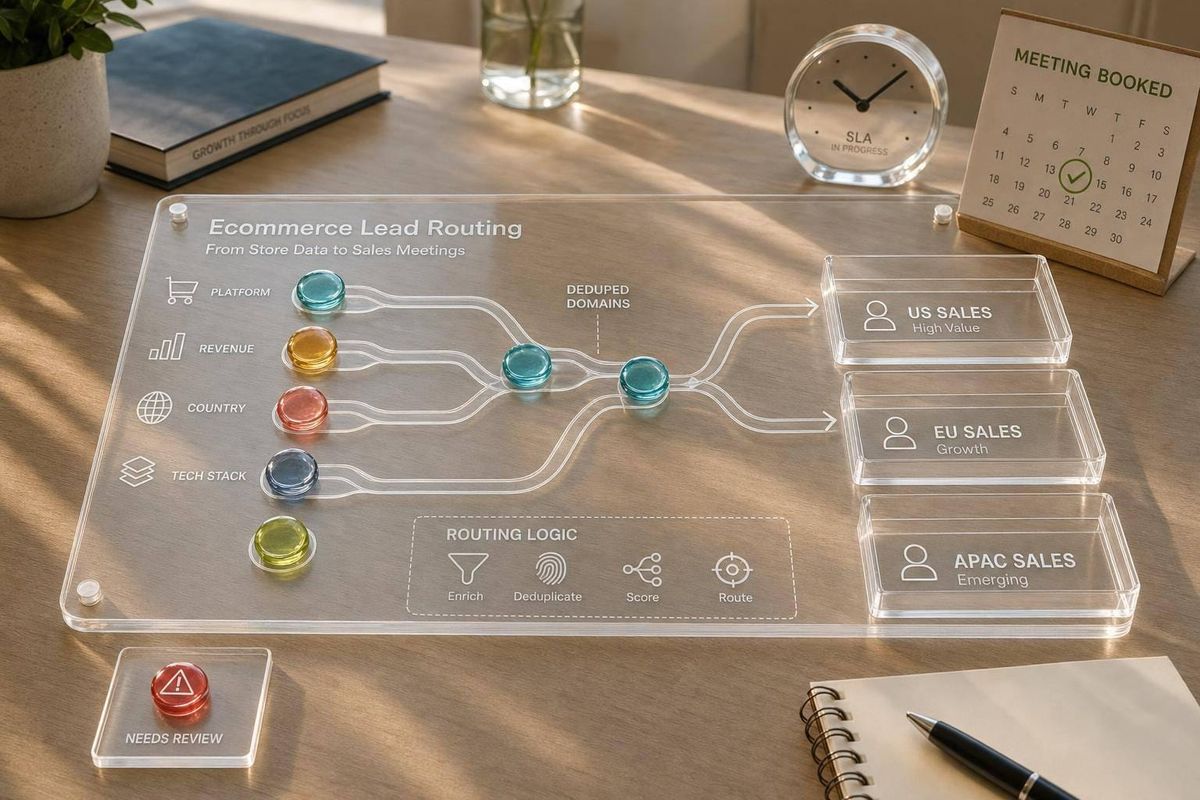
Most ecommerce lead routing fails for one simple reason: teams assign leads before they know what store they’re dealing with.
If I had to sum up the whole guide in a few lines, it would be this:
- I should check the store first, then assign the lead.
- I should route based on platform, revenue band, country, stack, and recent changes.
- I should dedupe by normalized domain so two reps don’t contact the same merchant.
- I should send weak, missing, or old data to a review queue, not straight to sales.
- I should judge routing by meetings, pipeline, wins, and SLA misses - not just how fast a record got assigned.
That means a Shopify store doing $1 million+ in annual revenue should not go through the same path as a WooCommerce store with a heavy plugin setup. And if the same merchant comes in through two sources, I should attach the new contact to the current account owner instead of assigning it again.
Here’s the simple version:
- Inbound: collect → verify → enrich → assign
- Outbound: segment → score → suppress → assign → export
- CRM: use fixed rules, fixed priorities, and fixed fallback paths
- Reporting: track median and P95 response times, duplicate rate, review-queue rate, meeting-booked rate, and win rate
Bottom line: I get better routing when store data drives ownership, and I keep the system useful by checking data age, rule quality, and sales results over time.
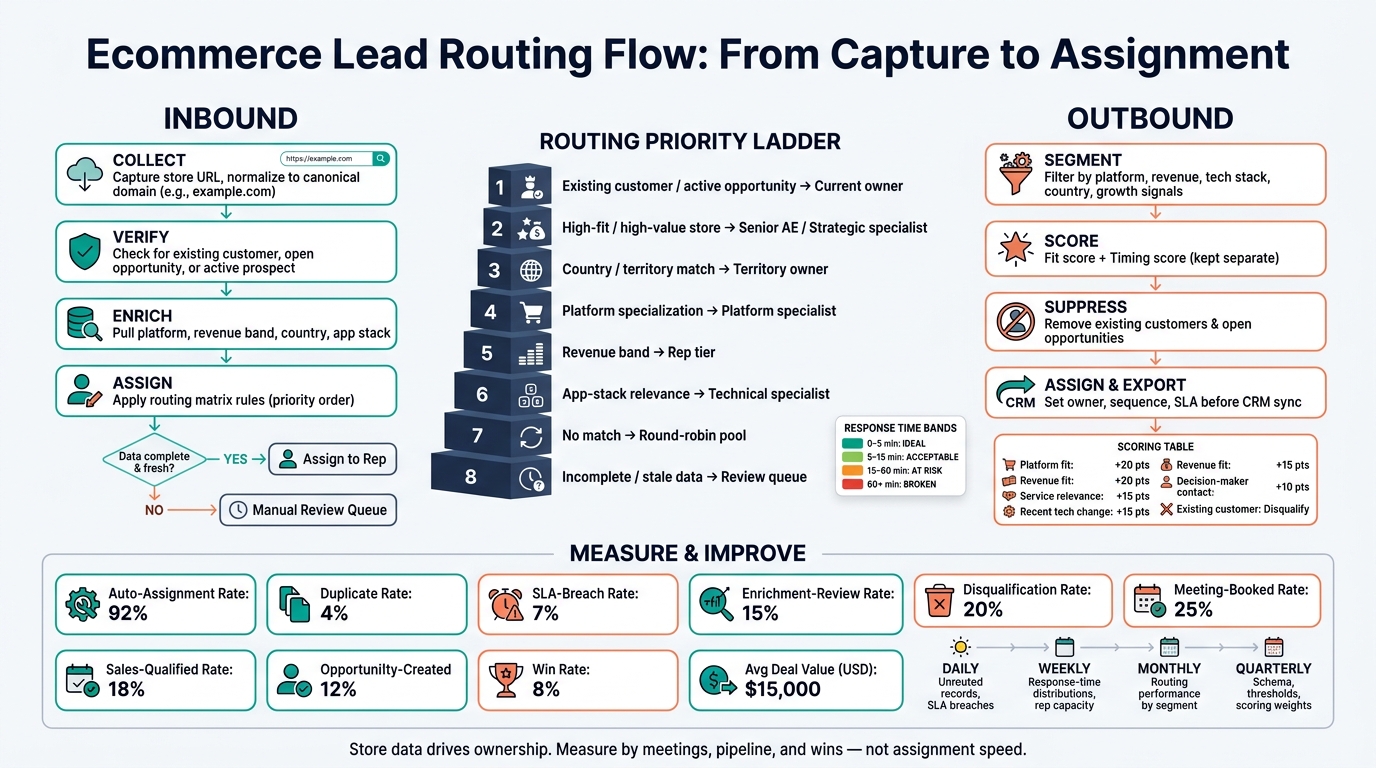
Ecommerce Lead Routing Flow: From Capture to Assignment
Qualify inbound leads before assigning a rep
For inbound leads, the flow should stay simple: capture, qualify, assign.
Start with the store URL. Normalize it into one canonical domain by removing the protocol, www, paths, query parameters, trailing slashes, and case. So https://WWW.Example.com/collections/sale?utm_source=form turns into example.com. That domain becomes your deduplication key.
From there, check whether that store already exists as a customer, an active opportunity, or a prospect with an owner. If it does, attach the new contact to the existing account and alert the current owner. Do not send that lead into round-robin.
Platform, revenue band, country, and app stack should drive routing. They aren't just extra fields sitting on the record. Once you've deduplicated the lead, route it using a clear rule set.
Build a routing matrix with clear rule priority
Each routing rule needs a fixed priority. If you skip that step, two rules can fire at once and create a mess with conflicting assignments. The best way around that is to check the most specific and highest-stakes cases first.
| Routing condition | Business meaning | Assigned owner | Next action |
|---|---|---|---|
| Existing customer or active opportunity | The merchant already has an account relationship or open deal | Current account or opportunity owner | Link the new contact, notify the owner, create a follow-up task |
| High-fit or high-value store | The store matches the ICP or exceeds the senior-service revenue threshold | Senior ecommerce account executive or strategic specialist | Immediate outreach with the qualification reason logged |
| Country or territory | Local coverage, language, time zone, or market expertise is required | Territory owner | Apply the territory response window; schedule outreach in the lead's local business hours |
| Platform specialization | Shopify or WooCommerce expertise is required | Platform specialist | Route to the appropriate specialist queue |
| Revenue band | Deal size or service complexity determines rep level | Rep tier aligned to the revenue band | Start the corresponding sales sequence |
| App-stack relevance | The store uses technology tied to a specific service capability | Technical or solutions specialist | Include the detected stack and likely use case in the task |
| No higher-priority match | The lead is qualified but doesn't need specialized ownership | Eligible round-robin pool | Assign evenly; create the standard follow-up task |
| Incomplete data or stale enrichment | Required routing fields can't be trusted | Manual review queue | Flag for review; do not auto-assign |
Round-robin should be the last qualified-lead fallback. It shouldn't be the default path for every record.
It works when the reps in the pool are basically interchangeable:
- Same platform knowledge
- Same territory coverage
- Same seniority level
- Similar capacity
If that's not true, narrow the pool before you assign anything.
Use these priorities to deal with the most common inbound routing situations.
Assignment logic for common ecommerce routing scenarios
High-revenue Shopify store: A verified Shopify store with annual revenue of $1,000,000 or more should go to a senior Shopify specialist. Shopify Plus is also a strong budget signal. The follow-up task should log "high-value Shopify store" as the routing reason and include an immediate outreach deadline.
Complex WooCommerce stack: A WooCommerce merchant using multiple plugins, custom integrations, or other technically heavy tooling should go to a WooCommerce technical specialist. The task should include the detected stack, so the rep walks into the first conversation already knowing the setup.
Below-threshold revenue: A valid store below the agency's minimum revenue band should move into a nurture workflow, not a sales queue, unless there's a strong intent or strategic-fit exception. Log both the routing reason and the threshold decision so the record can move back into qualification if the store's signals change.
Missing or invalid store URL: No valid domain means no assignment. Send the record to a manual review queue. A rep or operations owner should request the URL, verify the store, and only then put it back into the routing flow.
Existing opportunity, second contact: If a second person from the same merchant fills out a form while an opportunity is already open, link that contact to the existing account and notify the current owner.
Every assignment should create one follow-up task that includes the owner, due time, canonical domain, platform, revenue band, country, stack signal, source, qualification status, SLA, and routing reason.
That routing reason matters more than it may seem. It's what helps a manager tell the difference between a weak sales result and a routing mistake.
Use the same store fields to build outbound segments before export.
sbb-itb-61169e3
Route outbound accounts using store data and buying signals
Use the same enriched store fields for outbound, but use them before export. Inbound routing reacts to what a merchant does. Outbound routing starts earlier, before a merchant takes any action.
The flow is simple: identify accounts, score them, assign ownership, then start outreach. In plain English, qualify, score, and assign accounts before any sequence starts.
Build outbound segments with StoreCensus data
StoreCensus lets you search across 6M+ Shopify and WooCommerce stores using the same fields that shape routing decisions: revenue band, tech stack, theme, country, and growth signals.[1] That means you can build a qualified account list from the start, instead of dumping a raw export into your CRM and sorting it out later.
Start small. Tie each segment to one offer, one owner, and one sequence. That keeps things clean and makes it easier to see what's working.
A few practical examples:
- U.S. Shopify growth accounts: Shopify stores in the United States with estimated annual revenue between $1 million and $10 million.
- Complex WooCommerce builds: WooCommerce stores above the agency's minimum revenue threshold using several technically demanding plugins.
- Service-fit accounts: Merchants using an app or integration tied to the agency's service, such as subscription, loyalty, search, analytics, or automation tools.
- Recent tech-change accounts: Stores that recently added, removed, or changed a technology.
Recent change can matter more than size. A smaller store with a fresh growth signal may outrank a larger account that's gone quiet.[1] That's the difference between a list that looks good on paper and one that gives reps a real reason to reach out now.
StoreCensus also pulls decision-maker contacts, so routing and outreach can start from the same record.[1]
Once those segments are in place, score them for fit, timing, and suppression before they enter the CRM.
Score, suppress, and assign accounts before export
Before export, define the fit score, timing score, owner, sequence, and suppression rules.
Keep fit and timing as separate scores. That's a big deal. A large store might look like a perfect fit but show no sign that it's evaluating anything right now. Meanwhile, a smaller store with a recent app removal or tech change may be a weaker fit on paper but have much stronger timing. If you crush both into one number, you lose that signal.
| Scoring dimension | Example rule | Points |
|---|---|---|
| Platform fit | Target Shopify or WooCommerce platform | +20 |
| Revenue fit | Inside the agency's preferred revenue band | +20 |
| Service relevance | Uses a technology the agency supports | +15 |
| Recent technology change | Change detected within the past 90 days | +15 |
| Decision-maker confidence | Valid, role-relevant contact identified | +10 |
| Existing customer or open opportunity | Suppression condition | Disqualify |
| Missing or unverified critical data | Requires research | Hold |
Before any record syncs to the CRM or enters an outreach tool, suppress existing accounts and open opportunities before export. Then split what's left into three buckets: approved for outreach, research required, and do not route.
Assign ownership to approved records before export. Pass owner, sequence, and suppression status into the outbound tool before export too. Reps shouldn't be making those calls manually after the fact.
The last step is to carry those rules into CRM so assignment stays automatic.
Turn the routing matrix into CRM workflows
Your CRM should enforce the routing matrix on its own. Use the same normalized fields from qualification to drive assignment inside the CRM. First normalize and score the record. Then assign ownership. Manual overrides should be rare.
The CRM fields and workflow steps that matter
Use structured CRM fields for platform, revenue band, country, sales territory derived from country, primary app or plugin category, growth signal, fit score, lead source, status, owner, routing reason, enrichment timestamp, and next activity due date. Free-text notes are not enough for lead routing.
Lead status should follow controlled values:
NewValidatingEnrichment NeededReady to RouteAssignedWorkingNurtureSpecialist ReviewClosed/Disqualified
Two fields need special care. Store the routing reason as a code plus a short label, such as R-04: Shopify, U.S. Pacific, $1M+ revenue, high-growth signal. The enrichment timestamp should show when the store data was last verified, not when the CRM record was created. Mix those up, and stale data can end up driving live assignments.
Use a fixed sequence so every record moves through the same path:
| Stage | What happens | Failure action |
|---|---|---|
| Trigger | Form submission, meeting booked, outbound import, qualification threshold reached, or relevant store change detected | Reject malformed or spam records |
| Validation | Confirm email, store domain, lead source, and submission timestamp; normalize domain, country, platform, and revenue band; check duplicates and existing account ownership | Set status to Enrichment Needed or Data Conflict |
| Scoring | Calculate fit from platform, revenue, country, app category, and growth signal; calculate intent separately where possible | Send low-fit records to nurture |
| Branching | Apply rule priority: existing owner → high-intent inbound → specialist need → territory → capacity | Send unmatched records to routing review |
| Assignment | Set team, rep, routing reason, assignment timestamp, and SLA due date in one transaction | Use a catch-all queue if no rep qualifies |
| Action | Create task, notify rep, set next activity due date | Escalate if task creation or notification fails |
| SLA control | Check whether first activity happened by the deadline | Reassign to backup rep or manager queue |
| Audit | Log rule version, enrichment source, prior owner, new owner, and exception | Flag records with missing audit fields |
No record should exit without an owner, due date, and routing reason.
After the main flow, set up exception routes for incomplete or stale records.
Define fallback paths for incomplete or stale data
Map each data problem before it shows up. The workflow should never quietly assign a record using a blank or questionable routing field. Send the exception to a named queue with a due date instead.
| Trigger | Condition | CRM action | Fallback |
|---|---|---|---|
| Missing platform | Store URL exists, but the platform cannot be verified | Set status to Enrichment Review; create a data-verification task; pause platform-specific assignment |
Send to a general ecommerce triage queue |
| Missing revenue band | Platform is verified, but revenue data is unavailable | Keep platform-based routing; mark revenue as Unknown; assign only to reps eligible for unknown-size accounts | Apply a low-priority territory route or manager review |
| Conflicting country data | Form country differs from store country or billing country | Store both raw values, set country status to Conflict, and prevent automatic territory assignment |
Send to Regional Review with a due date |
| Unverifiable app or plugin | A submitted technology is not detected or cannot be confirmed | Exclude it from specialist routing; retain the value as Unverified | Route by platform and territory |
| Stale enrichment | Enrichment timestamp exceeds the agency's freshness threshold, such as 30 or 60 days | Mark the record Stale; queue a refresh before reassignment or outbound sequencing |
Use the last verified route only for low-risk follow-up |
| No eligible rep | The record qualifies, but the matching team has no available coverage | Set team assignment and create an escalation task | Assign to a named coverage owner or manager queue |
| Low fit score | Data is complete but the account falls outside target criteria | Set status to Nurture or Disqualified and record the reason |
Re-enter only after a defined signal or qualification change |
Treat freshness as a routing input, not just a reporting field. If the data is old, the workflow should react. Platform data should be refreshed quarterly or when a migration happens. Revenue and growth should be refreshed monthly or before high-priority outbound. Apps should be rechecked before specialist assignment.
Store both the enrichment timestamp and a freshness status: Current, Aging, or Stale. That gives the workflow a simple way to act on data age instead of guessing.
Measure routing quality and improve the system over time
Once your routing matrix is live, the job isn't done. You need to check whether it's sending the right stores to the right reps.
That sounds obvious, but it's easy to confuse automation coverage with routing quality. They're not the same thing. A lead can be auto-assigned in seconds and still land with the wrong person. So the only way to judge routing quality is to track what happens after assignment.
Track the metrics that show whether routing is working
Start by separating capture-to-assignment time from assignment-to-first-activity time. They measure different parts of the process, and both matter.
Report each one as:
- Median
- P95
Averages can make things look fine when a chunk of leads is stuck for far too long.
For high-intent inbound leads, use these response bands:
- 0–5 minutes: ideal
- 5–15 minutes: acceptable
- 15–60 minutes: at risk
- 60+ minutes: broken
Use the same fields for segmentation across every metric: platform, revenue, country, and stack. Then look at the business results that show whether routing is accurate:
| Metric | What it tells you |
|---|---|
| Auto-assignment rate | Percentage of eligible leads assigned without manual intervention |
| Enrichment-review rate | Percentage sent to a review queue because key fields are missing or uncertain |
| Meeting-booked rate | Meetings booked divided by routed leads |
| Sales-qualified rate | Sales-qualified leads divided by routed leads |
| Opportunity-created rate | Opportunities created per routed lead; specify the denominator |
| Win rate | Closed-won opportunities divided by closed opportunities |
| Average deal value (USD) | Average closed-won value, reported in U.S. dollars |
| Disqualification rate | Disqualified leads divided by routed leads |
| Duplicate rate | Duplicate records divided by all captured records |
| SLA-breach rate | Leads that exceeded the applicable assignment or first-activity threshold divided by leads subject to that SLA |
Always name the denominator. "12 meetings from 100 routed leads" and "12 meetings from 20 qualified leads" may sound similar at a glance, but they point to very different results.
Every metric should be segmented by platform, revenue band, country, app-stack segment, source, rep, and routing rule. That's where problems show up. A strong top-line average can hide a mess in one slice of the business. Maybe high-value U.S. Shopify leads are missing SLAs. Maybe WooCommerce accounts with a target plugin stack are going to the wrong specialist. If you don't segment, you won't see it.
Review the system on a set cadence.
Daily, check unrouted records, fallback-queue volume, duplicate spikes, enrichment failures, and SLAs that are close to breaching or already breached.
Weekly, look at response-time distributions, assignment volume, rep capacity, rule errors, disqualification reasons, and leads waiting on enrichment.
Monthly, compare routing performance by platform, revenue band, country, app stack, source, rep, and routing rule.
Quarterly, revisit the schema, territory ownership, service-line definitions, revenue thresholds, fallback paths, and scoring weights.
You should also run an off-cycle review after major changes to service lines, territories, CRM setup, or store-signal inputs.
Conclusion: Keep routing simple, ecommerce-specific, and current
The goal is simple: give the rep a working hypothesis about the merchant.
For example:
"This Shopify store is in the target band and just added a subscription app."
That kind of context gives the rep a place to start. Not a perfect answer. Just a smart starting point.
Five ideas keep the system honest over time. Keep the store-data schema clean and minimal, with only the fields that change assignment or qualification. Qualify inbound leads before assignment when platform, revenue, or country can change ownership in a big way. Route outbound accounts using fit and timing signals instead of a static list. Build clear fallback paths for missing, stale, conflicting, duplicate, or low-confidence data. And judge routing by meetings, qualified leads, opportunities, wins, and revenue - not automation coverage alone.
Store data should help qualification before assignment and routing quality after assignment. StoreCensus provides the store data that makes those routing rules possible.
FAQs
Why check the store before assigning a lead?
Checking the store first helps your sales team spend time on high-fit prospects instead of chasing accounts that were never a match.
With StoreCensus, you can enrich leads with revenue bands, tech stack, and growth signals to confirm fit before reps reach out. You can also route leads based on real-time changes, like a new app install or theme change, so outreach lands at the right moment and feels more relevant.
How do I handle duplicate leads from the same merchant?
Use the store domain as the unique identifier when you connect StoreCensus to your CRM. Make it the primary key so your CRM updates existing records with the latest merchant data instead of creating duplicates.
That keeps your lead data current and in one place. You can track outreach progress and store changes inside a single, clean merchant profile.
What should happen when store data is missing or stale?
Stale store data can throw your pipeline off fast and make your outreach feel sloppy. That’s why your prospect database should work like a living system, not a one-and-done list.
Give your list a monthly audit to remove stores that have changed direction, shut down, or already fixed the problem you solve. Then, before each outreach batch, check the tech gap again and confirm the core contact details every 3 to 6 months.