CMS Migration Patterns Across Shopify and WooCommerce
Compare five migration paths between WooCommerce and Shopify, outlining trade-offs, costs, SEO and agency risks to choose the simplest right stack.


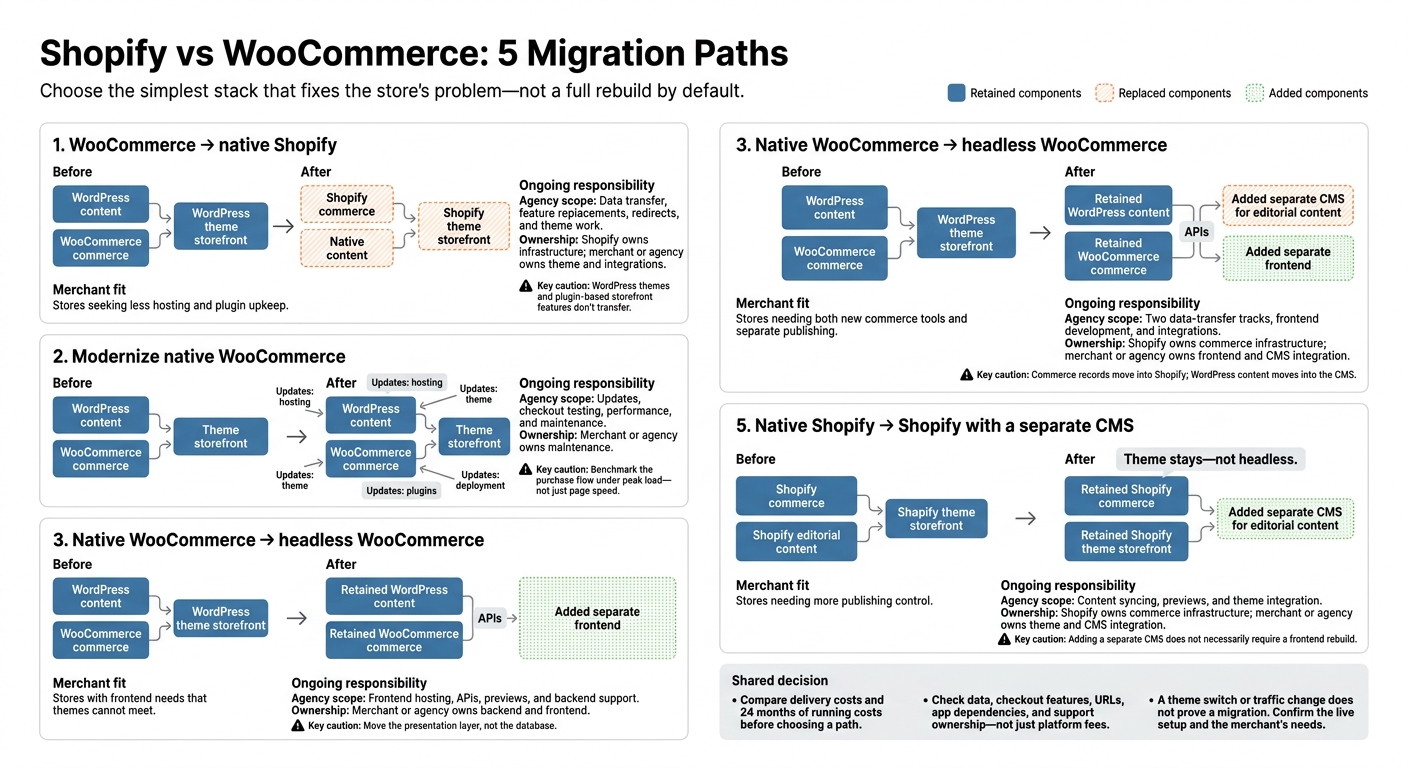
Choose the simplest stack that fixes the store’s problem - not a full rebuild by default. Across these 5 paths, the first step is deciding what needs to change: commerce, content, storefront delivery, or maintenance.
Quick Comparison
| Path | What changes | Best fit | Main agency responsibility |
|---|---|---|---|
| WooCommerce → native Shopify | Commerce platform and storefront | Stores seeking less hosting and plugin upkeep | Data transfer, feature replacements, redirects, and theme work |
| Modernize native WooCommerce | Hosting, theme, plugins, and deployment | Stores that still need WordPress and WooCommerce | Updates, checkout testing, performance, and maintenance |
| Native WooCommerce → headless WooCommerce | A separate frontend replaces the theme | Stores with frontend needs that themes cannot meet | Frontend hosting, APIs, previews, and backend support |
| WooCommerce → headless Shopify with a separate CMS | Commerce, content, and frontend systems | Stores needing both new commerce tools and separate publishing | Two data-transfer tracks, frontend development, and integrations |
| Native Shopify → Shopify with a separate CMS | Editorial content moves outside Shopify; the theme stays | Stores needing more publishing control | Content syncing, previews, and theme integration |
Compare delivery costs and 24 months of running costs before choosing a path. Check data, checkout features, URLs, app dependencies, and support ownership - not just platform fees.
Store-change records can help agencies prioritize discovery, but a theme switch or traffic change does not prove a migration. Confirm the live setup and the merchant’s needs before scoping the work.
Shopify vs WooCommerce: 5 Migration Paths
1. WooCommerce to Native Shopify
Store Profile and Migration Trigger
This path suits merchants whose plugin upkeep, conflicts, or growth pressures outweigh WooCommerce’s flexibility. Before setting scope, check shipping logic and checkout fields against Shopify’s checkout limits. Some changes may require Shopify Plus [2]. The work shifts from fixing plugins to checking checkout requirements and replacing features.
Data Transfer and SEO
Products, inventory, orders, and customer emails can move through APIs or migration tools. WordPress themes and plugin-based storefront features don’t transfer. Wishlists, loyalty tools, and product customizers will need replacements, so scope data migration separately from feature rebuilds [2].
Build the URL redirect map before launch. Match old WordPress URLs to their intended Shopify destinations, carry over meta titles, and recreate required schema markup. Check the new sitemap, then monitor Google Search Console during the first few weeks for crawl errors and broken redirects [2]. With content and redirects mapped, the main remaining risk is matching platform features - not transferring data.
Architecture and System Ownership
Shopify takes hosting and updates off the merchant’s plate, but it also limits platform-level control. Checkout options depend on the features and customizations Shopify supports. Confirm those limits before promising to match a heavily customized WooCommerce store [2]. For agencies, these limits shape scope, timelines, and post-launch support.
Agency Opportunity and Delivery Risk
Use store-change signals to prioritize discovery, not as proof of migration intent. StoreCensus theme-change and technographic signals, plus 7-day and 30-day changes in product count, traffic, and estimated app spend, can help identify merchants to contact. A theme change may point to nothing more than a redesign [1]. Before quoting a migration, ask which maintenance costs and missing features are driving the work.
sbb-itb-61169e3
2. Modernizing Native WooCommerce
Store Profile and Migration Trigger
When WooCommerce still fits the business, modernizing it creates less friction than migrating. This path suits established stores with important data when hosting, checkout, performance, security, or redesign needs start holding the business back.
Architecture and System Ownership
Keep WordPress and WooCommerce, but improve the hosting, themes, plugins, and integrations around them. Start by auditing versions, hosting, plugins, themes, custom code, integrations, and automations. Remove plugin overlap and fix outdated WooCommerce theme overrides.
Build the theme around reusable blocks, templates, permissions, and previews. That way, editors can work without adding another page builder.
Use a staging site that mirrors production to test hosting and caching changes. Benchmark the purchase flow under peak load - not just page speed. Before activating High-Performance Order Storage (HPOS), check every integration and custom snippet that reads orders, especially payment, subscription, fulfillment, CRM, analytics, and export tools.[3][4]
Once the stack is stable, the focus shifts to protecting data and search visibility.
Data Transfer and SEO
Most core records stay put, but a hosting move still needs tested backups and a final database sync. After deployment, check SKUs, stock, order totals, and subscriptions.
Keep existing URLs where possible. If they must change, set up one-to-one redirects. Whether URLs change or not, verify metadata, internal links, and structured data.[5]
Agency Opportunity and Delivery Risk
Separate upgrade work from continuing support rather than treating everything as one project. Give hosting optimization, plugin cleanup, theme work, and maintenance their own scopes.
Set aside testing time for undocumented checkout logic and subscription integrations. A blanket plugin update isn’t enough. Assign owners for releases, backups, licenses, and incident response, then compare checkout errors and performance with the pre-project baseline.
3. Native WooCommerce to Headless WooCommerce
Store Profile and Migration Trigger
This path suits established merchants whose needs have outgrown theme-based delivery, whether that means complex merchandising, international storefronts, or frequent releases. The extra infrastructure needs a clear business reason: slow mobile pages, low mobile conversion, or release bottlenecks. For agencies, repeated redesign requests, poor mobile performance, and stalled releases can signal that it’s time to assess this option.
Architecture and System Ownership
WordPress still handles content, and WooCommerce still handles commerce. A separate frontend app, often Next.js, replaces theme-based delivery. Use the WordPress REST API for content[8] and WooCommerce’s Store API for storefront product, cart, and checkout data.[10] Keep administrative API credentials on the server.[10]
Choose the checkout model before design starts. That decision shapes API scope, caching, and test coverage. Plugins built around PHP templates, shortcodes, or theme hooks may need replacements or custom integrations. Cache catalog pages separately from customer-specific carts and accounts. Editors also need draft previews and cache revalidation when they publish.[9]
Data Transfer and SEO
With a separate frontend, migration risk shifts to rendering and SEO output. Move the presentation layer, not the database. Make custom fields and content blocks available through documented APIs so the new frontend can display them.
The frontend must also produce the SEO output that the theme previously handled, including canonicals and structured data. Use server-side rendering or static generation for indexable pages.[6] Then check the rendered HTML with Google Search Console URL Inspection and Rich Results testing - not just the browser view.[7]
Agency Opportunity and Delivery Risk
Scope this work as frontend engineering plus API maintenance. The engineering workload continues after launch: API version changes, plugin compatibility, cache invalidation, preview workflows, deployment failures, monitoring, security, and support for checkout and account flows. If the commerce engine also needs to change, the next step is a different headless stack.
4. WooCommerce to Headless Shopify With a Separate CMS
Store Profile and Migration Trigger
This path suits merchants that need a different commerce engine and more control over content than a native Shopify storefront offers. In StoreCensus, review Shopify brand prospect lists for 7-day and 30-day changes in product count, traffic, theme switches, and estimated tech/app spend. Treat these as discovery signals only. Confirm that the merchant needs separate commerce and publishing systems before scoping a headless build.[1]
Architecture and System Ownership
Unlike headless WooCommerce, this move also replaces the commerce engine. Shopify becomes the system of record for products, inventory, customers, orders, and payments. The separate CMS manages editorial content, and the decoupled frontend displays content from both systems. Keep checkout on Shopify’s native flow rather than planning a custom checkout.[2]
Data Transfer and SEO
With content and commerce in separate systems, plan two transfer tracks: commerce records move into Shopify, while WordPress content moves into the CMS. Page-builder layouts and links between products and content won’t transfer automatically. Rebuild them in the new stack.[2]
Agency Opportunity and Delivery Risk
For agencies, the main risk is matching each old WooCommerce function to the right Shopify replacement. WooCommerce plugins do not become Shopify integrations. Rebuild backend functions, such as accounting and order processing, as Shopify apps or direct integrations. Frontend-dependent features, such as loyalty points, also need to be rebuilt for the new stack. Headless builds typically take 14–22 weeks, compared with about 8 weeks for monolithic setups.[2]
5. Native Shopify to Shopify With a Separate CMS
Store Profile and Migration Trigger
This path fits merchants whose publishing workflows have outgrown Shopify’s native tools. Before recommending it, check whether editorial approvals, localization, or multichannel publishing add extra work. Revenue, headcount, and tech spend help gauge whether a merchant can support a separate CMS - not whether they need one.[1]
Architecture and System Ownership
Unlike a headless migration, this setup keeps Shopify’s theme as the storefront and adds a CMS for editorial control. The theme pulls in content managed outside Shopify. Choose the integration based on editorial workflows and the level of frontend control needed.[11][12]
Set clear ownership: Shopify handles commerce data, while the CMS manages marketing content and publishing workflows. Before migration starts, assign responsibility for SEO metadata and integration failures.[12]
Agency Opportunity and Delivery Risk
Once the CMS is in place, most of the work centers on integration and maintenance. Audit app compatibility before quoting the build. Theme-based integrations can retain compatibility with apps that depend on the Shopify theme.[11][12]
Scope support separately, including content syncing and who responds when content delivery fails. Agencies own CMS integration, app compatibility, and failure response.[11][12]
Comparing Merchant Fit, Stack Changes, and Agency Signals
Each path starts with a different shift in responsibility: commerce, content, storefront delivery, or maintenance.
Which Stores Fit Each Migration Path?
Match the path to the stack change, not the store’s size.
| Path | Who fits | Stack-change check | Who owns it |
|---|---|---|---|
| WooCommerce → native Shopify | Catalog-focused merchant | Confirm the platform switch to Shopify | Shopify owns infrastructure; merchant or agency owns theme and integrations |
| Modernize native WooCommerce | Merchant that can stay on WordPress while updating hosting, themes, and plugins | Confirm stack updates without a platform switch | Merchant or agency owns maintenance |
| Native WooCommerce → headless WooCommerce | Merchant needing a separate frontend | Confirm WooCommerce remains the backend and a new frontend is added | Merchant or agency owns backend and frontend |
| WooCommerce → headless Shopify with a separate CMS | Merchant needing new commerce, frontend, and CMS layers | Confirm Shopify, a separate frontend, and CMS integration | Shopify owns commerce infrastructure; merchant or agency owns frontend and CMS integration |
| Native Shopify → Shopify with a separate CMS | Merchant with content-heavy workflows | Confirm CMS integration with the Shopify theme, with commerce records staying in Shopify | Shopify owns commerce infrastructure; merchant or agency owns theme and CMS integration |
Check timestamped historical change logs to tell migrations apart from temporary tests.[1] Then map what needs to move, stay, or be rebuilt.
Data Transfer and SEO Requirements
Map which fields move and which stay before estimating scope. Matching product counts alone doesn’t prove the transfer succeeded.
Stack Changes Before and After Migration
A theme change points to a redesign. Changes to the CDN, analytics, payments, and apps point to stack work - not just a new look.[1]
For headless WooCommerce, assign ownership for WordPress/PHP, the database, APIs, and the frontend. The work often calls for both PHP and React skills.[2]
Qualifying Leads and Managing Delivery Risks
Use stack signals to separate migration work from routine redesigns or maintenance.
With StoreCensus, filter by revenue, country, theme, technology, and growth signals, then review recorded changes.[1] Verify the architecture directly before calling it a migration.
Benefits, Trade-Offs, and Maintenance Costs
Once you’ve chosen a stack, the next question is cost: what the merchant keeps paying for, and who handles the work.
Compare each path by its costs after launch. Subscriptions, hosting, apps or plugins, integration support, and development all add to the total. Each migration path brings a different maintenance workload.[16][17][18]
| Migration path | Main advantage | Main disadvantage | Recurring costs | Largest maintenance burden |
|---|---|---|---|---|
| WooCommerce → native Shopify | Less infrastructure administration | Specialized requirements can add app or customization costs | Shopify plan and app subscriptions | Theme and integration upkeep |
| Modernize native WooCommerce | Preserves investment in WordPress workflows | Requires a funded technical owner | Hosting, updates, and plugin testing | Compatibility troubleshooting |
| Native WooCommerce → headless WooCommerce | Pays for frontend flexibility without replacing commerce | Adds application costs while keeping backend upkeep | Backend maintenance and frontend hosting | Framework and API maintenance |
| WooCommerce → headless Shopify with a separate CMS | Pairs hosted commerce with flexible publishing | CMS and integration costs may outweigh the benefit | Shopify, CMS, and frontend hosting fees | Frontend and integration engineering |
| Native Shopify → Shopify with a separate CMS | Supports more efficient editorial workflows | Adds CMS overhead that limited publishing needs may not justify | CMS licensing and theme integration - not necessarily a frontend rebuild | Content syncing and preview testing |
These are continuing expenses, not promises of savings.[14][15][16][18]
Split the budget into delivery and running costs. Delivery covers discovery, data mapping, content transformation, redirects, implementation, QA, training, and launch support. Running costs cover subscriptions, hosting, renewals, monitoring, security, integrations, and developer support.
Build a 24-month cost model that includes both. One published headless analysis puts the initial build at 30%–45% of two-year spending. Treat that as a planning reference, not a universal benchmark.[13]
Agencies should define support ownership before launch. Before approval, assign owners and budgets for framework upgrades, API changes, integrations, and preview testing.[14][15] The architecture’s recurring costs need to match the business need.
Don’t price a project around assumed performance or SEO gains. A lower subscription price doesn’t mean a lower total cost.[14][19]
Conclusion: Match the Architecture to the Work
Choose the simplest architecture that meets the merchant’s needs. Native Shopify suits merchants who want less complexity. Modernized WooCommerce suits those who need WordPress workflows and custom commerce rules. Complex storefront needs may justify headless on either platform. More demanding editorial workflows may call for a separate CMS - not a frontend rebuild. Change only the responsibilities that need to change.
Treat these matches as hypotheses, not proof of how often merchants migrate or why. A platform change needs to reflect a real shift, not an incidental signal. Use that distinction to decide which stores deserve a closer look.
Use recorded changes in StoreCensus to prioritize investigation. Then check the live storefront and confirm with the merchant: was the change a production migration, a theme replacement, or a temporary test? Once you confirm the signal, move from prospecting to scoping.
Before recommending a rebuild, run an architecture and migration-readiness audit. That’s the agency test: identify what must move, what can stay, and what shouldn’t be rebuilt. Check the trigger, content structure, team capacity, dependencies, and risks to checkout, search, data, and operations. Explain whether the merchant needs a rebuild - or whether targeted modernization solves the problem.
FAQs
How can I minimize downtime during migration?
Put coordination and technical planning first. For core Shopify migrations, approve the release checklist and validate the rollback plan [1]. For headless migrations, keep existing URLs, manage redirects, and correctly map historical content and metadata to the new architecture [1].
Avoid inefficient API calls that can slow performance. Agencies should test integrations thoroughly and confirm that failure handling is active for every API-backed feature [1].
Can I roll back a failed migration?
Yes, but you need an approved rollback plan before launch. Once a full platform migration goes live, rolling back typically means restoring the store’s data, assets, and configurations from backups made before the move [1].
Migrating in stages can reduce risk. As part of launch support, document the recovery steps so the store can be restored if critical issues occur [1].
How do I validate migration signals before outreach?
Use live data, not static snapshots. In StoreCensus, watch for theme changes, frequent app replacements, and shifts in the technology stack that may point to a migration.
Qualify leads by checking these signals against revenue, geography, and vertical. Before reaching out, confirm the business context through recent platform activity. Storefront API engagement or changes to content-control plugins like Shogun often come before architectural migrations.