Payment Apps vs Theme Code: Checkout Failure Impact
Diagnose checkout failures by tracing the last successful step, checking gateway logs, and isolating theme or webhook issues with permission.


A failed checkout doesn’t prove a payment app or theme is broken. Start with the last successful step: opening checkout, submitting payment, or receiving confirmation. Then check the related logs with the merchant’s permission.
Quick Comparison
| Possible source | Common symptoms | First checks |
|---|---|---|
| Payment setup or integration | Missing payment methods, declines, payment fields that won’t load | Method eligibility, gateway settings, processor responses |
| Theme or storefront code | Inactive buttons, field errors, cart resets | Browser errors, scripts, session handling, recent code changes |
| Webhooks or order sync | Pending orders, missing confirmation after payment | Transaction status, order records, webhook delivery |
These patterns guide checks; they don’t confirm the cause. A pending bank entry may be an authorization hold rather than a completed charge.
For agencies, StoreCensus filters and public checkout signals can help sort leads - not prove defects or lost sales. Match outreach to the observed problem, then offer a scoped review backed by permitted testing and logs.
Checkout Failure Diagnosis: Payment Apps vs Theme Code
How To Fix Checkout Error on Shopify (2026 Updated List)
sbb-itb-61169e3
Payment Setup vs Theme Code: How Checkout Problems Differ
The pattern of symptoms helps you decide where to look next. Scope narrows the cause; it doesn’t prove it. A missing payment method may point to gateway settings or a blocked script. A checkout-wide failure may point to shared storefront code or a processor outage.[3]
| Possible failure source | Checkout stage | Scope | Customer impact | What outsiders cannot confirm |
|---|---|---|---|---|
| Payment configuration or gateway integration | Method display, submission, or payment confirmation | One method or the entire checkout | Missing options, declines, unresolved payment status | Credentials, eligibility, fraud rules, API responses |
| Theme or storefront code | Cart, field entry, or checkout handoff | One interaction, device, or many shoppers | Cart errors, inactive buttons, blocked progress | Server errors, private code changes, cache settings |
| Webhook or capture flow | After submission | Affected transactions or sessions | Pending order or missing confirmation | Authorization versus capture, webhook delivery, order status |
Payment Setup: Missing Methods, Declines, and Pending Orders
Keep gateway setup separate from transaction handling. Configuration controls which methods appear; declines, fraud rules, and 3D Secure affect individual payment attempts. A missing method isn’t always a defect: Apple Pay, Google Pay, and Shop Pay depend on the browser, device, and eligibility.[2][3]
| Observed symptom | Possible causes | Evidence needed with permission | Suitable service |
|---|---|---|---|
| Missing method | Account eligibility, currency mismatch, credentials | Gateway settings and account status | Configuration audit |
| Payment fields do not load | Script blocking, consent controls, API timeout | Console errors and network requests | Integration repair |
| Submission error | Issuer decline, fraud rule, failed 3D Secure, tokenization error | Gateway response codes and authentication status | Integration troubleshooting and monitoring |
| Apparent charge without confirmed order | Authorization hold, interrupted return flow, webhook or API failure | Transaction status, order records, webhook delivery history | Reconciliation, recovery, and monitoring |
| Only one method fails | Method-specific outage, settings, or blocked JavaScript | Method-specific errors and script requests | Configuration or integration repair |
Authorization is not capture. Authorization reserves funds; capture collects them. A pending entry in a bank account doesn’t, on its own, confirm a completed charge. Order creation and payment confirmation can follow different workflows on each platform. Before suggesting another payment attempt, match the gateway transaction to the store record. A failed webhook can leave the store’s status out of sync, but it doesn’t prove that capture failed.[3]
These clues support outreach about configuration, integration, or reconciliation. If the payment layer doesn’t explain the problem, check storefront code and the checkout handoff next.
Theme Code: Broken Buttons, Fields, and Cart Updates
Liquid, PHP, JavaScript, CSS overlays, cart scripts, and caching can block payment requests before they reach the processor. On Shopify, checkout extensions and validation rules can fail inside hosted checkout.[1][2][3] In WooCommerce, check template overrides, checkout-field snippets, plugin conflicts, and script dependencies. Headless builds also introduce risks around cart sessions and cross-domain handoffs.[3]
| Observed symptom | Possible code location | Browser or device pattern to check | Evidence to request |
|---|---|---|---|
| Cart errors or resets | Cart scripts, session handling, caching | After quantity changes, login, or cross-domain navigation | Network requests and cookie behavior |
| Inactive buttons | JavaScript handlers, CSS overlays | Mobile-only or browser-specific | Screen recording and console errors |
| Validation problems | Checkout-field scripts, snippets, validation rules | Same field repeatedly blocks progress | Exact field message and relevant configuration |
| Blank page | PHP errors, template overrides, headless rendering | Across devices if server-side | Server error logs and response status |
| Loading loop | Script dependencies, API endpoints, caching | Slow connections or repeated failed requests | Network trace and console output |
| Failure across methods | Shared scripts, checkout integration, compatibility conflict | One browser or all tested browsers | Shared request failures and theme source code |
These clues point toward frontend-focused outreach, rather than an assumed need for a payment audit. For agencies, they help shape both the service offer and the repair path.
Describe the observed interaction, not the repair. An inactive button points to frontend inspection; an unresolved payment status points to reconciliation.[3]
Find Where Checkout Fails Before Choosing a Fix
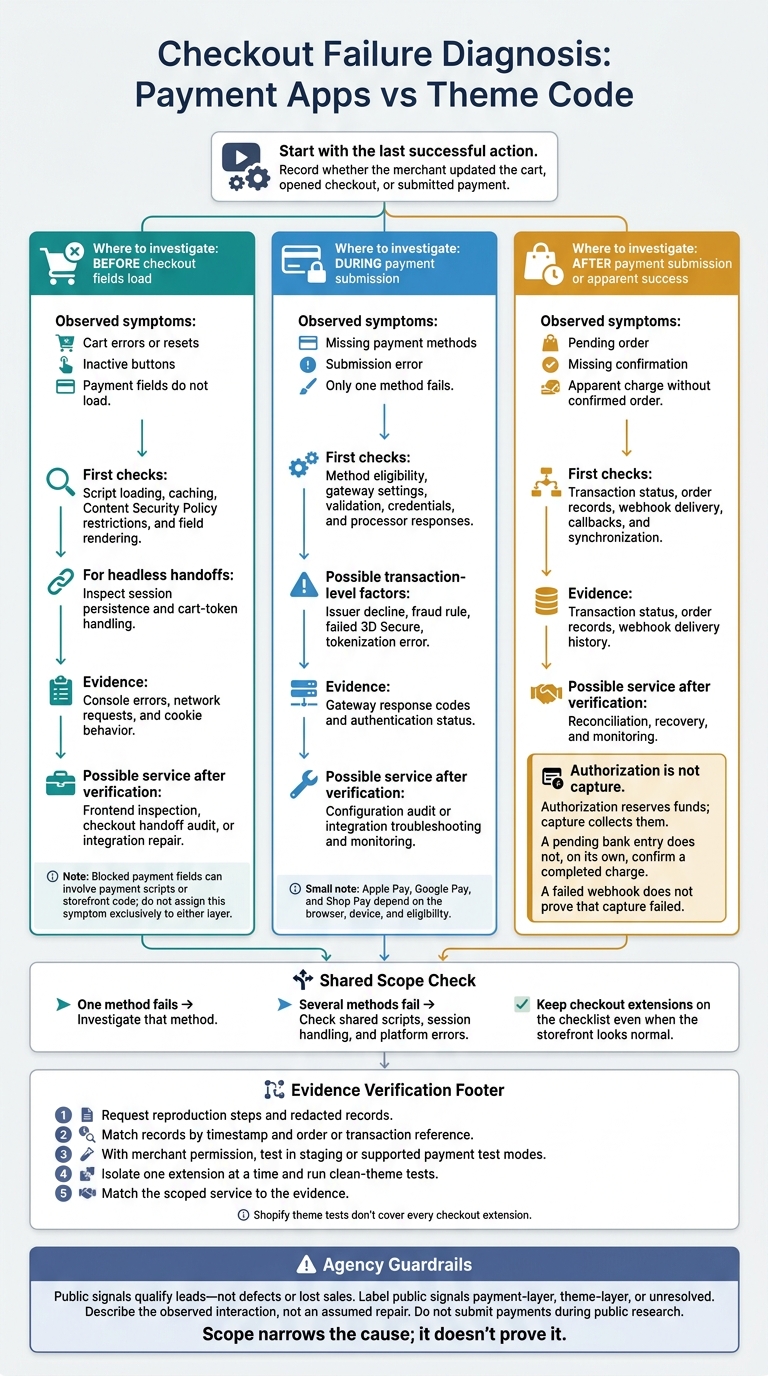
Start with the last successful action, not the merchant’s diagnosis. The same symptom can stem from payment setup or theme code. Record whether the merchant updated the cart, opened checkout, or submitted payment. Then compare that action with when the failure began. A browser error alone won’t identify the source. The sequence tells you where to look first - not what to fix.[1][3][4]
Trace Problems Before, During, and After Payment
Use timing to separate payment-layer clues from frontend code clues. Before checkout fields load, check script loading, caching, Content Security Policy restrictions, and field rendering. If the cart disappears during a headless handoff, inspect session persistence and cart-token handling. During submission, review validation, credentials, and processor responses. After success, trace webhooks, callbacks, order states, and synchronization.[3]
The scope of the failure narrows your checks; it doesn’t prove the cause. If one payment method fails, investigate that method. If several fail, check shared scripts, session handling, and platform errors. Keep checkout extensions on the checklist even when the storefront looks normal. These checks help distinguish payment-layer failures from theme-level defects.[1][2][3]
Collect Logs and Test With Merchant Permission
Request steps to reproduce the issue, along with redacted console, network, decline, gateway, order, server, and webhook records. Match the records by timestamp and order or transaction reference.[3]
With the merchant’s permission, test in staging, use supported payment test modes, isolate one extension at a time, and run clean-theme tests. Shopify theme tests don’t cover every checkout extension.[1][3] Use these records to help the agency assess whether a lead needs payment, theme, or reconciliation help.
Qualify Agency Leads With Checkout Signals
Once you’ve narrowed down the failure pattern, use public store signals to decide which merchants to contact.
Build Shopify Brand Prospect Lists With StoreCensus
Use StoreCensus to filter Shopify and WooCommerce stores by country, revenue tier, theme, and technology stack. Put stores with recent changes, such as a new app or theme update, first. Treat revenue, detected tech, and change history as prospecting clues - not proof of a checkout defect.[5]
This gives you a list of stores most likely to fit a payment- or theme-focused outreach offer.
Record Public Symptoms Without Submitting Payments
Review checkout features and payment signals you can see publicly: custom branding, checkout UI extensions, wallet buttons, BNPL options, and international checkout tools.[2] Record the surrounding conditions, then check again under the same setup before describing the behavior as repeatable.[5]
Label each signal payment-layer, theme-layer, or unresolved. These labels describe the signal, not its cause.
Match Your Outreach Offer to the Observed Problem
Describe what you saw and what you still don’t know. A missing payment option supports an offer to review payment availability and configuration - not a claim that shoppers are abandoning orders. A cart or checkout UI problem calls for frontend inspection, not an automatic redesign pitch. Don’t claim lost revenue without evidence.
Offer a diagnostic with a clear scope covering the affected flow. Specify the deliverables: a reproduction record, evidence that supports or rules out suspected causes, and next steps. Use recent changes to rank the lead, not assign blame.[5]
Conclusion: Match the Service to the Evidence
Use the labeled public signals to choose a service that fits the evidence.
No single clue identifies the failing layer. Provider records may point to a payment-layer failure. Console errors and missing requests, however, can stem from either theme code or payment scripts.[6]
Limit the diagnostic to the affected checkout path, agreed test conditions, and required log access. Base your confidence on merchant-permitted testing and logs - not stack detection alone.[3]
Match the lead to the service using the failure patterns below.
| Failure type | Observed symptoms | First evidence | Suitable agency services | Limits of public research |
|---|---|---|---|---|
| Payment-layer | Missing methods, declines, pending orders | Provider logs, payment status codes, tokenization errors | Payment configuration audit and integration repair | Cannot see private gateway settings or account status. |
| Theme-layer | Unresponsive buttons, hidden fields, cart update failures | Console errors, DOM inspection, theme change history | Checkout UI repair and theme optimization | Cannot see private backend errors. |
| Combined payment-layer and theme-layer symptoms | Empty carts, session loss, shipping not recalculating | Network requests, API logs, cart-token status | Checkout handoff and integration audit | Cannot confirm cross-domain cookie failures without testing. |
FAQs
Can a theme update break just one payment method?
Yes. A theme update can change storefront code tied to the payment flow, breaking one payment method while others still work. Failures may cluster by payment method, device, or browser, especially right after a theme change.
Checkout events like begin_checkout, add_payment_info, and purchase can help pinpoint where the flow breaks. Agencies should retest every payment method after an update and compare failure rates across methods. [2][1]
How can I diagnose intermittent checkout failures?
Start by separating payment-layer issues from theme-level code problems. Review 30 or 90 days of payment records - not abandoned carts - and match each complaint to a payment attempt. Check raw provider codes to tell issuer declines apart from authentication failures, merchant risk rules, and API errors.
For WooCommerce, check whether your gateway works with your theme, caching, and custom code. For Shopify, compare provider logs with order timelines. Test one fix at a time.
How can I turn checkout signals into credible outreach?
Connect visible technical gaps to specific business costs. Use StoreCensus to find high-value prospects, such as Shopify Plus stores that appear to lack fraud management apps, MFA layers, or checkout UI extensions.
Start with what you can observe, then explain how those gaps could lead to chargeback risk, dispute costs, or revenue lost to checkout friction. Treat missing signals as points to verify - not proof that a store lacks protection.
Offer a focused audit of merchant-controlled risk rules, gateway settings, or theme-level changes, tied to the gaps you've identified.