How Database APIs Power Sales Automation
Database APIs automate lead discovery, enrichment, segmentation, and outreach to cut manual work, speed sales cycles, and boost sales productivity.


Sales teams spend too much time on manual tasks like data entry and lead research, slowing down their workflows. Database APIs solve this by automating data handling, offering real-time updates, and enabling seamless integration with CRMs and outreach tools. This boosts productivity, shortens sales cycles, and reduces time spent on repetitive tasks.
Here’s what database APIs do for sales automation:
- Real-time data updates: Automatically syncs lead information across platforms.
- Lead enrichment: Provides detailed profiles with contact info, revenue estimates, and more.
- Advanced segmentation: Filters leads by revenue, location, or technology to target the right prospects.
- Automated outreach: Triggers personalized messaging based on real-time events like app installations or growth trends.
For example, platforms like StoreCensus give access to data on millions of ecommerce stores, helping sales teams identify high-intent leads and automate workflows. The result? A 25% increase in productivity and a 30% reduction in sales cycle length.
Database APIs aren't just tools - they're game-changers for scaling sales efforts with less manual effort.
How to Automate B2B Lead Generation with Apify, Make.com, and Airtable
What Database APIs Are and Why They Matter for Sales Automation
A database API is a tool that allows applications to access and retrieve structured data from a database in real time. Unlike general APIs that handle a variety of operations, database APIs are specifically designed to extract and sync data. They deliver this data in structured formats like JSON, making it easy for CRMs, outreach platforms, and sales tools to access live, up-to-date information without the hassle of manual exports or spreadsheet uploads.
Database API Basics and Core Features
Database APIs take over tasks that were once manual, streamlining data workflows. They can perform real-time queries, retrieve structured information, and synchronize it across systems. For instance, when a new lead is added to your CRM, a database API can automatically pull in relevant details like the company’s profile, their technology stack, or even contact information.
What makes these APIs particularly useful for sales teams are their core features. They can handle complex queries, applying filters like revenue ranges, geographic location, or specific technologies in use. They also enable direct domain lookups for instant data enrichment and include automated field mapping to ensure data flows smoothly between different systems. These capabilities lay the groundwork for scaling sales processes efficiently.
How Database APIs Scale Sales Workflows
With these features, database APIs allow sales teams to tackle massive datasets with ease. Instead of manually researching thousands of potential leads, teams can query databases containing millions of records, each enriched with over 25 data points. For example, StoreCensus offers API access to more than 2.5 million ecommerce stores, enabling teams to generate pre-qualified lead lists based on criteria like installed apps, revenue brackets, or growth trends. This kind of instant, enriched data fuels automated workflows, from lead generation to outreach, making sales automation far more effective.
The impact on sales teams is game-changing. Companies that use contact database APIs report an average 25% boost in sales productivity and a 30% reduction in sales cycle time. This shift comes from replacing static spreadsheets with live data sources that update automatically. For example, when a store installs a new app or hits a revenue milestone, that update is immediately available through the API. Sales teams can then act on the most current information instead of relying on outdated lists.
The true advantage becomes clear when database APIs connect lead generation tools directly to CRMs. This integration enables "prospecting at the source", where every piece of intelligence about why a lead qualifies (like using a subscription app but lacking email marketing software) stays linked to that lead throughout the sales process. By streamlining lead qualification and syncing data, organizations save nearly three hours per week per sales rep, giving teams more time to focus on closing deals.
How to Use Database APIs for Sales Automation
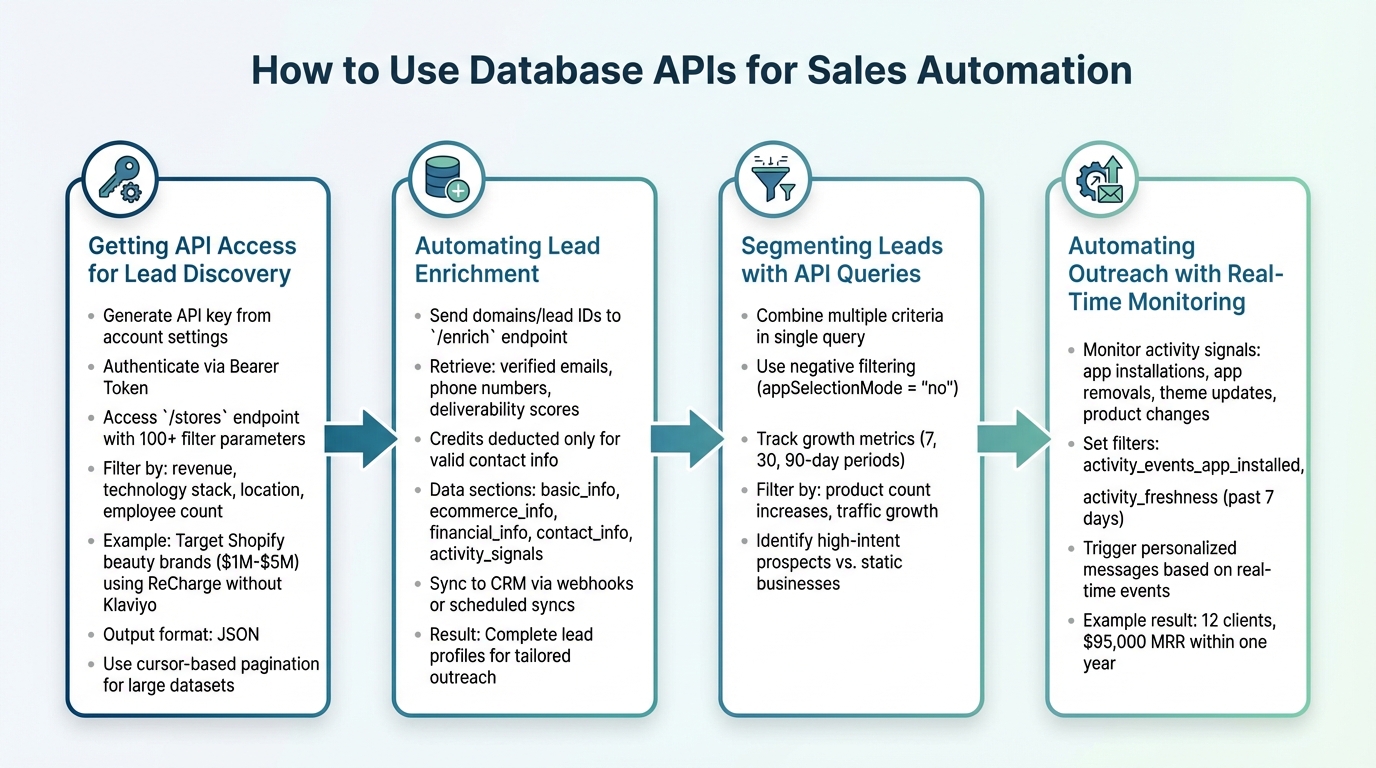
4-Step Database API Sales Automation Workflow
1. Getting API Access for Lead Discovery
Start by generating an API key from your StoreCensus account settings. Use this key to authenticate via a Bearer Token in the Authorization header, giving you immediate access to the /stores endpoint.
The /stores endpoint offers over 100 filter parameters. These allow you to zero in on stores based on factors like revenue, technology stack, location, employee count, and more. For example, you could target Shopify beauty brands earning $1M–$5M annually that use ReCharge but don’t have Klaviyo implemented. The API response is delivered in JSON format, making it easy to integrate directly into your CRM or outreach tools.
Handling larger datasets? Use cursor-based pagination with the nextCursor parameter to efficiently retrieve additional results. This ensures you can scale your lead discovery efforts without missing important data.
Once you’ve identified your leads, the next step is to enrich the data for deeper insights.
2. Automating Lead Enrichment
To enrich your leads, send batches of domains or lead IDs to the /enrich endpoint. This instantly provides detailed profiles, including verified emails, phone numbers, and deliverability scores. Credits are only deducted when valid contact information is found, making it a cost-efficient solution for processing large lists.
The enrichment process organizes data into distinct sections like basic_info, ecommerce_info, financial_info, contact_info, and activity_signals. You can request only the sections you need - such as contact details or revenue estimates - to minimize payload size and conserve credits.
This enriched data can flow directly into your CRM via webhooks or scheduled syncs. For example, when a new lead enters your pipeline, the API can automatically append details like their technology stack, estimated revenue, product catalog size, and decision-maker contacts. This gives sales reps a complete profile to work with, enabling more tailored outreach. By filling in these gaps, you can create precise segments and automate real-time outreach, streamlining your entire sales process.
With enriched data in hand, it’s time to refine your targeting.
3. Segmenting Leads with API Queries
Database APIs allow for precise targeting through advanced filters. The /stores endpoint supports combining multiple criteria - like platform, revenue range, industry, and specific challenges - into a single query.
A useful strategy is negative filtering. For instance, by setting the appSelectionMode parameter to "no" for a specific app ID, you can identify stores that don’t use a particular technology. If you provide email marketing services, you might look for stores with subscription apps but no email automation tools.
Another powerful feature is growth metric tracking. Use growth delta filters to identify businesses with measurable increases in product count or traffic over 7-, 30-, or 90-day periods. These growing stores often represent high-intent prospects compared to more static businesses.
By leveraging these segmented leads, you can trigger highly targeted, automated outreach.
4. Automating Outreach with Real-Time Monitoring
The real magic of automation lies in activity signals. The API tracks key events like app installations, app removals, theme updates, and product catalog changes. These signals can indicate high intent and act as triggers for outreach.
For example, you can set filters like activity_events_app_installed or activity_freshness to monitor stores that have made changes in the past 7 days. A store installing a new app or updating its theme could signal an active budget or a new growth phase. Your outreach system can then send personalized messages referencing these changes.
Take Marcus, a Meta Ads agency owner, as an example. He used StoreCensus to filter Shopify stores with Meta Pixel and high traffic. Starting with 312 prospects, he refined his messaging to focus on ROAS and, within a year, secured 12 clients, generating $95,000 in monthly recurring revenue.
Common Challenges in API-Driven Sales Automation and How to Solve Them
Managing API Rate Limits and Data Quotas
APIs come with limits, and exceeding them can quickly disrupt your automation. For instance, StoreCensus Professional plans allow 6 requests per second, while Enterprise plans offer 30 requests per second. If you go over these thresholds, you'll encounter a 429 "Too Many Requests" error, which halts operations.
To handle this, implement exponential backoff with jitter. When you hit a 429 error, the Retry-After header in the response will tell you how long to wait before retrying. Instead of hammering the API with repeated requests, let your automation pause and retry at gradually increasing intervals.
For handling large datasets, cursor-based pagination is your friend. Use the nextCursor to efficiently resume data retrieval. Additionally, optimize your requests with batch processing. For example, the /enrich endpoint lets you process up to 1,000 lead IDs in a single request. Use the sections parameter to pull only the data you actually need, which saves time and reduces credit usage. StoreCensus helps you stretch your budget by deducting credits only when contact information is found, so you won’t waste resources on empty results.
But managing API limits is just one piece of the puzzle - keeping your data accurate and relevant is equally important.
Maintaining Data Accuracy and Relevance
Automation is only as good as the data it runs on. If your data is outdated or inaccurate, your automated workflows can fall apart. In fact, poor data management can cause businesses to lose up to 70% of qualified leads.
StoreCensus tackles this issue with real-time activity signals. By checking timestamps like last_activity_at, last_product_update_at, and last_crawled, you can ensure you're targeting businesses that are active and growing. For even more precision, use growth deltas to identify stores that have added products or experienced traffic increases over the past 7 or 30 days. These are high-intent prospects, not dormant leads.
Another critical step is validating contact information. Use the enrichment endpoint's email deliverability scores to minimize bounces and protect your sender reputation.
One common mistake is exporting leads to spreadsheets, where valuable context often gets lost. StoreCensus keeps tech stack data, revenue estimates, and your notes attached to each record throughout the sales process. This continuity means that if a lead resurfaces months later, you’ll still have all the context you need to pick up where you left off, avoiding what’s often called “Context Amnesia.” Losing track of why a lead was a good fit can result in a 10% drop in conversions.
"The best prospecting system isn't about finding more leads. It's about losing fewer of the ones you already found." – StoreCensus
To make the most of your leads, implement a rating system. Focus 60% of your resources on 5-star prospects while setting up automated reminders for the rest. Remember, 60% of leads won’t be ready to buy for 3 to 12 months, so staying organized pays off.
Measuring the Impact of Database APIs on Sales Automation ROI
Tracking Performance Metrics with API Analytics
Database APIs can significantly influence sales automation success, but the key lies in tracking the right metrics. For starters, aim for 99%+ uptime by monitoring query success rates and ensuring API calls are executed smoothly. Keep a close eye on error logs and address issues as they arise to maintain seamless operations.
ROI measurement becomes clearer when focusing on lead enrichment. For instance, if 80% of incomplete leads are updated with contact details, your outreach potential increases substantially. Companies using API-based lead scoring have reported impressive results: conversion rates climbing by over 10%, productivity gains reaching up to 35%, and pipeline conversion rates jumping by 56%.
Real-time syncing through APIs adds another layer of efficiency. It enables personalized outreach within hours, boosting response rates to 18–25%, compared to the 2–3% typically seen with generic outreach.
Another critical metric is funnel conversion ratios across various stages - such as discovery-to-qualification, outreach response, response-to-meeting, and meeting-to-close. For example, refining API filters might improve your discovery-to-qualification ratio from 30% to 70%, effectively reducing wasted time and effort. These insights help pinpoint where API-driven automation delivers the most value.
The following case study highlights how these metrics translate into real-world success.
Case Study: Using StoreCensus for Scalable Sales Automation
The practical benefits of these metrics come to life through the experiences of agencies utilizing StoreCensus. Take Sarah, for example. By targeting Shopify stores that used ReCharge but lacked Klaviyo, she identified 247 prospects in her first month. Over the next year, she secured 6 clients by Month 5, generating $28,000 MRR (monthly recurring revenue), and scaled that to 14 clients with $84,000 MRR by Month 12.
Sarah’s system tracked lead statuses - such as Contacted, Replied, Negotiating, Closed, and Rejected - and set automated reminders for follow-ups. This approach was particularly effective, given that 60% of B2B prospects require 3 to 12 months to make a purchase decision. By focusing 60% of her time on "5-star" leads - those identified as perfect fits through API data - she achieved conversion rates of 40% to 60%, while automated reminders managed lower-priority prospects.
Similarly, Marcus, who ran a Meta ads agency for DTC apparel brands, leveraged StoreCensus to target high-traffic stores with a Meta Pixel. By refining his messaging to highlight his value - “Turn your 2x ROAS into 4x+” - he gained 12 clients and generated $95,000 MRR within a year.
Both Sarah and Marcus tracked their success by focusing on lead-to-opportunity conversion rates, which increased by 30% thanks to enriched data. They also measured time savings, freeing up 10–15 hours weekly from manual research, and revenue impact, with Marcus adding $50,000 to his pipeline by monitoring just 500 stores. Their CRM analytics, synced with StoreCensus API exports, provided clear insights into the workflows that drove revenue growth. This demonstrates how capabilities like lead enrichment, segmentation, and automated outreach directly contribute to measurable results.
Wrapping It Up
By implementing the automation strategies outlined earlier, database APIs transform time-consuming sales tasks into streamlined, scalable processes. The results? A 25% boost in productivity and a 30% reduction in sales cycle length - all thanks to key benefits like improved lead quality through real-time data enrichment, massive time savings (cutting manual data entry by up to 70%), and better ROI through faster revenue generation and higher conversion rates.
But it’s not just about efficiency numbers. These tools lay the groundwork for long-term sales growth by automating repetitive tasks, allowing teams to focus on meaningful customer interactions that drive real impact.
For ecommerce sales teams, platforms like StoreCensus take automation to the next level. With API access to a database of over 2.5 million stores enriched with 25+ data points, StoreCensus makes lead discovery, enrichment, and real-time monitoring effortless. Plus, its CRM integrations and outbound automation features enable ongoing outreach campaigns triggered by store updates - like app installations or growth trends - turning manual research into a thing of the past.
FAQs
What should I automate first with a database API?
Start by automating the process of identifying and tracking potential leads. Leveraging real-time data signals - such as app installations, growth patterns, or updates to a company’s technology stack - can help pinpoint leads with high intent at the perfect time.
You can take this a step further by automating lead enrichment. Adding structured ecommerce data, like revenue figures or store activity, simplifies the qualification process. This makes it faster and scalable, allowing your team to focus on what matters most.
The result? More timely outreach, a focus on high-value prospects, and a noticeable boost in ROI.
How do I keep API-driven lead data accurate in my CRM?
To keep your CRM filled with accurate, API-driven lead data, leverage real-time data signals and automated enrichment processes. Using tools like StoreCensus can make this easier by offering structured and constantly updated eCommerce store data. This includes insights into changes like technology stack updates or shifts in business activity.
By automating workflows to sync store updates - such as app installations or removals - you can ensure your CRM remains up-to-date. This reduces the risk of errors and eliminates the hassle of tedious manual updates.
How can StoreCensus triggers personalize outreach in real time?
StoreCensus triggers allow businesses to deliver personalized outreach in real time by identifying key changes, such as app installations, removals, or shifts in store activity. These triggers can instantly kick off workflows, ensuring communication is not only timely but also relevant to each lead's specific situation.