Social Media Profile Enrichment for CRM Data
Turn basic CRM contacts into actionable profiles by adding LinkedIn, Twitter, and GitHub data—improve personalization, timing, and response rates.


Social media profile enrichment transforms basic CRM contact details into detailed, actionable profiles. By linking data like email addresses to platforms such as LinkedIn, Twitter, or GitHub, sales teams gain deeper insights into prospects’ professional history, skills, and interests. This approach improves outreach with better timing, personalization, and multi-channel engagement.
Key Takeaways:
- Boost Lead Response Rates: Adding social profiles can increase response rates by up to 25%.
- Shorter Sales Cycles: Teams using enriched data report sales cycles 40% shorter.
- Multi-Channel Engagement: Use LinkedIn for professional details, Twitter for real-time interests, and GitHub for technical insights.
- Data Accuracy Matters: Clean, verified CRM data ensures effective enrichment and reduces errors.
Steps to Get Started:
- Prepare Your CRM: Clean and verify existing data, focusing on unique identifiers like email or store URLs.
- Choose Platforms: Prioritize LinkedIn, Twitter, and GitHub based on your target audience.
- Automate Enrichment: Use tools like StoreCensus to match social profiles and update CRM records.
- Personalize Outreach: Tailor messages using insights from enriched profiles for better engagement.
Social media enrichment isn’t just about adding data - it’s about using it effectively to build stronger, more informed connections with prospects.
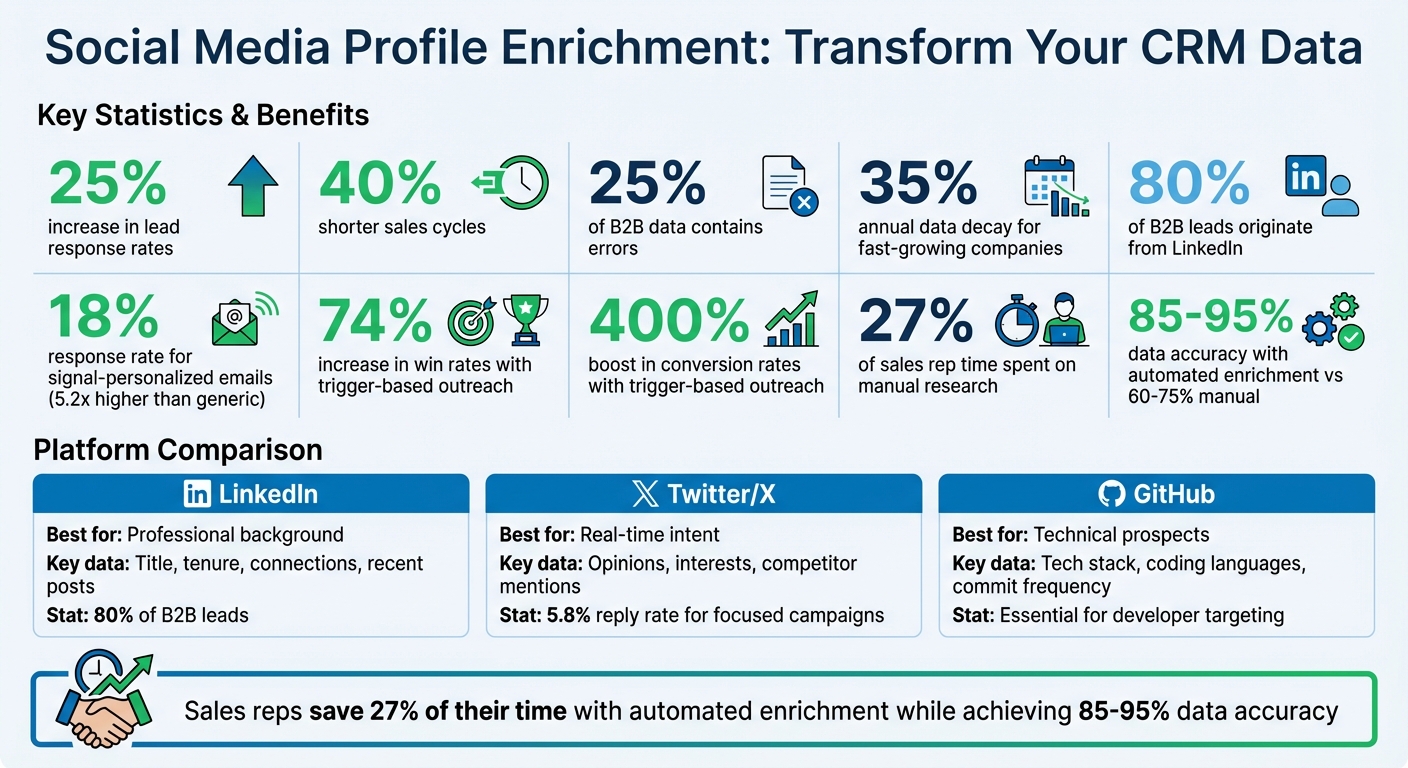
Social Media CRM Enrichment: Key Statistics and Benefits
Add Prospects To Your CRM & Enrich Data Automatically (with Surfe)
Preparing Your CRM for Social Media Profile Enrichment
Before diving into adding social media profiles to your CRM, it's essential to ensure your database is clean, free of duplicates, and well-organized. Proper preparation sets the stage for accurate enrichment and avoids the chaos of mismatched or redundant data.
Exporting CRM or StoreCensus Lead Data
Most CRMs, like Salesforce and HubSpot, come equipped with tools to export contact or account records into CSV files. If you're using StoreCensus for building ecommerce lead lists, you can also export data in CSV format, regardless of your plan. When exporting, prioritize unique identifiers such as store URLs or domains over company names. Why? A store URL or domain serves as a consistent reference point, ensuring social profiles are matched to the right contact. After exporting, take time to verify and clean your data for accuracy and reliability.
Cleaning and Verifying Existing Data
Did you know that nearly 25% of B2B data contains errors? To avoid these pitfalls, standardize formats like country names, fix typos, and eliminate duplicates. Email verification is another critical step. If your email bounce rate exceeds 5%, it’s likely that your "verified" emails are outdated. To maintain data quality, implement "do-not-overwrite" rules to protect verified information. Adding a "Last Updated" timestamp field can also help track when records were last enriched, enabling your sales team to focus on the most up-to-date data. Keep in mind that data decay can reach 35% annually for companies experiencing rapid growth. Once your data is polished, you can determine which social platforms align best with your outreach efforts.
Choosing Which Social Platforms to Target
Now that your CRM data is clean and ready, it’s time to identify the social platforms that will provide the most value. LinkedIn is a must-have - 80% of B2B leads originate there. It’s ideal for uncovering decision-makers and learning about their professional backgrounds. Twitter (X), on the other hand, offers a glimpse into real-time behaviors, showcasing opinions, interests, and even competitor mentions. For technical audiences like CTOs or developers, GitHub is a goldmine, offering insights into tech stacks, coding languages, and activity levels.
Jonathan Maurin from Derrick App puts it perfectly: "Social media attributes provide the context that transforms cold outreach into informed, personalized conversations".
To summarize:
- LinkedIn is your go-to for general B2B outreach, helping you identify key players and their professional details.
- Twitter/X captures behavioral triggers and real-time interests.
- GitHub is invaluable for targeting technical roles with insights into their expertise and projects.
| Social Source | Best For | Key Data Points |
|---|---|---|
| Professional background | Title, tenure, connections, recent posts | |
| Twitter/X | Real-time intent | Opinions, interests, competitor mentions |
| GitHub | Technical prospects | Tech stack, coding languages, commit frequency |
How to Enrich CRM Data with Social Media Profiles
Once your CRM is set up and you've identified your target platforms, you can follow these steps to enhance contact records with social media profiles. These methods align with the preparation and validation processes discussed earlier.
Step 1: Connect StoreCensus to Your CRM
If you’re using StoreCensus to compile ecommerce lead lists, you can link it directly to your CRM for a smoother enrichment process. StoreCensus offers CRM integrations starting at $99 per month with its Professional plan, which also includes API access for custom workflows. When syncing data, always use store URL or domain as the matching criteria instead of company names to ensure accuracy.
Step 2: Upload CSV Files for Bulk Enrichment
For larger datasets, export your CRM or StoreCensus lead information as a CSV file and upload it to your enrichment tool. Be sure the file includes unique identifiers like store URLs or domains in a dedicated column. Most platforms handle CSV uploads asynchronously, so your system won’t be bogged down while waiting for results. Before uploading, double-check that your data is standardized to avoid enrichment errors.
Step 3: Set Up Automated Social Profile Matching
Automating the process can save time and ensure consistency. Configure your tool to prioritize verified data over updates from third-party sources. This helps protect valuable internal insights from being overwritten by less reliable information. Include a "Last Updated" timestamp to track when each profile was enriched, and set up automated checks to identify duplicates or stale data. Profiles older than 60–90 days should be flagged for re-verification to keep your records current.
Step 4: Validate and Remove Duplicate Data
After the enrichment process, only accept profiles marked as verified by the tool. Set up exclusion rules to filter out irrelevant profiles, such as those with titles like "Student" or "Intern" if they don’t align with your target audience. Use "do-not-overwrite" rules to safeguard manually verified CRM data from being replaced by automated updates. Mishandling overwrite rules might compromise the quality of your CRM data. When done right, enriching contact data with social profiles can boost lead response rates by as much as 25%.
Step 5: Sync Enriched Data Back to Your CRM
Once validated, map the enriched social data - such as LinkedIn profile URLs, Twitter handles, or GitHub usernames - to the relevant fields in your CRM. Use asynchronous processing to avoid slowing down your CRM during updates. Regular synchronization ensures your CRM reflects the latest social profiles. If you’re using StoreCensus, take advantage of its real-time monitoring and alerts to track changes like app installs or store updates. These changes can trigger automated workflows for sales outreach or lead nurturing, keeping your data actionable without requiring manual updates.
| Status Tracking Category | Purpose in Enrichment Workflow |
|---|---|
| Contacted | Initial outreach sent; set a 3-day reminder for follow-up |
| Replied | Engagement received; schedule a discovery call |
| Negotiating | Proposal sent; daily check-ins required |
| Closed | Deal won; move to client management |
| Rejected | Not interested; set a 6-month reminder to re-engage |
Using Enriched Social Profiles to Improve Ecommerce Sales
Segmenting Ecommerce Leads by Social Activity
When your CRM includes enriched social profiles, you can segment leads more effectively by analyzing their online behavior and professional influence. For example, social influence scoring can highlight prospects with substantial reach - like those with more than 500 LinkedIn connections or over 1,000 Twitter followers - helping you prioritize industry leaders. GitHub data adds another layer by revealing programming languages and tech stacks in public repositories, enabling segmentation of technical leads proficient in languages like Python or JavaScript.
Activity-based prioritization is another strategy, allowing you to focus on high-engagement profiles, such as users who post regularly on platforms like Twitter or LinkedIn, and deprioritize inactive profiles. Additionally, intent signals - such as job changes, funding rounds, or mentions of competitors - can help you identify leads who might be ready to make purchasing decisions. Tools like StoreCensus take this further by tracking real-time ecommerce signals, such as app installations or store updates, which can be combined with social activity for even more targeted segmentation.
Personalizing Outreach with Social Insights
Enriched profiles make personalized outreach much more effective. Research shows that signal-personalized emails can achieve an 18% response rate - 5.2 times higher than generic cold emails. The key is applying the SMYKM principle (Show Me You Know Me), which means focusing on the prospect’s priorities rather than leading with a product pitch. For example, referencing a specific LinkedIn post or GitHub project in your opening line can make your message stand out. If a prospect tweets about CRM data issues, tailoring your message to address that specific challenge can significantly improve relevance.
As Semir Jahic, CEO of Salesmotion, explains, "The difference is not AI versus human. It is relevant versus irrelevant". Avoid starting with generic information the prospect already knows. Instead, combine social insights with company-specific signals from StoreCensus - like recent app installations or growth trends - to create multiple layers of personalization. Smaller, more focused campaigns (targeting 50 or fewer recipients) have been shown to achieve reply rates of 5.8%, compared to just 2.1% for larger campaigns.
Tracking and Improving Social Media Engagement
Integrating social listening into your CRM allows you to monitor brand mentions and keyword signals, offering early indicators of intent before a prospect directly engages. Modern CRMs use identity resolution to match social profiles with existing contacts, ensuring a complete view of the customer lifecycle and avoiding duplicate records. When prospects engage through direct messages or comments, converting these interactions into CRM tasks with clear response deadlines ensures no engagement goes unnoticed, reducing churn risk.
Trigger-based outreach has proven to be highly effective, increasing win rates by 74% and boosting conversion rates by 400%. Being the first seller to contact a prospect after a trigger event makes you five times more likely to close the deal. StoreCensus supports this by monitoring ecommerce stores for updates - such as new app installations or design changes - and initiating outreach workflows at the most opportune times. Adding lead scoring to your CRM, such as assigning points for specific actions (+20 for a Twitter intent signal or +30 for a GitHub tech stack match), can help you focus on your most valuable prospects.
| Social Source | Data Revealed | Best Use Case |
|---|---|---|
| Professional background, title, network size | Identifying decision-makers and influential contacts | |
| Twitter/X | Real-time opinions, pain points, competitor mentions | Timing outreach to address current challenges |
| GitHub | Tech stack, coding languages, commit frequency | Segmenting technical leads and developers |
Common Mistakes and Best Practices for Social Media Profile Enrichment
Mistakes vs. Best Practices
Enriching social media profiles can bring new life to your CRM, but it’s easy to fall into traps that undermine its value. Let’s break down some common mistakes and how to avoid them.
One of the most critical missteps is overwriting manually verified data with automated entries. This can erase high-quality information painstakingly verified by your team. To avoid this, establish "do-not-overwrite" rules that protect fields marked as manually verified.
Another common error is misinterpreting social activity as buying intent. Just because someone tweets daily or frequently updates their GitHub doesn’t mean they’re ready to make a purchase. Instead, align social activity with firmographic events like funding announcements, hiring trends, or - if you're in ecommerce - real-time signals from tools like StoreCensus, such as app installations or store updates.
Over-personalization can also backfire. Referencing specific social media posts can create a "surveillance effect", making prospects feel uncomfortable. Instead, use social insights to guide your approach - timing and messaging - without directly quoting their posts.
Then there’s the issue of stale data. Using outdated information like old job titles or abandoned technologies can make your outreach irrelevant. To keep your data fresh, limit social enrichment to activity from the last 30–60 days. For fast-growing organizations, data can become outdated by as much as 35% per year, so refreshing key accounts quarterly is essential.
Here’s a quick summary of these mistakes and the corresponding best practices to avoid them:
| Mistake | Impact | Prevention / Best Practice |
|---|---|---|
| Overwriting Manual Data | Replaces accurate, human-verified information. | Set "do-not-overwrite" rules for fields marked as "Manually Verified". |
| Using Stale Social Data | Leads to irrelevant outreach due to outdated insights. | Enrich data based on recent activity (e.g., tweets or commits from the last 30–60 days). |
| Over-Personalization | Alienates prospects by making them feel surveilled. | Use social data to guide your strategy without quoting specific posts. |
| Ignoring Data Governance | Creates inconsistencies and compliance issues in your CRM. | Standardize formats and document data sources (e.g., "USA" vs. "United States"). |
| Confusing Activity with Intent | Wastes resources on prospects not ready to buy. | Match social signals with firmographic events like funding rounds or tech adoption. |
| Overreliance on a Single Data Source | Limits coverage and increases inaccuracies. | Use "waterfall enrichment" to verify data across multiple sources. |
Conclusion
Summary of Benefits
Adding social media profiles to your CRM can completely transform how ecommerce teams approach sales. Instead of relying on broad, generic outreach based on job titles, this strategy provides deeper insights that turn cold emails into meaningful conversations. With real-time enrichment, response rates can triple, and sales cycles can shrink by 40%. It also allows for precise segmentation, such as identifying Shopify Plus users or categorizing leads by revenue tiers, rather than sticking to vague groupings.
Social platforms are treasure troves for uncovering trigger events - like hiring announcements, product launches, or changes in tech stacks - often before they show up on professional networks. For teams focused on ecommerce, tools like StoreCensus streamline this process by monitoring over 2.5 million stores and enriching profiles with over 25 data points. These include decision-maker contacts and real-time activity signals, giving you an edge in your outreach.
The efficiency boost is hard to ignore. Sales reps typically spend about 27% of their time on manual research. Automated enrichment not only saves this time but also delivers higher data accuracy - 85–95% compared to the 60–75% accuracy rates of manual efforts. With such clear advantages, the next step is to integrate these practices into your workflow.
Next Steps for Implementation
The first step is to audit your current CRM data. Clean data is the foundation for effective enrichment, so make sure to standardize formats, remove duplicates, and fill in missing fields like social URLs or job titles. Then, decide which social platforms align best with your target audience. For instance, LinkedIn is ideal for professional details, Twitter (or X) provides insights into real-time interests, and GitHub can reveal technical expertise.
If ecommerce is your focus, integrating StoreCensus can be a game-changer. Set up alerts for key updates, like new app installations or revenue milestones, and use the enriched profiles to create a multi-touch approach. For example, connect on LinkedIn, engage on Twitter, and then follow up with an email. This layered strategy builds familiarity and trust before making your pitch.
Start small with a pilot program to test the accuracy and effectiveness of the enriched data before scaling up. Train your sales team to use the new attributes wisely - social insights should guide the timing and personalization of outreach without overstepping. This approach directly addresses common challenges like outdated data and the inefficiencies of manual verification.
As StoreCensus puts it: "The best prospecting system isn't about finding more leads. It's about losing fewer of the ones you already found".
FAQs
What data do I need in my CRM to match social profiles accurately?
To ensure accurate matching of social profiles in your CRM, make sure to include essential details like the full name, email address, company name, job title, and LinkedIn or other social media handles. Adding extra information, such as company details and recent activity, can refine the accuracy even further. Tools like social media APIs or store intelligence platforms can help enrich this data, improving lead segmentation and making personalization efforts more effective.
How often should I refresh enriched social profile data to avoid staleness?
To keep your data accurate and relevant, it's crucial to update enriched social profile information every 3 to 6 months. Why? Because CRM data tends to decay at an average rate of 2.1% per month. Regular updates ensure your lead segmentation and personalization efforts remain effective and trustworthy.
How can I personalize outreach without sounding creepy?
When it comes to personalized outreach, the key is to truly understand what your prospects need and what challenges they face. This goes beyond just adding their name to an email or message - surface-level personalization like that can come across as insincere.
Instead, focus on using well-researched insights to make your messages relevant. For example, tap into industry trends, company updates, or recent activities to tailor your communication. Addressing specific pain points or goals shows that you’ve done your homework and genuinely care about offering a solution.
To keep this process efficient, you can combine thoughtful research with AI tools. These tools help you scale your efforts without sacrificing the personal touch. The result? Outreach that feels authentic, resonates with your audience, and delivers real impact.