Shopify Store Owner Data: How to Build a Targeted List
Define your ICP, use ecommerce intelligence and real-time app signals, enrich contacts, and sync verified Shopify store lists to your CRM for higher conversions.

Want to connect with Shopify store owners who are ready to buy? Here’s the key: stop sending generic emails and start using data to target the right prospects. With over 4.6 million Shopify stores globally, precision matters more than ever.
Here’s how you can build targeted Shopify brand prospect lists that converts:
- Define Your Ideal Customer Profile (ICP): Focus on specifics like revenue range, location, and industry niche. For example, target U.S.-based fashion stores earning $50K–$1M annually.
- Use Data Platforms: Tools like StoreCensus help you filter and analyze 2.5M+ Shopify stores based on growth signals, installed apps, and more.
- Leverage Real-Time Signals: Identify stores adding or removing apps, updating designs, or showing growth trends to time your outreach perfectly.
- Segment and Enrich Lists: Group stores by shared traits and fill gaps with verified contact details and behavioral insights.
- Sync with Sales Tools: Export lists, clean emails, and integrate with CRMs like HubSpot or Salesforce for seamless workflows.
How to Find Shopify Store Leads for Your Agency In Minutes

Define Your Ideal Shopify Store Owner Profile
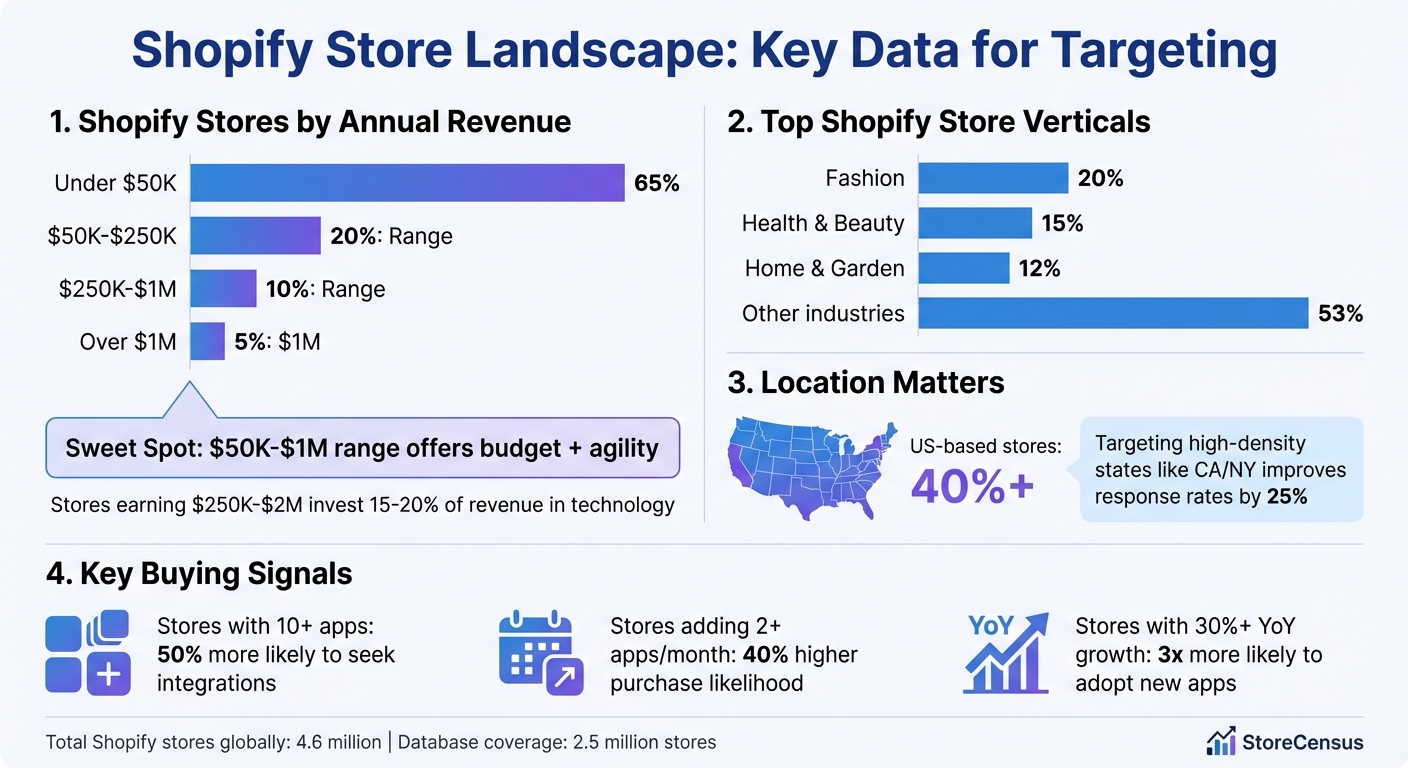
Shopify Store Distribution by Revenue and Industry Statistics
Building on the earlier data-driven approach, it's crucial to define your Ideal Customer Profile (ICP) to zero in on Shopify store owners most likely to convert. An ICP helps you focus your efforts, cut down on wasted outreach, and, according to HubSpot's B2B lead generation benchmarks, boost conversion rates by up to 68%.
Skipping this step can lead to inefficient outreach. You might end up targeting stores that lack the budget, aren't at the right growth stage, or simply don't need your solution. The outcome? Low response rates, poor return on investment, and a tarnished sender reputation.
The solution is precision. Instead of casting a wide net for "all Shopify stores", narrow your focus. For instance, target "US-based fashion stores earning $50K–$1M annually, with Meta Pixel installed but missing email marketing tools." This level of detail transforms generic outreach into tailored, relevant offers that resonate.
Identify Key Targeting Criteria
To create a solid ICP, focus on 5–7 critical criteria spanning demographics, behaviors, and firmographics.
- Industry niche: Start by narrowing down the type of store you're targeting. Shopify powers over 2.5 million stores, with major verticals like fashion (20%), health & beauty (15%), and home & garden (12%). Zeroing in on niches like activewear, clean beauty, or pet supplies lets you craft messaging that hits specific pain points.
- Revenue range: Revenue tells you about a store's budget and scale. Shopify stores break down like this: 65% earn under $50K annually, 20% fall between $50K–$250K, 10% make $250K–$1M, and just 5% exceed $1M. The $50K–$1M range is ideal, offering both the budget and agility for premium services. Stores earning $250K–$2M often invest 15–20% of their revenue in technology, making them strong prospects.
- Location: Geography matters. Over 40% of Shopify stores are US-based, and targeting high-density ecommerce states like California or New York can improve response rates by 25%. Localized messaging and compliance with regional rules can further refine your outreach.
- Growth signals: Look for stores showing signs of expansion, such as 30%+ year-over-year revenue growth, new product launches, or traffic surges. These indicators often align with higher app adoption rates - up to 3x more likely. Other signals like hiring activity or increased ad spend can point to stores ready to scale.
Once you've identified these criteria, dive deeper into a store's technology stack to uncover additional buying signals.
Understand the Role of Technology Stack and Apps
A store's technology stack provides invaluable insights into its readiness to buy. Beyond revenue and demographics, the apps a store uses reveal its maturity, current priorities, and unmet needs.
- Active app usage: Stores with 10+ apps installed are 50% more likely to seek additional integrations. For example, a store using Klaviyo for email marketing and Gorgias for customer support is likely scaling and open to tools that complement its growth.
- Installed apps as signals: Apps like Meta or TikTok Pixel indicate investment in paid advertising. Stores adding 2+ new apps per month show a 40% higher likelihood of making purchases, signaling they're actively looking for solutions.
- Tech gaps: Identifying what's missing in a store's tech stack can highlight opportunities. For instance, a store with 25,000+ monthly visitors but no email capture tool is an ideal candidate for email marketing solutions. Tools like StoreCensus can help you filter for combinations like "has Meta Pixel but missing Klaviyo", targeting stores with proven ad budgets that lack your solution.
- Decision-making speed: The complexity of a store's tech stack can also indicate how quickly decisions are made. Smaller stores using basic tools like Judge.me and PageFly often make decisions within 1–2 weeks. In contrast, Shopify Plus stores with enterprise apps like Yotpo or GA4 may require 1–3 months due to more involved approval processes.
Discover Shopify Stores Using Ecommerce Intelligence Platforms
Once you’ve defined your ideal customer profile, the next step is finding stores that match it. While manual methods like Google search operators can help, they often fall short. They don’t provide critical data like revenue, traffic, or technology spend, making them inefficient and time-consuming.
Ecommerce intelligence platforms solve this problem by giving you access to massive, pre-built databases filled with detailed information about millions of stores. These platforms allow you to filter stores based on specific criteria - like revenue range or installed apps - so you can skip the tedious manual work. StoreCensus founder Nick calls this wasted effort the "prospecting tax", referring to the time lost on repetitive research that doesn’t build on previous efforts.
The biggest benefit? Precision at scale. For example, you can quickly identify stores running paid ads (indicated by a Meta Pixel) but missing key tools like Klaviyo for email automation. One email marketing agency applied this filter to target beauty brands earning $100K–$500K annually. Out of 174 qualified prospects, they achieved a 32% open rate, booked meetings with 9%, and closed 35% of those leads - adding $14,500 in new monthly recurring revenue (MRR).
Access Shopify Store Data at Scale
Using a robust database is a game-changer. These platforms enrich each store profile with over 25 structured data points, including revenue estimates, traffic levels, installed apps, product counts, store age, and even contact details for decision-makers. With weekly updates, you’ll always have the latest data on new store launches, app installations, and revenue changes.
This eliminates the need for outdated lead databases or scraping tools. Instead, you gain access to a global database covering 180 countries and more than 8,300 apps. For example, say you’re targeting pet product stores in the U.S. with revenues between $250K and $1M. In just minutes, you can generate a list complete with verified email addresses and LinkedIn profiles using the integrated Decision Maker Finder.
The platform also tracks growth indicators like product count increases, new app installations, and traffic spikes. For instance, a subscription app developer used these insights to target Food & Beverage stores in the $250K–$1M revenue range that weren’t using ReCharge. Out of 800 stores, they secured 12 demos and 4 installs, adding $1,800 in MRR.
Use Advanced Filtering Options
StoreCensus offers advanced filtering features that make it easy to create highly specific prospect lists. You can filter by:
- Platform usage: Focus on Shopify stores only.
- Installed apps: Include or exclude tools like Klaviyo, Gorgias, or ReCharge.
- Revenue tiers: From under $50K to over $100M.
- Location: Narrow down by country, state, or city.
- Industry verticals: Target niches like Beauty, Fashion, or Pet Products.
- Growth signals: Use metrics like traffic estimates, product count, or store age to prioritize leads.
For example, a CRO agency targeted Fashion & Apparel stores with over 25,000 monthly visitors and an active Meta Pixel. Out of 200 prospects, they received 40 replies and closed 8 clients within 45 days. The secret? Combining filters to focus on high-traffic stores (a sign of scale) and Meta Pixel presence (indicating ad spend).
You can also identify technology gaps. For instance, nearly half of Shopify stores with high traffic lack an email capture tool - an opportunity for email marketing providers.
Real-time monitoring takes this a step further by alerting you to key changes, such as app additions or removals, design updates, and other activity signals. This allows you to engage prospects at the right moment, like when they uninstall a competitor’s app or adopt a new marketing tool.
| Filter Category | Examples | Use Case |
|---|---|---|
| Revenue Tiers | $50K–$100K, $100K–$500K, etc. | Match budget to your pricing |
| Technology Stack | Meta Pixel, Klaviyo, etc. | Spot ad spend or tech gaps |
| Location | US, CA, NY, TX, UK, AU | Target specific regions |
| Industry Verticals | Beauty, Fashion, Pet Products | Tailor messaging to niche needs |
| Growth Signals | Traffic >25K, Product >100 | Prioritize high-momentum stores |
Once you’ve built your filtered list, you can move on to segmentation and enrichment for even more targeted outreach.
Segment and Enrich Your Data
Once you've filtered your list, the next step is refining it through segmentation and enrichment. This ensures your outreach is not only targeted but also timely. By layering additional data points and real-time insights onto your filtered list, you can transform a general database into a highly specific prospect list. The result? Personalized outreach that can boost response rates by 2–3x.
Segmentation helps you group stores based on shared traits - like growth trends, technology usage, or decision-maker roles - so you can craft messaging tailored to each group. Enrichment fills in the blanks with verified contact details, behavioral insights, and activity data, helping you identify the right moment to reach out. Together, these strategies can reduce wasted outreach by up to 70% while ensuring you're connecting with the right person at the right time.
Apply Advanced Segmentation Techniques
Growth trends are a powerful segmentation tool. Focus on stores with monthly revenue growth of 20% or more, as these businesses are more likely to invest in tools and services. For example, a $200,000/year store experiencing 50% annual growth is often a better prospect than a stagnant $2 million/year store.
Technology clusters can also guide your approach. For instance:
- Stores using Meta Pixel + Klaviyo + TikTok Pixel likely fall into a "Growth-Focused" category and might be interested in advanced automation tools.
- Stores relying on PageFly + Judge.me are often "DIY Builders" who could benefit from professional optimization services.
Accessibility compliance is another overlooked filter. Many ecommerce sites fail basic accessibility standards, such as missing alt text on 30% or more of their images. This presents an opportunity to address a clear pain point. For example, you could reach out with a message like: "We noticed some accessibility gaps on your site. Here's how we can help." Since 15–20% of ecommerce sites fail basic accessibility audits, this approach can resonate with a large audience.
Decision-maker segmentation ensures you're targeting the person who can make decisions quickly. For stores earning under $1 million annually, reaching out to founders directly often yields faster results, as they typically make decisions within 1–2 weeks. This role-based targeting can increase conversion rates by 25% compared to generic outreach.
Once you've segmented your list, the next step is integrating real-time signals to determine the best moment for outreach.
Add Real-Time Signals to Your List
Real-time signals add context and immediacy to your segmented list, turning it into a dynamic tool for engagement. These signals help identify when a store is actively addressing a need, making your outreach more relevant.
App installs are one of the strongest indicators of intent. For example, if a store installs Klaviyo, it shows they're focusing on email marketing. Reaching out within 48 hours with a message like, "We noticed you just added Klaviyo - here's how to optimize it", can increase reply rates by 35%.
App removals are just as insightful. When a store removes a competitor's tool, it often indicates dissatisfaction and a search for alternatives. Tools like StoreCensus can track these changes across millions of stores, enabling you to act quickly and offer your solution when they're evaluating new options.
Design updates signal rebranding efforts or UX improvements. When a store updates its theme or makes significant design changes, it's a great chance to pitch services like conversion optimization or performance audits. A timely message such as, "Congrats on the redesign - here's how to maximize conversions with your new look", feels relevant and helpful rather than cold.
| Signal Type | What It Indicates | Outreach Timing | Example Message |
|---|---|---|---|
| App Install | Focus on a specific function | Within 48 hours | "Just saw you added Klaviyo - here's how to boost ROI" |
| App Removal | Dissatisfaction with current tool | Immediately | "Looking for a better alternative to [removed app]?" |
| Design Update | Rebranding or UX investment | Within 1 week | "Love the new design - let's optimize conversions" |
One SaaS team put this into action by targeting 500 stores that had recently installed abandoned cart apps. They sent personalized demo invites within 24 hours of each install, achieving an 18% trial sign-up rate - compared to just 4% from cold lists. The key difference? Timing and relevance powered by real-time data.
Export and Integrate Your Targeted List into Sales Tools
Once your enriched and segmented list is ready, it’s time to connect it to your sales tools. By exporting the data and syncing it with your CRM or automation platforms, you can eliminate tedious manual entry and speed up your sales process.
Export Data for Use
Start by downloading your segmented list as a CSV file, which works seamlessly with most CRMs and email tools. In StoreCensus, you can filter for essential data points - like store URL, owner contact details, tech stack, and revenue signals - before exporting your list.
Key fields to include:
- Store URL
- Name and email of the owner or decision-maker
- Technology stack details (e.g., Shopify apps in use)
- Location
- Growth metrics (like traffic trends)
- Activity signals (e.g., recent design updates)
StoreCensus enriches your export with over 25 structured data points, making it easier to craft personalized outreach messages. For instance, you could write, "Congrats on installing Klaviyo - here’s how to make the most of it."
Before importing your CSV into a CRM or email platform, run it through an email verification tool. This step is crucial for reducing bounce rates from 15–20% to under 2%. Simply upload your CSV to the verification tool, download the cleaned list with valid emails, and then import it into your sales platform.
Finally, connect this verified data to your sales systems for real-time updates and automation.
Sync Data with CRM and Automation Tools
Integrating with your CRM ensures that your data stays updated and workflows remain automated. StoreCensus supports popular platforms like HubSpot, Salesforce, Pipedrive, and Apollo. To set up an integration, head to the integrations section in your StoreCensus dashboard, choose your CRM, authenticate using your API key, map fields (e.g., store URL to company name, owner email to contact), and enable real-time syncing. This way, updates in your StoreCensus data - such as new leads - flow directly into your CRM.
This setup also enables bidirectional workflows. For example, changes in your CRM, like updated deal stages or new contact notes, can trigger alerts back in StoreCensus.
For advanced automation, StoreCensus offers API access. Use their API endpoints to pull segmented data into custom scripts or no-code platforms like Zapier or Make.com. You could, for instance, automate daily API queries to update Google Sheets and launch outreach campaigns through ActiveCampaign. This approach supports ongoing prospecting efforts, with users reporting that it speeds up lead qualification by three times compared to manual list handling.
Conclusion
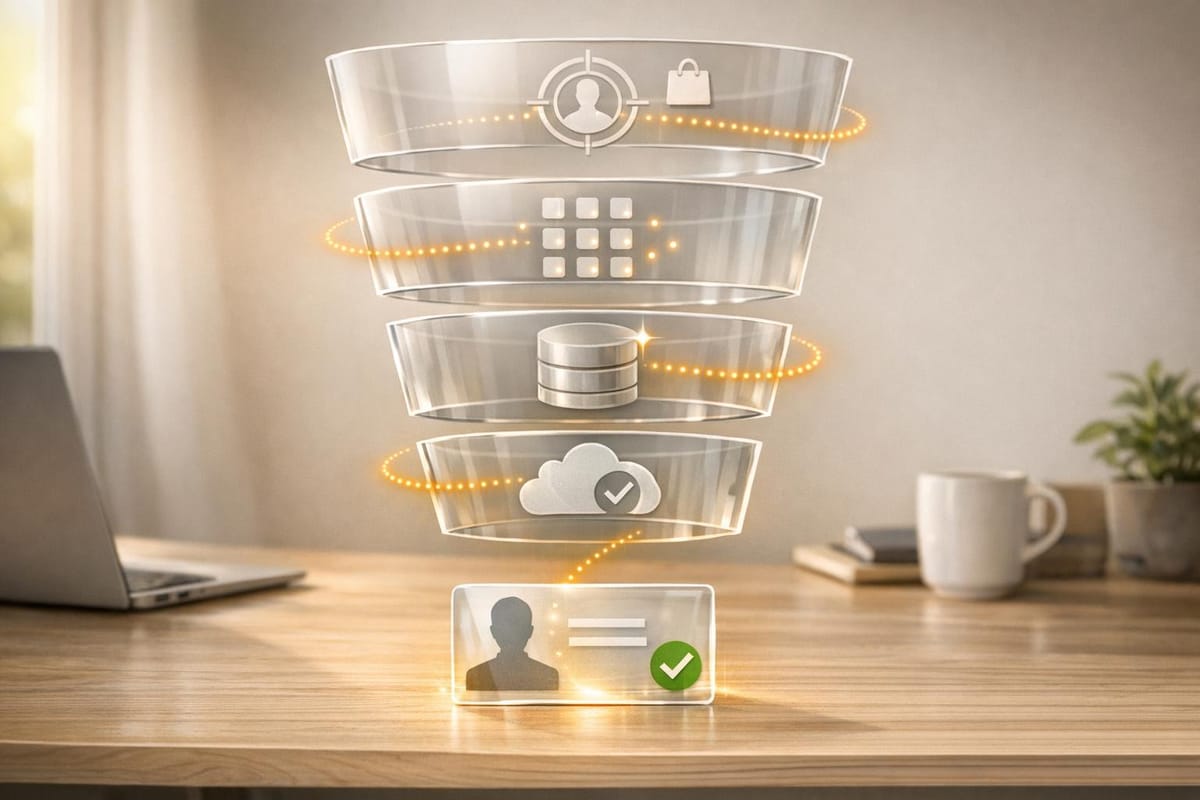
Your strategy boils down to four key steps: define your ideal customer profile (ICP), use data intelligence to identify stores, segment and enrich your data, and export it into your sales tools. These steps take the uncertainty out of the process, replacing hours of manual research with actionable insights.
By adopting a data-driven approach, your outreach becomes more precise and impactful. For instance, referencing specific tech gaps - like a store using Meta Pixel but not Klaviyo - grabs attention and builds credibility, leading to higher response rates.
The foundation of successful outreach lies in the quality of your contact lists, not just the messaging. Companies that harness data analytics effectively are five to six times more likely to retain customers and increase profitability.
StoreCensus simplifies prospecting, cutting hours of work down to minutes. With access to over 2.5 million Shopify stores, tracking 8,300+ apps, revenue trends, and real-time store updates, it ensures your data stays current. This constant stream of fresh, relevant data fuels your sales pipeline. When synced with your CRM, you're not just creating a list - you’re building a self-sustaining sales engine that can deliver 233% more revenue compared to outdated methods.
Focus on a well-defined ICP, leverage real-time insights, and let automation do the heavy lifting. With StoreCensus, every data point becomes a stepping stone toward landing your next high-value client.
FAQs
What data points matter most for my Shopify ICP?
When building your Shopify Ideal Customer Profile (ICP), focus on key data points like revenue range, industry classification, technology stack, installed apps, store activity signals, and growth indicators.
Real-time activity signals - such as app installations or design updates - can highlight stores with strong potential. Verified contact details, on the other hand, make targeted outreach more precise. By combining these metrics, you can streamline your efforts to prioritize and connect with the Shopify prospects that matter most.
How do I spot high-intent Shopify stores using real-time signals?
To find Shopify stores with high intent, tools like StoreCensus can be incredibly helpful. These platforms monitor real-time activity signals, including app installations, app removals, and design updates. Such changes often point to stores experiencing growth or undergoing strategic adjustments. By narrowing down your search to stores showing recent activity and growth trends, you can target businesses actively working to optimize or scale. This approach boosts your chances of turning them into loyal clients.
How can I keep my list clean and CRM-ready after exporting?
To keep your exported Shopify list organized and ready for your CRM, make it a habit to verify and update contact details regularly. Leverage tools that enhance data accuracy and segment your list based on factors such as location, industry, or customer activity. Automating the tracking of store updates ensures outdated entries are swiftly updated or removed. Additionally, performing routine data cleaning to eliminate duplicates and invalid contacts will help you maintain a streamlined and effective CRM for your outreach efforts.