How Shopify Data Powers Email Personalization
Leverage Shopify first-party data to segment customers, automate dynamic emails, and measure results to boost engagement and sales.

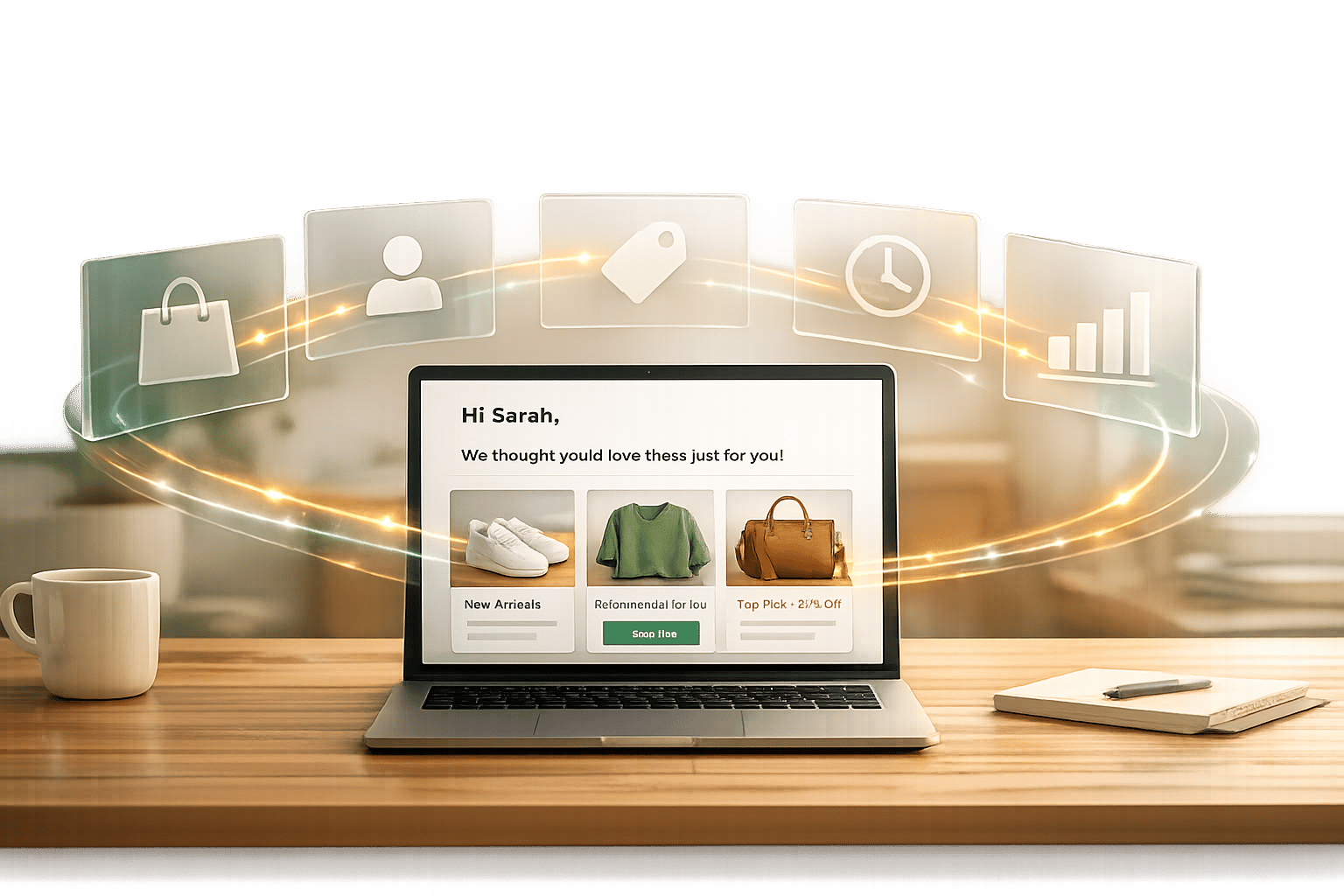
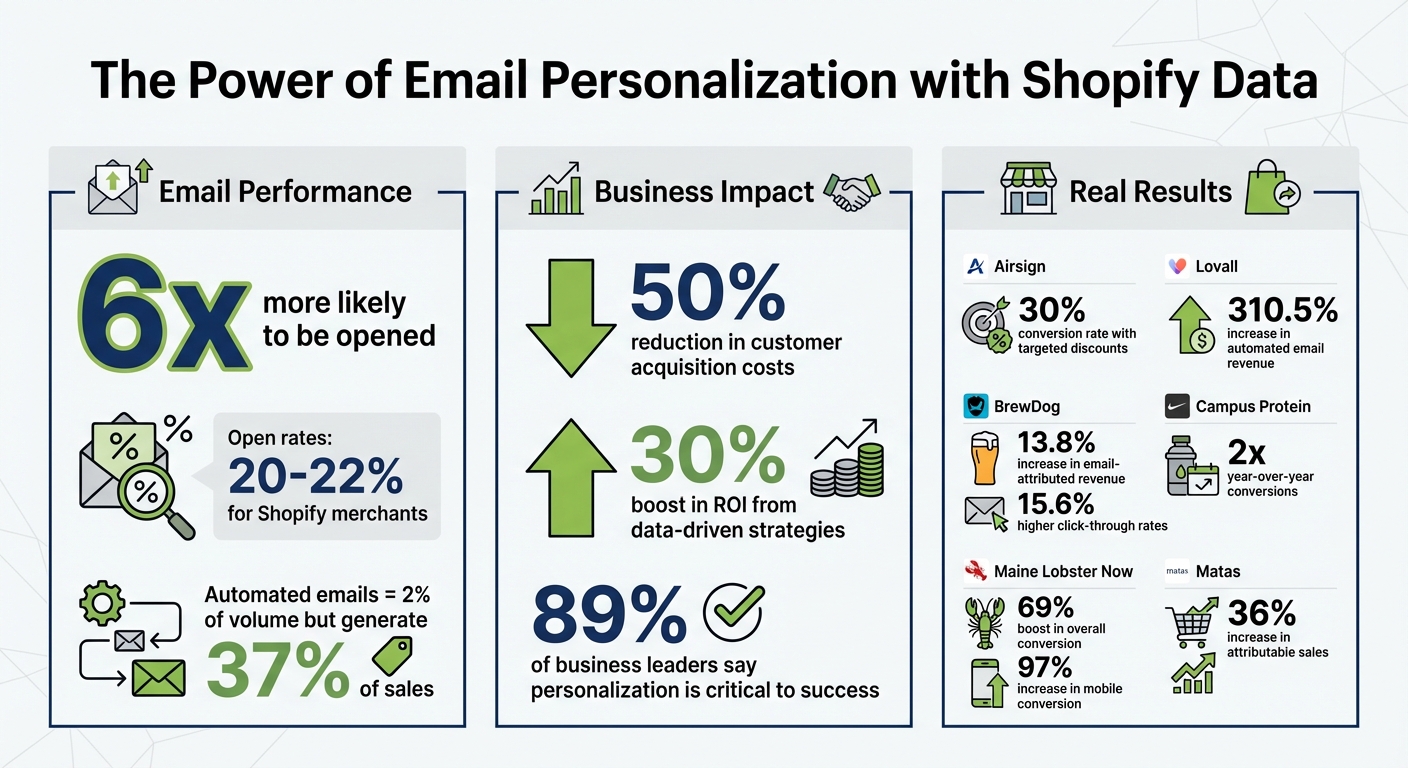
Shopify simplifies email personalization by using first-party data like browsing history, purchase records, and order history to create unified customer profiles. These profiles enable businesses to segment audiences, automate campaigns, and deliver tailored messages. Personalized emails are six times more likely to be opened, and retailers using data-driven strategies can reduce acquisition costs by 50% while boosting ROI by 30%.
Key points:
- First-party data is crucial as third-party cookies phase out.
- Shopify centralizes customer data for easy access and segmentation.
- Tools like Shopify Flow and integrations with platforms like Klaviyo enable automation at scale.
- Metrics like open rates, click rates, and sales help refine campaigns.
- Personalization improves engagement, loyalty, and revenue, with examples like Airsign achieving a 30% conversion rate using targeted discounts.
This article covers how to collect, organize, and use Shopify data to create effective, automated email campaigns.
Shopify Email Personalization Statistics and ROI Impact
Collecting and Organizing Shopify Data
Key Data Points from Shopify Stores
Shopify gathers a wealth of first-party data from customer interactions. This includes everything from on-site search queries and browsing history to items added to the cart, abandoned carts, and order histories. You can also collect demographic details like age, gender, and location (ZIP code or country), as well as contextual data such as device type and referral sources.
But it doesn’t stop at transactions. Shopify allows you to track behavioral data like product page views, time spent on pages, email link clicks, and video views. You can also monitor customer journey metrics such as signup times, last purchase dates, and whether a customer is new or returning.
Additional insights can come from third-party apps integrated with your Shopify store. These might include data from loyalty programs, customer service interactions, subscription statuses, or even quiz responses. Together, this creates a more complete view of your customers, helping you craft targeted email campaigns with precision.
Centralizing Your Shopify Data
Shopify automatically centralizes all this diverse data, making it easier to use for personalized email marketing. The platform organizes customer information into unified profiles within the "Customer" tab of your admin dashboard. These profiles are created as soon as a customer provides their information and link together activity across tools, channels, devices, and sessions, creating a single, reliable source of truth.
"Shopify unites all your browsing, purchasing, and order data in one core customer model. You don't have to integrate a bunch of third-party tools or worry about losing data across different selling channels." – Chris Payne, Shopify Author
For those managing multiple Shopify stores or conducting broader market research, tools like StoreCensus can take things a step further. StoreCensus tracks over 2.5 million ecommerce stores and provides 25+ structured data points, such as technology stacks, installed apps, and activity trends. This allows you to segment audiences not just by their behavior on your site but also by larger ecommerce patterns.
Segmenting Your Audience with Shopify Data
Shopify's Built-In Segmentation Features
Shopify makes it easy to turn raw customer data into actionable insights through its built-in segmentation tools. These tools automatically group customers based on real-time behavior, ensuring your marketing stays relevant. For example, a customer who just made their first purchase is seamlessly moved from the "new visitor" group to the "first-time buyer" group - no manual updates needed.
The Customer tab in your Shopify admin serves as the control center for segmentation. You can apply straightforward filters like location, order history, or spending habits to create tailored groups. If you need more complex filtering, ShopifyQL allows you to query customer data with precision. For instance, you can pinpoint customers who bought a specific product multiple times within a certain timeframe or identify those living near your store.
Adding to this flexibility, customer tags let you manually group customers based on unique interactions, such as quiz responses, loyalty tiers, or support tickets. These tags can then be used to refine your email campaigns, apply targeted discounts, or trigger automated workflows.
A great example of Shopify's segmentation power comes from Airsign, a smart cleaning appliance company. In early 2025, they targeted customers who had purchased their vacuum at launch but hadn’t subscribed to HEPA filter replacements. Cofounder Alex Dashefsky shared:
"We identified the segment in Shopify, created a discount for that specific segment, communicated with them in a way that was very personalized for their needs, and we saw about 30% of those people convert".
These native tools provide a strong foundation, but advanced segmentation methods can take your targeting to the next level.
Advanced Segmentation Methods
For deeper insights and more precise targeting, advanced segmentation focuses on customer behavior and predictive metrics. For instance, lifetime value (LTV) segmentation helps you distinguish high-spending customers from occasional buyers, allowing you to customize your messaging. Similarly, tracking purchase frequency can highlight which customers are ready for replenishment reminders versus those who might need more engagement.
Geographic segmentation is another powerful strategy. Instead of simply targeting by country or state, you can tailor promotions based on climate or proximity. Think winter coat discounts for colder regions or swimwear promotions for warmer areas. You can also use location data to invite customers to in-store events or offer local pickup options.
Lifecycle stage segmentation is all about meeting customers where they are in their journey with your brand. New visitors might appreciate educational content or welcome discounts, while first-time buyers could benefit from product care tips or cross-sell recommendations. Repeat customers often respond well to loyalty perks or exclusive early access to new products.
Here’s a quick breakdown of segmentation types and their practical applications:
| Segmentation Type | Example Criteria | Use Case |
|---|---|---|
| Behavioral | Abandoned cart, browsing history, past purchases | Recovery emails, "complete the look" suggestions |
| Lifecycle | New visitor, first-time buyer, VIP customer | Welcome emails, loyalty rewards, exclusive previews |
| Geographic | ZIP code, climate zone, store proximity | Seasonal promotions, local event invites |
| Value-Based | Lifetime value, purchase frequency, average order value | Tiered rewards, replenishment notifications |
For an even broader view of your market, tools like StoreCensus can help you analyze trends and ecommerce tech stacks, giving you a competitive edge in segmentation.
How To Setup Shopify Email Marketing (Step-by-Step)
Creating Personalized Email Campaigns
When you segment your audience effectively, you can craft emails that feel like they were written just for the recipient. Shopify's unified customer profiles bring together browsing habits, purchase history, and order details into one centralized view. This makes every email feel tailored and relevant.
Adding Dynamic Content to Emails
With these unified profiles, you can include dynamic content in your emails to reflect each customer’s unique behavior.
Dynamic content transforms a generic email into a personalized experience. For instance, you can use Liquid tags like {{ customer.first_name }} to customize subject lines or body text. If a name isn’t available, you can set a fallback like "Friend" to keep things polished and professional.
You can also include product recommendations that match what a customer has browsed or purchased. For example, if someone recently bought running shoes, you might suggest athletic apparel or accessories in your next email. Shopify integrates seamlessly with tools like Klaviyo and Bloomreach, which use real-time data to create "Recommended for You" sections from your product catalog.
"Lovall, a UK womenswear brand, adopted AI-driven personalization with Bloomreach in February 2026. By adding dynamic product recommendations based on browsing behavior, they achieved a 310.5% increase in automated email revenue and a 50.85% year-over-year boost in total CRM revenue".
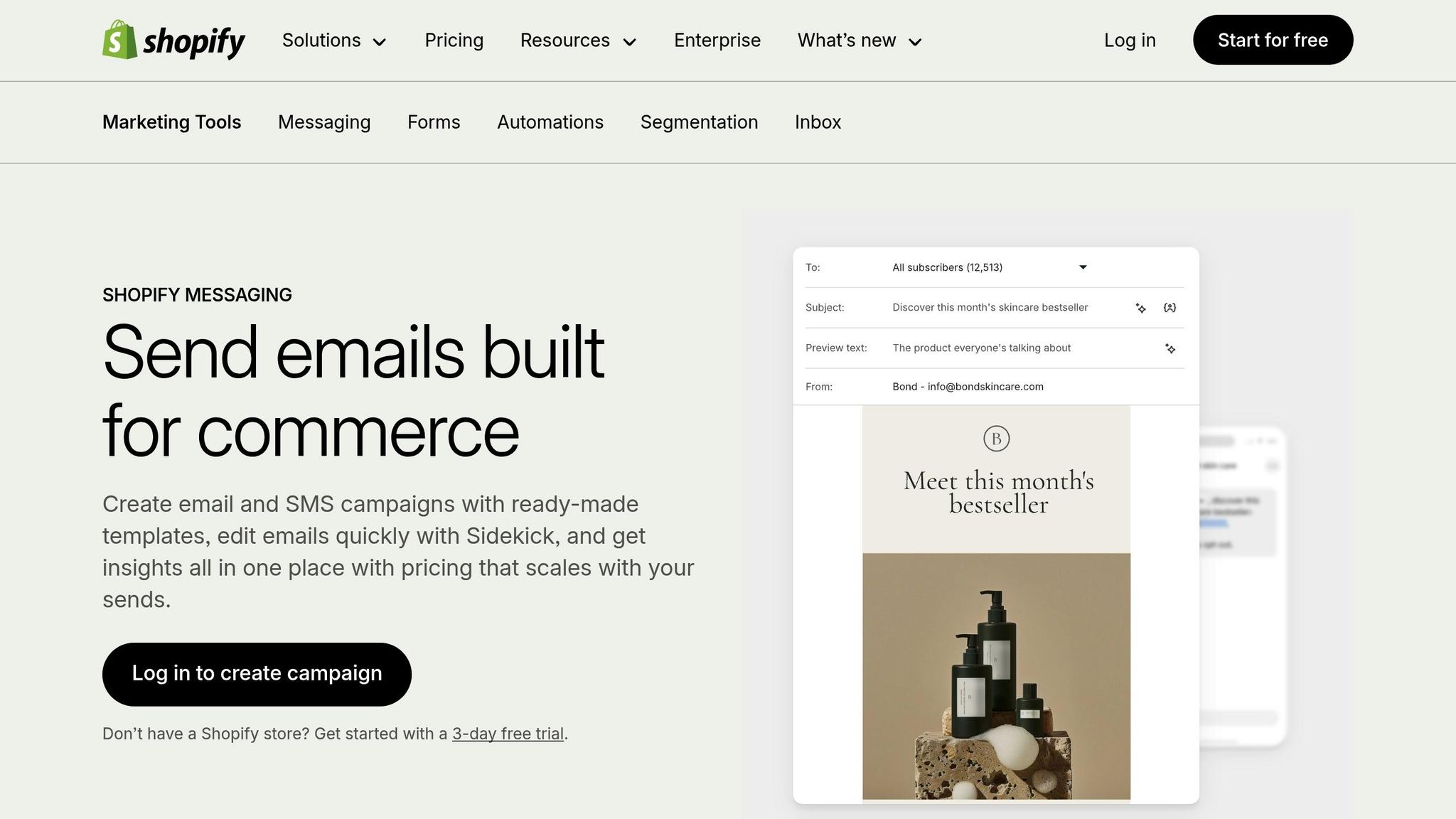
Shopify Messaging allows for two personalization fields in subject lines and previews, and up to ten fields in the email body.
Customizing Offers and Promotions
Segmentation unlocks endless possibilities for personalizing offers and promotions.
Browsing and purchase data let you create discounts that resonate with specific groups, rather than sending a one-size-fits-all offer. For example, you can target loyal customers with exclusive discounts or run A/B tests to find what works best.
"BrewDog used Bloomreach to test personalized offers and added dynamic countdown timers to create urgency. This approach led to a 13.8% increase in email-attributed revenue and 15.6% higher click-through rates".
You can also reward repeat customers by celebrating loyalty milestones. If someone earns 150 points, for instance, you can send an exclusive email or SMS with a special discount code. This not only incentivizes further purchases but also strengthens their connection to your brand.
For consumable products, replenishment reminders are highly effective. If you know a customer typically reorders skincare, pet food, or coffee every 30 days, send a timely reminder with a reorder link. Sweeten the deal with free shipping to encourage action.
Setting Up Behavior-Triggered Emails
Behavior-triggered emails respond to customer actions in real time, making them far more impactful than generic broadcasts. These emails generate 10 times more revenue than standard campaigns.
A classic example is the abandoned cart email. When a customer leaves items in their cart without checking out, Shopify can automatically send a reminder about 30 minutes later. Include images of the products, a direct link to their cart, and perhaps a small discount to nudge them toward completing the purchase.
Post-purchase follow-ups are another powerful tool. After someone makes a purchase, send them a tailored email with setup instructions or a "how-to" guide. For instance, if a customer buys furniture, you could provide assembly tips 24 hours after delivery. These follow-ups build trust and reduce customer support inquiries.
"Maine Lobster Now revamped their checkout and post-purchase email system after switching to Shopify. By tailoring messages to delivery dates and product types, they saw a 69% boost in overall conversion and a 97% increase in mobile conversion".
To re-engage inactive customers, set up winback campaigns. If someone hasn’t purchased in 60 days, send a "We miss you" email with a personalized discount or showcase new products they might like based on their past behavior.
Shopify Flow simplifies this process with pre-built templates and a visual workflow builder. You define the trigger (e.g., "checkout created"), set a condition (like "order not placed after 10 hours"), and choose an action (such as sending an abandoned cart email). This automation ensures your outreach is timely and effective.
Automating Email Personalization at Scale
Personalizing emails doesn’t have to mean spending countless hours on manual tasks. With Shopify's automation tools, you can craft customized emails for thousands of customers effortlessly. These tools seamlessly connect Shopify's data with systems that deliver personalized customer experiences on a large scale.
Shopify Automation Tools for Email
At the heart of Shopify's automation is Shopify Flow, which operates on a straightforward "if this, then that" logic. This allows you to create customized workflows triggered by specific actions or data points from your store.
"We can run a global business with six people because Shopify enables us to automate so much of the work."
– Sebastian Geis, Cofounder, Paperlike
Shopify Messaging and Shopify Email make things even easier with ready-to-use templates for scenarios like abandoned carts, upselling after a first purchase, or post-purchase follow-ups. These tools integrate directly into Shopify's admin dashboard, making them accessible even to those new to automation.
For businesses with more advanced needs, platforms like Klaviyo and Bloomreach sync with Shopify's data to enable precise segmentation and predictive analytics. A great example: in early 2025, the womenswear brand Lovall implemented Bloomreach’s AI-driven personalization. The results? A 310.5% boost in automated email revenue and a 50.85% year-over-year increase in CRM revenue.
Shopify Forms also plays a key role by capturing leads and instantly funneling them into unified customer profiles. This allows for immediate inclusion in automated sequences like welcome emails. Additionally, Shopify Inbox can trigger follow-up emails based on live chat interactions. For instance, if a customer inquires about outerwear, the conversation can be tagged, and they’ll automatically receive relevant product recommendations.
Using Real-Time Triggers for Automation
Shopify takes automation a step further with real-time triggers, ensuring timely responses to customer actions. Event-based triggers respond to activities like browsing a product, abandoning a cart, or completing a purchase. Time-based triggers, on the other hand, are perfect for scheduled messages, such as sending a replenishment reminder 30 days after a purchase.
Shopify’s unified customer profiles update in real time, allowing segments to evolve as customer behaviors change. For example, when a first-time buyer makes a second purchase, they’re immediately reclassified as a repeat customer, and your automated workflows adjust accordingly.
Triggers also handle specific events like back-in-stock notifications or high-risk order alerts. For example, if a previously viewed item comes back in stock, customers can be notified automatically. These strategies deliver impressive results: while automated emails represent just 2% of total email volume, they generate a whopping 37% of sales.
Airsign demonstrated the power of this approach in 2025. They identified customers who had purchased a vacuum at launch but hadn’t subscribed to filters. By targeting this group with a personalized discount based on their purchase history, they achieved a 30% conversion rate for the new subscription service.
Setting up workflows in Shopify Flow is simple. Define a trigger (e.g., "checkout created"), add conditions (e.g., "cart value over $50"), and select an action (e.g., sending a targeted email). This process ensures your personalization efforts scale effortlessly.
Measuring Email Personalization Results
Once your personalized email campaigns are up and running, the next step is all about measuring performance. Why? Because tracking the right metrics helps you understand what’s working and what needs tweaking. Shopify’s built-in analytics make this process easier by linking email performance directly to store revenue, giving you a clear view of how personalization is impacting your sales.
Metrics to Track
To gauge the success of your campaigns, keep an eye on engagement metrics like open rates, click rates, delivery rates, bounce rates, unsubscribe rates, and spam complaints. For Shopify merchants, open rates typically fall between 20% and 22%. Personalized emails, however, can push those numbers much higher - up to six times higher than generic emails. Beyond engagement, track order counts, total sales, and average order value (AOV) to measure the financial impact of your efforts.
Shopify’s email conversion funnel is a powerful tool for spotting where potential customers drop off. It tracks each step, from email opens to store visits, cart additions, and completed purchases. For example, if you notice high open rates but weak cart additions, it might be time to fine-tune your product recommendations. Shopify Messaging also uses a "Last non-direct click" attribution model to tie sales to specific email actions, and adding UTM parameters in Google Analytics can provide even deeper insights.
These metrics and tools pave the way for fine-tuning your campaigns.
A/B Testing Your Personalization
Experimentation is key to figuring out what clicks with your audience. Start by testing subject lines - does including the recipient’s first name or location outperform a more generic approach? Then, move on to testing content. For instance, compare the performance of blog posts versus product carousels or try different promotional strategies, like tiered discounts based on cart value versus flat discounts for everyone. Google Analytics can help you dig deeper by using secondary dimensions like "Gender" or "Landing Page" to see which types of content resonate most with specific groups.
For example, Campus Protein saw its conversions double year over year by testing personalized bestseller lists instead of generic product rankings.
The trick is to test one variable at a time and use Shopify’s funnel analysis to pinpoint exactly where your changes are making an impact.
Once you’ve gathered insights, use them to refine your segments and adjust your campaigns automatically with Shopify data.
Refining Campaigns with Shopify Data
As your campaigns run, Shopify’s data becomes an invaluable resource. Use funnel insights to identify where customers are dropping off and adjust your strategies accordingly. If a specific segment isn’t converting, dive into ShopifyQL to analyze customer behavior. This tool allows you to query customer data with precision - like identifying customers who’ve purchased the same product three times in six months - so you can create highly targeted segments.
Dynamic segmentation takes this a step further by automatically updating customer groups based on real-time actions. For instance, when a first-time buyer makes a second purchase, they can seamlessly move into a "repeat buyer" segment, triggering workflows tailored to their new status.
Matas, a leading retailer in Denmark, boosted attributable sales by 36% in 2026 by continuously refining its personalization strategies using behavioral data across all touchpoints.
Conclusion
Shopify data brings customer interactions together, allowing you to create personalized email campaigns that truly connect with your audience. By integrating browsing, purchasing, and interaction data into unified customer profiles, you can precisely segment your audience and automate messaging that aligns with their real-time behavior. This approach has been shown to significantly boost engagement and drive sales.
As third-party cookies disappear, first-party data has become more critical than ever. Bobby Morrison from Shopify highlights its growing importance, stating that first-party data is now your most valuable resource. This means your customer data isn't just helpful - it gives you a competitive edge.
To get started, focus on automating dynamic segmentation based on customer actions as they happen. Set up behavior-triggered automations for key moments, like abandoned carts or post-purchase follow-ups. Tools like ShopifyQL can help you create detailed customer segments, while performance metrics guide ongoing improvements. For instance, brands like Airsign have achieved 30% conversion rates by targeting specific segments with personalized discounts.
Take personalization beyond email to enhance the entire customer journey. With 89% of business leaders agreeing that personalization will be critical to success in the coming years, now is the time to make the most of your Shopify data. Platforms like StoreCensus can help you turn this data into actionable insights, powering email campaigns that deliver real results.
FAQs
Which Shopify data points matter most for email personalization?
To create personalized email campaigns with Shopify, focus on key data points that give you a deeper understanding of your customers. Here are the main areas to consider:
- Purchase history: Knowing what customers have bought before helps you recommend products they’re likely to love.
- Browsing behavior: Tracking what products or categories they’ve viewed offers insight into their current interests.
- Engagement metrics: Data like email open rates and click-through rates can show how engaged a customer is with your content.
Customer segmentation also plays a big role. Factors like location, order frequency, and product preferences allow you to tailor your messaging to specific groups. For instance, you might promote seasonal items to customers in certain regions or highlight subscription options for frequent buyers.
Lastly, keep an eye on store activity signals. Things like app usage, sales trends, and recent updates can help you identify high-intent customers - those who are ready to make a purchase. Reaching out to them with timely, relevant content can make all the difference.
By combining these insights, you can craft email campaigns that feel personal and drive results.
How do I set up behavior-triggered emails in Shopify Flow?
With Shopify Flow, you can create automated workflows that send emails based on specific customer actions or store events. Here's how it works:
- Define Triggers: Identify the events that will activate the workflow, such as order creation or cart abandonment.
- Set Conditions and Actions: Add conditions to refine when the action should occur and specify the email to be sent as the action.
- Integrate Email Services: Connect your email platform or Shopify Messaging to automate personalized emails.
This setup ensures your customers receive timely, relevant communication tailored to their behavior, helping you stay engaged with them effectively.
How can StoreCensus help segment Shopify stores for outreach?
StoreCensus offers a powerful way to segment Shopify stores using real-time data from over 2.5 million ecommerce stores. With its advanced filtering options, users can sort stores based on factors like installed apps, technology stack, growth patterns, and recent updates. The platform's monitoring tools track changes such as new app installations or design updates, helping businesses spot high-potential leads. This allows for personalized outreach strategies that align with each store's latest activities and growth trajectory.