Real-Time Revenue Alerts for Sales Teams
Real-time revenue alerts turn ecommerce signals into immediate sales opportunities, cutting response time and boosting conversions through automated integrations.

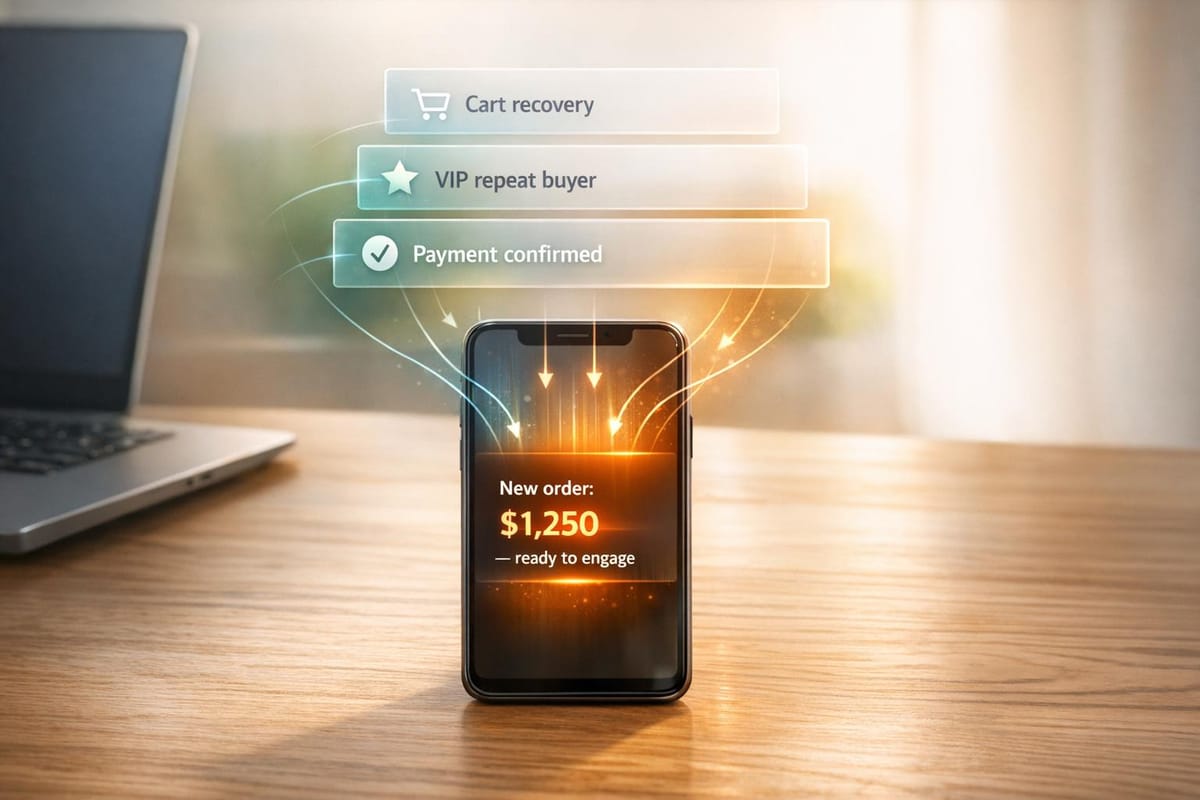
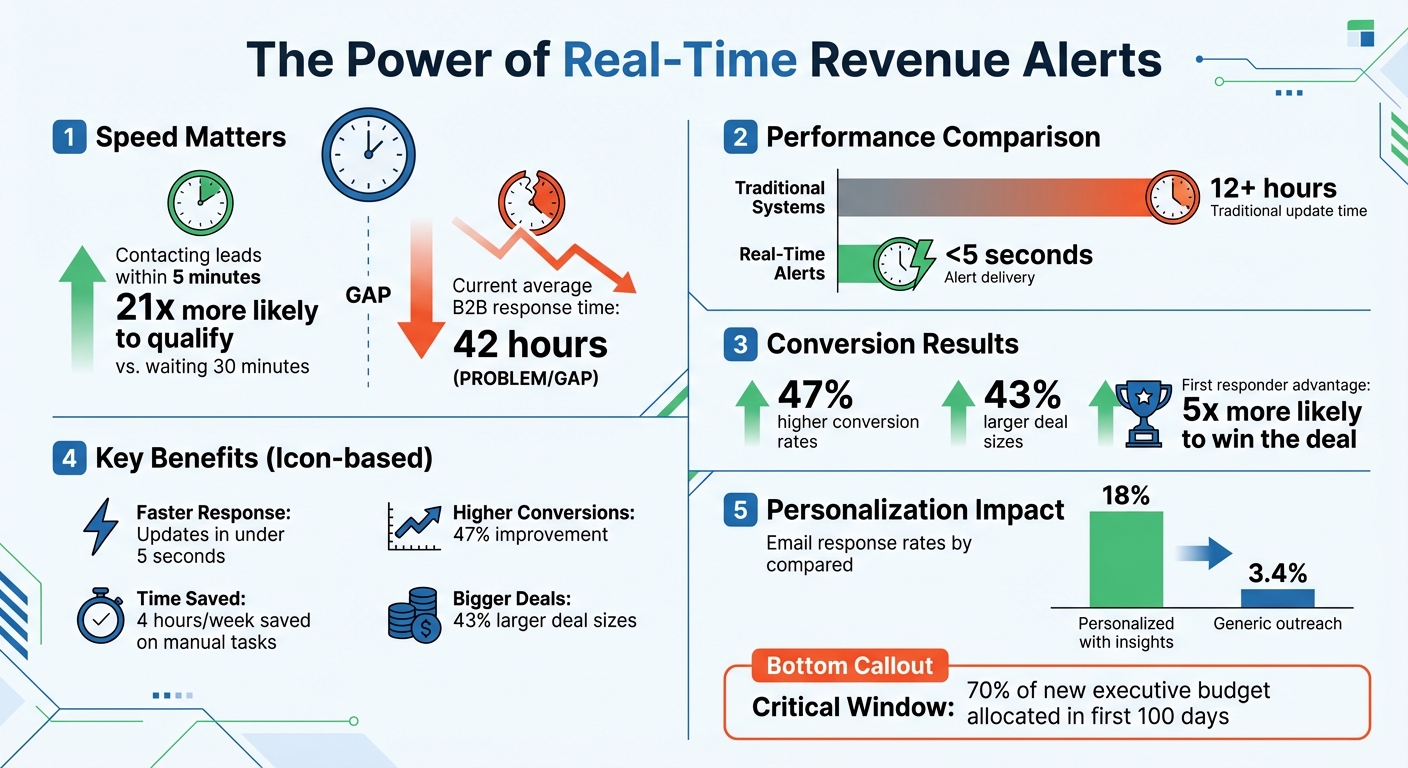
Real-time revenue alerts help sales teams act fast on high-intent signals, like pricing page visits or funding announcements. These alerts, sent via tools like Slack or email, allow reps to respond instantly, improving follow-up timing and boosting conversions. Speed is critical - contacting leads within 5 minutes increases qualification rates by 21x compared to waiting 30 minutes. Yet, the average B2B response time is still 42 hours, leaving opportunities untapped.
Key benefits include:
- Faster response times: Alerts deliver updates in under 5 seconds, compared to 12+ hours for traditional systems.
- Higher conversion rates: Signal-qualified leads convert 47% more often and yield 43% larger deals.
- Improved productivity: Automated alerts eliminate manual CRM updates, saving hours weekly.
StoreCensus simplifies this process by integrating with CRMs and outreach tools, offering over 20 filters to identify high-value leads. Set triggers like revenue milestones or app changes, and route alerts directly to your team’s preferred platforms. With real-time insights, sales teams can prioritize leads effectively, personalize outreach, and close deals faster.
Real-Time Revenue Alerts Impact on Sales Performance Statistics
Why Sales Teams Need Real-Time Revenue Alerts
How Timely Data Improves Sales Outcomes
Real-time data is a game-changer for sales teams, helping them act on opportunities as they arise. The timing of outreach can make or break a deal - reaching out immediately versus even an hour later can be the difference between success and failure. Companies using signal-qualified leads report 47% higher conversion rates and 43% larger deal sizes compared to traditional prospecting methods.
Stats back this up: the first salesperson to contact a decision-maker after a trigger event is 5x more likely to win the deal. This is especially critical during key moments, like when a new executive joins a company. Newly hired leaders often allocate 70% of their budget within their first 100 days. Without real-time alerts, teams risk missing these short-lived opportunities.
Traditional revenue reports, which often take 12+ hours to update due to nightly batch processing, simply can’t compete. Real-time alerts, on the other hand, deliver updates in less than 5 seconds. This shift allows sales reps to engage prospects when their interest is at its peak - not after it fades. The result? More effective, proactive sales strategies.
Finding High-Intent Leads Using Real-Time Signals
Real-time alerts highlight buyer behaviors that signal a readiness to purchase. These go well beyond basic activity tracking, capturing actions like visits to pricing pages, changes in tech stacks, funding announcements, and executive job transitions. By layering these signals together, modern systems identify accounts that are actively "in-market" rather than just casually browsing.
"Traditional prospecting tells you who might be a fit. Signal-based selling tells you who is ready now and why." - Daniel Wiener, Building the ChatGPT for Sales
The best alerts don’t just notify; they provide context. For example, they might include details like a prospect’s technology stack, revenue estimates, app usage changes, or web traffic patterns. This level of insight prevents "context amnesia", where sales reps forget why a lead was flagged. The impact? Emails with personalized insights achieve 18% response rates - a stark contrast to the 3.4% response rate for generic outreach.
How Automated Alerts Improve Team Productivity
Real-time alerts don’t just speed up responses - they also streamline workflows. Instead of wasting time manually updating CRM records or combing through spreadsheets, sales reps receive all the critical information directly in tools like Slack, Microsoft Teams, or email. This eliminates unnecessary context switching, freeing up more time for actual selling.
For RevOps teams, manual forecasting and CRM exports can eat up 4 hours per week. Real-time monitoring replaces these outdated processes with instant notifications for important events, such as a deal stage change, a competitor’s tool being removed, or a prospect hitting a key usage milestone. Automation also addresses a common issue: "lead death." Research shows 60% of a sales team’s top prospects aren’t ready to buy for 3–12 months. Automated reminders ensure these leads aren’t forgotten, managing follow-ups without the need for manual tracking.
"Clearbit has enabled Fast to leverage intent data by providing instantaneous alerts and notifications for our sales team, allowing them to follow up and close deals more efficiently." - Tyler Yee, Performance Marketing Manager, Fast
How to get Real-Time Alerts when Prospects are Ready to Buy - HubSpot Secret Feature
How to Set Up Real-Time Revenue Alerts with StoreCensus
By automating data collection and delivering timely alerts, you can transform real-time insights into actionable sales opportunities.
Connecting Your Ecommerce Data Sources
StoreCensus monitors over 2 million stores, enriching each with more than 25 data points and achieving a 99.2% accuracy rate. You can link StoreCensus to your CRM and outreach tools to seamlessly channel qualified leads into your sales pipeline.
The platform integrates directly with tools like Apollo.io, Instantly.ai, and Smartlead.ai, allowing you to send leads straight into email campaigns. For broader integration needs, Zapier connects StoreCensus with HubSpot, Salesforce, Slack, Gmail, Notion, and over 5,000 other apps. Weekly change detection ensures you stay updated on key shifts, such as stores moving revenue bands, updating tech stacks, or showing other buying signals. To get started, you can test the system with 3 free credits, ensuring your filters and data meet your expectations before upgrading to a paid plan.
Once connected, you can define specific triggers to identify sales opportunities.
Setting Revenue Thresholds and Triggers
Triggers are conditions that highlight potential sales opportunities. StoreCensus provides over 20 search filters, including estimated revenue bands (e.g., $100K–$250K), traffic stats, installed apps, and technology stack details. For example, you could set up alerts for stores surpassing $1M in revenue but not using Klaviyo, or when competitor apps are removed - both signaling high-value leads. If a store moves from one revenue tier (like $100K) to a higher one (like $250K), StoreCensus activates your pre-configured "Evergreen Automation" workflow.
"When a store matches your trigger criteria, they're in an active buying cycle. Your message arrives exactly when they need it most." – StoreCensus
To prioritize your efforts, use the 1–5 star rating system built into the platform. Spend 60% of your time focusing on 5-star leads - those that meet all criteria, including verified decision-maker contact details. You can also set reminders to follow up with leads at the right time.
Delivering Alerts to Your Sales Tools
Once your triggers are set, you can route alerts directly to the tools your team uses most. Direct outreach integrations send qualified leads automatically into campaigns on Instantly.ai, Smartlead.ai, or Apollo.io as soon as they meet your criteria, such as hitting a revenue threshold or updating their tech stack.
For CRM and productivity platforms, Zapier enables seamless connections to HubSpot, Salesforce, Slack, or email. Many teams create dedicated Slack channels for high-priority alerts, ensuring they receive real-time updates without needing to check multiple platforms. StoreCensus also includes a built-in CRM for managing leads directly. You can track their status (e.g., Contacted, Replied, Negotiating, Closed, Rejected), add internal notes, and set reminders for follow-ups.
| Integration Type | Supported Tools | Primary Function |
|---|---|---|
| Direct Outreach | Instantly.ai, Smartlead.ai, Apollo.io | Push leads into automated email campaigns |
| Workflow Automation | Zapier (5,000+ apps) | Connect triggers to external CRMs and other apps |
| CRM & Productivity | HubSpot, Salesforce, Slack, Notion, Gmail | Receive notifications and manage lead records |
| Internal Tools | Built-in CRM, Reminder System, Status Management | Manage lead context and follow-ups within StoreCensus |
Using automated triggers based on store changes can result in 3× higher conversion rates compared to manual lead searches, and 3–5× higher response rates compared to traditional cold outreach methods.
"Set up once, run forever. Your automations work around the clock, catching opportunities while you sleep." – StoreCensus
With these integrations working together, your sales team is equipped to act on every high-intent signal as it happens.
How to Use Revenue Alerts Effectively
Ranking and Acting on High-Value Opportunities
To get the most out of real-time revenue alerts, focus on high-priority signals and act quickly. For instance, when a store hits a revenue milestone or removes a competitor's app, treat it as a Tier 1 alert. These situations demand immediate attention - ideally within 24–48 hours. On the other hand, lower-priority signals, like general website updates, can be addressed through a standard nurture process.
StoreCensus's 1–5 star rating system makes it easier to allocate your efforts effectively. Spend 60% of your time on 5-star leads that meet all key criteria. Why? These leads close at rates between 40–60%, compared to just 5–10% for 3-star prospects. Timing is another critical factor. Responding to leads within five minutes can make a huge difference.
"Leads contacted within five minutes are 21x more likely to qualify than those contacted after 30 minutes." – Charanyan, Co-founder, RevenueHero
Use your CRM to stay organized by tracking lead statuses like Contacted, Replied, Negotiating, Closed, or Rejected. Set follow-up reminders based on key updates, such as product launches or changes in the tech stack. Once you've identified high-value opportunities, tailor your outreach to make the most of these insights.
Using Alert Data to Personalize Outreach
Personalization is key when acting on alerts. Emails that reference specific, verifiable signals can achieve an 18% response rate. The difference lies in the context you provide. For example, if an alert shows a store has reached a new revenue milestone, craft your message to highlight growth opportunities tied to that achievement.
StoreCensus alerts offer detailed insights like tech stack details, revenue tiers, and recent changes, saving you hours of research. If an alert signals that a store recently removed an app, mention it directly in your outreach. For instance, you could ask what motivated the change, turning a cold email into a meaningful dialogue.
To structure your outreach effectively, try the 5-line email framework: reference your research, pinpoint a specific gap, state your intended outcome, provide social proof, and suggest an easy next step.
After acting on alerts, it's essential to keep refining your alert system to ensure it stays relevant.
Reviewing and Improving Your Alert Settings
Alert systems can lose their edge over time, so it's important to review and adjust your settings regularly. Monitor metrics like time to first contact, signal-to-meeting rate, and signal-to-pipeline rate to identify which triggers are delivering results.
If you're overwhelmed with low-value alerts, raise your thresholds to focus on signals that indicate clear buyer intent. Alternatively, combining multiple signals - like a revenue milestone paired with an app removal - can help pinpoint the most valuable opportunities.
"A signal that is a week old is no longer a signal - it is old news." – Daniel Wiener, CEO, Autobound
Dynamic thresholds can also improve your results. For example, if your close rate typically increases during Q4, adjust your alert settings to capture more opportunities in that period. Use StoreCensus's status tracking to spot patterns. If leads in the "Negotiating" stage often stall after a certain period, consider adding an escalation rule to involve a manager. The goal is quality, not quantity - better alerts mean better results.
Conclusion
Real-time revenue alerts are changing the game for sales teams by cutting out the delays that often cause deals to fall apart. Acting within minutes can significantly improve lead qualification rates, giving your team the upper hand when buyer interest is at its peak.
The old methods - where as many as 70% of qualified leads vanish due to poor follow-up - just don’t cut it anymore. Sales teams today need tools that keep critical context intact, help prioritize effectively, and prompt action at the perfect moment. StoreCensus delivers just that, integrating essential intelligence like tech stacks, revenue tiers, and activity signals directly into store profiles. This eliminates the chaos of spreadsheets and scattered emails, creating a seamless system that supports a steady, reliable pipeline.
"The best prospecting system isn't about finding more leads. It's about losing fewer of the ones you already found." – StoreCensus
By shifting from reactive service-level agreements (SLAs) to proactive alert systems, your team can build a pipeline that grows stronger with every timely signal. For the 60% of prospects who won’t be ready to buy for another 3–12 months, automated reminders ensure no opportunity is left behind. These process improvements and well-timed actions can make all the difference.
StoreCensus turns ecommerce data into actionable insights. With real-time monitoring, advanced filtering, and direct alerts sent to tools like Slack or your CRM, your team can focus on what matters most - closing deals. The payoff? More meetings, faster pipeline development, and fewer missed opportunities.
FAQs
What signals should trigger a revenue alert?
Revenue alerts are essential when significant business changes occur, such as leadership hires, funding rounds, product launches, company restructuring, app installs or removals, hitting revenue milestones, or updates to technology stacks and business activities. These events signal high-potential opportunities, allowing sales teams to respond swiftly and capitalize on promising leads.
How do I prevent alert fatigue for my team?
To combat alert fatigue, prioritize high-priority signals by establishing thresholds for notifications that truly matter - like significant store activity or shifts in buyer intent. Leverage automation tools, such as real-time monitoring, to filter out minor updates and ensure your focus stays on critical opportunities. Tailor alert frequency based on the importance of each deal, and periodically review your settings to maintain a balance between staying responsive and avoiding unnecessary distractions.
What should a rep do in the first 5 minutes after an alert?
When a real-time revenue alert comes in, the first five minutes are crucial. Here’s how a sales rep can make the most of that time:
- Understand the alert's trigger: Check what prompted the alert, like an app install or a deal stage change, to determine how urgent it is.
- Dive into customer or store data: Quickly review any relevant information to understand the context and identify potential needs.
- Rank the opportunity: Decide how important the alert is and where it fits in your priorities.
- Act fast with personalized outreach: Reach out promptly while the customer's intent is still high.
- Record and plan follow-ups: Log the interaction in your CRM and set up a plan for future engagement.
Taking these steps ensures you act quickly and effectively, keeping the momentum strong.