How to Find Shopify Stores for Lead Generation
Practical methods to find and qualify Shopify stores for B2B outreach using manual search, directories, competitor backlinks, and automated tools.


Finding Shopify stores for lead generation can be simplified with the right strategies. Shopify powers over 4.6 million stores globally, making it a massive opportunity for B2B professionals offering apps, marketing services, or fulfillment solutions. Shopify's standardized platform makes identifying stores easier through predictable URL structures and technical traits. Here's how you can get started:
- Manual Search: Use Google search operators like
site:myshopify.comand directories like Datazonic to identify stores by niche, location, or other criteria. - Competitor Analysis: Tools like Ahrefs or Semrush help uncover Shopify stores linked to your competitors.
- Automated Tools: Platforms like StoreCensus track millions of Shopify stores, offering filters for revenue, tech stack, and growth signals to find high-potential leads.
For the best results, combine manual discovery with automation to scale your outreach efforts. Use tools to identify decision-makers and craft personalized emails for higher response rates. Timing is key - reaching out after a competitor's app is uninstalled can boost conversion rates significantly.
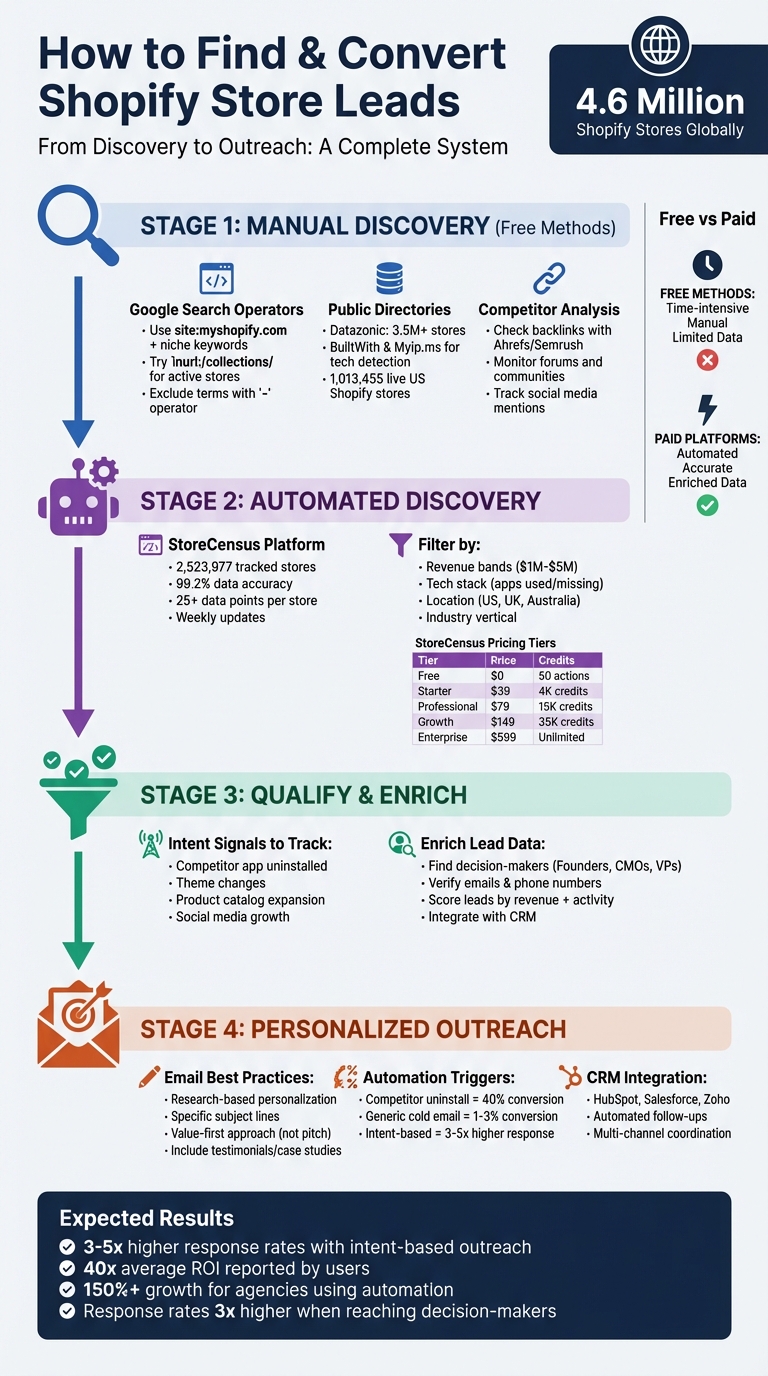
Complete Guide to Finding and Converting Shopify Store Leads
How to Find Shopify Store Leads for Your Agency In Minutes
Manual Methods to Find Shopify Stores
Before diving into paid tools, you can use free methods to uncover hundreds of Shopify stores. These techniques not only help you identify potential stores but also give you a better understanding of the Shopify landscape.
Using Google Advanced Search Operators
Google's advanced search operators are incredibly handy for pinpointing Shopify stores. The site:myshopify.com operator is particularly effective because many stores still have their default Shopify subdomain indexed by Google, even after adopting a custom domain. For example, searching site:myshopify.com "organic skincare" can quickly lead you to relevant stores in that niche.
Shopify's uniform URL structure makes it even easier to target specific pages. For instance, all product collections are located under /collections/. By searching inurl:/collections/ "Powered by Shopify", you can find active stores that still display Shopify's footer credit. To confirm a store is powered by Shopify, look in its source code for mentions of "cdn.shopify.com" or "myshopify.com."
You can refine your searches further by excluding certain terms with the minus operator (-). For instance, site:myshopify.com clothing -wholesale -dropshipping filters out wholesale and dropshipping stores. Adding location keywords like site:myshopify.com eco-friendly shoes USA focuses your search on specific regions. Alternatively, use OR to broaden your search across related categories, such as site:myshopify.com skincare OR beauty. The intitle:Shopify operator can also help, though it typically returns fewer results.
Here’s a quick reference table for these operators:
| Search Operator | Purpose | Example Query |
|---|---|---|
site:myshopify.com |
Limits results to Shopify's default subdomain | site:myshopify.com jewelry |
inurl: |
Finds specific Shopify URL structures | inurl:/products/ "fitness" |
" " (Quotes) |
Searches for an exact phrase match | "Powered by Shopify" |
- (Minus) |
Excludes specific terms from results | site:myshopify.com -dropshipping |
OR |
Searches for multiple alternative keywords | site:myshopify.com coffee OR tea |
Once you've exhausted these search techniques, public directories can help you expand your list of Shopify stores.
Browsing Public Shopify Store Directories
There are several platforms that provide free or trial-access databases of Shopify stores. Datazonic, for example, has over 3.5 million store listings, complete with filters for regions like the USA, UK, and Australia, as well as subscription tiers like Shopify Plus. Samantha Lee, a Sales Director at an SEO agency, highlights its value:
"As a digital marketer, I've found Datazonic to be an essential tool for lead generation and competitive analysis".
Shopify itself curates industry-specific lists, showcasing top-performing stores in sectors like fashion, electronics, and home décor. For a more technical approach, tools like BuiltWith and Myip.ms can identify websites running on Shopify's platform.
If you're looking for niche-specific leads, platforms like Seller Directories offer databases with over 40,000 US-based Shopify stores. These include verified decision-maker emails and are organized by categories such as Beauty, Health, and Apparel. Most directory providers also offer free samples (usually around 100 leads) so you can test the data quality before committing to a larger purchase. To ensure accuracy, cross-reference these findings by visiting each store's "Contact Us" or "About" pages to locate additional decision-maker details not included in the database.
Currently, there are 1,013,455 live Shopify stores in the United States alone, with over 6.3 million companies globally using the platform. The retail sector accounts for the largest share at 11%, followed by fashion and manufacturing. Interestingly, about 66% of Shopify users are small businesses with fewer than 50 employees.
These manual methods provide a strong foundation for discovering Shopify stores and can be further enhanced with automated tools.
Checking Competitor Backlinks and Forums
Another effective way to find Shopify stores is through competitor analysis. By examining where your competitors are mentioned, you can uncover leads that are already pre-qualified for your niche. Tools like Semrush and Ahrefs allow you to input a competitor's URL and view their "Referring Domains", which can reveal blogs, review sites, or directories that link to them. These same platforms could feature your prospects.
Forums and niche-specific communities are also treasure troves for discovering smaller brands that may not rank highly in search results. For example, searching through subreddits or industry-specific forums (like pet owner communities for pet supply stores) can uncover emerging brands. As OutreachMama notes:
"Competitor backlink harvesting... leverages successful strategies of competitors [and] provides a ready-made list of potential backlinks".
You can also use tools like Google Alerts or Ahrefs' Content Explorer to monitor when competitors are mentioned in blogs or forums, even if they aren’t linked. These discussions often highlight active trends in the market. Additionally, reaching out to journalists or bloggers who have previously written about competitors can open doors - they’ve already shown interest in your niche. Don't forget to explore social platforms like Instagram, TikTok, and Facebook, where influencers often tag and link to Shopify stores in their posts.
Using StoreCensus for Shopify Store Discovery
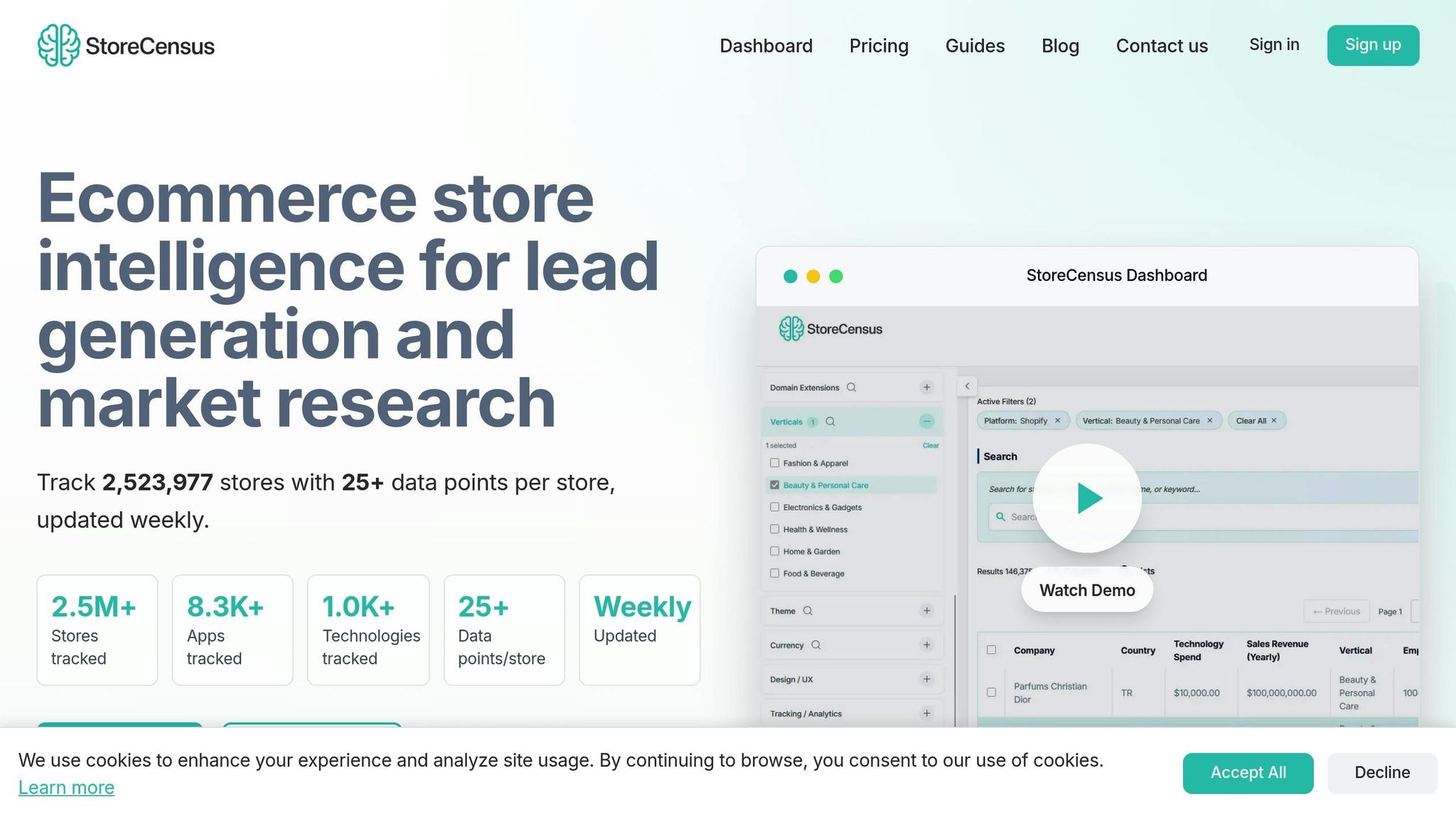
StoreCensus takes the hassle out of manual research by automating Shopify store discovery with precision. The platform tracks an impressive 2,523,977 Shopify stores, offering over 25 data points per store. With weekly updates, it maintains a 99.2% data accuracy rate. Instead of spending hours on manual searches, you can filter millions of stores by revenue, installed apps, location, and activity signals - all in just a few clicks. It’s a natural extension of the manual techniques discussed earlier but much faster and more efficient.
What makes StoreCensus stand out is its focus on intent-based discovery. The platform identifies key signals like stores uninstalling competitor apps, changing themes, or expanding their product catalogs. These indicators reveal businesses that are actively investing and may need your services. For instance, if you sell a loyalty app, you can filter for stores earning $1M–$5M annually that use Klaviyo for email marketing but lack a loyalty program. This level of targeting has been shown to deliver 3-5x higher response rates compared to generic cold outreach. It’s a game-changer for lead generation, which is the core focus of this guide to finding and targeting Shopify stores.
The platform’s Decision Maker Contact Finder takes things further by identifying key roles like founders and CMOs, complete with verified emails and phone numbers. StoreCensus data shows decision-makers respond three times more often than generic company email addresses. Aditya Singh, Founder of Oxify, shared his experience:
"StoreCensus completely changed how we do outreach. We stopped guessing and started targeting stores based on niche, app usage stage, and real growth signals".
StoreCensus offers a free plan to get started, which includes three credits to test its filters and preview live store data. This allows you to verify the quality of the information before committing to a paid subscription for full database access and bulk exports.
Step-by-Step Guide to Using StoreCensus
Getting started with StoreCensus is simple. Create a free account to receive your initial credits, which let you explore the platform’s filtering tools without any upfront cost. Once you’re in the dashboard, you’ll find the main search interface.
From there, apply filters to match your ideal customer profile. Start by targeting specific locations, such as the United States or even individual states like California, Texas, or New York for localized campaigns. Next, narrow down revenue bands to focus on stores earning $1M–$5M annually - businesses with real budgets. The tech stack filter is where the magic happens: search for stores using specific apps (e.g., “Uses Klaviyo”) or identify gaps using “NOT” filters (e.g., “Uses Klaviyo AND Recharge but NOT a loyalty app”). You can also filter by industry verticals like Fashion, Beauty, or Home Goods.
Preview your filtered results instantly. The platform displays store names, estimated revenue, and a full list of installed apps, so you can quickly verify whether these prospects align with your criteria. Tim K., Founder of a Digital Marketing Agency, shared:
"I found 3 high-value Shopify stores needing my exact services in my first day. Landed a $5,000 project after just 10 outreach emails".
To enrich your leads, use the built-in Decision Maker Finder or integrate with Apollo. With just one credit per contact, you can pull verified details like names, job titles, email addresses, and LinkedIn profiles. Depending on your plan, you can export up to 2,000 decision-maker contacts per month.
Once your leads are ready, export them as a CSV file or sync directly with your CRM (like HubSpot or Salesforce) or email tools via Zapier. You can also set up automated workflows to stay ahead of the competition. For example, trigger outreach sequences when a store uninstalls a competitor’s app or changes its theme - both strong buying signals. According to Noopur, Co-founder of Skailama:
"StoreCensus's installed-app filters let us zero in on high-potential prospects in a fraction of the time. It's become our go-to tool for precision targeting".
With your discovery process in place, you can review the pricing plans to find the best fit for your outreach strategy.
StoreCensus Pricing Plans Comparison
StoreCensus offers five pricing tiers, ranging from a free plan to enterprise-level options. Here’s a breakdown:
| Plan | Monthly Price | Credits | Automation Flows | Key Features | Best For |
|---|---|---|---|---|---|
| Free | $0 | 50 actions, 3 credits | 0 | Basic filters, CSV exports | Testing data quality |
| Starter | $39 | 4,000 | 2 | Basic filters, CSV exports | Solo entrepreneurs |
| Professional | $79 | 15,000 | 10 | Advanced filters, built-in CRM, decision-maker contacts, API access | Agencies and sales teams |
| Growth | $149 | 35,000 | 25 | Team access, lookalike audiences, built-in CRM, API access | High-volume prospecting |
| Enterprise | $599 | Unlimited | 50 | Priority support, built-in CRM, API access | Large teams |
All paid plans include access to the Decision Maker Contact Finder, which StoreCensus claims is twice as cost-effective as using Apollo independently. Users have reported an average 40x return on investment when leveraging the platform’s advanced filters, with agencies experiencing growth of over 150%.
Next up, we’ll dive into how to qualify and enrich these Shopify leads to maximize your conversion rates.
Qualifying and Enriching Shopify Leads
Lead Qualification Criteria
Focusing on the right leads can make your outreach efforts far more effective. Start by targeting stores that meet specific benchmarks, like annual revenue between $1 million and $5 million, specific industries, or particular locations. From there, use Boolean filters to refine your list further. For example, if your product is a subscription management tool, look for stores using Klaviyo for email marketing but missing a subscription app. This approach ensures you're targeting businesses that could genuinely benefit from your solution.
Pay special attention to stores showing intent signals. These could include actions like uninstalling a competitor's app, updating their theme, or expanding their product catalog. Businesses making these moves are often in the market for new tools. As StoreCensus highlights:
"When a store removes a competitor's app, they're actively shopping for alternatives. Your message arrives exactly when they need it most".
Social media activity is another valuable indicator. Keeping an eye on follower growth and engagement on platforms like Instagram, TikTok, and LinkedIn can help you spot brands gaining momentum and preparing for growth. By focusing on these signals, you can craft outreach strategies that resonate more effectively.
Lead Data Enrichment Steps
Once you've qualified your leads, the next step is enriching their data to make your outreach more personalized and impactful. StoreCensus, with its 99.2% data accuracy rate, helps ensure you're working with reliable information.
The first step is identifying key decision-makers. Generic company emails often yield poor results, so aim for verified contacts holding roles like founders, CMOs, or VPs of Marketing. StoreCensus's Decision Maker Contact Finder can provide names, job titles, verified emails, and LinkedIn profiles, giving you the tools to connect with the right people. This small step can significantly improve your outreach response rates.
Next, assign scores to your leads based on factors like revenue, catalog size, and recent activity. For instance, a store with high revenue, a large product range, and a recent competitor app uninstall would score higher than a smaller, newer store with limited offerings. Automating this scoring process can save time and integrate seamlessly with your CRM - whether you use HubSpot, Salesforce, or Pipedrive - through tools like Zapier or StoreCensus's API.
Finally, stay updated in real time. Set up automated workflows to trigger outreach when a store hits key milestones, like reaching a revenue threshold or uninstalling a competitor's app. These timely interactions can generate response rates three to five times higher than generic cold outreach. Richard Nguyen, CRO Expert at PageFly, underscores the importance of this approach:
"The key to successful competitor research is knowing how to find Shopify stores within your niche".
Outreach Strategies for Shopify Store Leads
Creating Personalized Email Campaigns
Sending generic cold emails to Shopify store owners is a fast track to being ignored. These business owners are constantly bombarded with pitches, so standing out requires a thoughtful approach. Start by doing your homework - dig into details like their product catalog size, market positioning, and the tools they’re currently using.
Kick off your email with a line that proves you’ve done your research. Mention something specific, like a recent product launch, their Instagram growth, or a new tool they’ve adopted. For instance, instead of saying, "I noticed you run a Shopify store", try something like, "I saw you recently added Klaviyo for email marketing - are you looking to expand your automation beyond your welcome series?" This kind of tailored approach shows you’re paying attention and understand their needs.
Your subject line should be short, clear, and personalized. The body of your email should focus on offering value rather than making an immediate pitch. Consider sharing a free audit, providing insights about their industry, or offering migration help if they’ve recently stopped using a competitor’s app. Maggie Sellers, an Angel Investor and Content Creator, emphasizes this approach:
"Know the value you can provide in return for that person's time and knowledge".
To build trust, include testimonials or case studies that highlight your success with similar businesses. Wrap up with a specific call to action, like scheduling a quick 15-minute call or reviewing a resource tailored to their needs. If you don’t get a response, limit your follow-ups to two messages spaced a few days to two weeks apart before moving on.
Finally, protect your email deliverability. Authenticate your domain and regularly clean up bounced addresses to maintain a strong sender reputation. For even better results, integrate these personalized efforts with automation tools and a reliable CRM.
Using Automation and CRM Integration
Relying on manual outreach and spreadsheets can lead to losing up to 70% of qualified leads. To avoid this, combine personalized email strategies with automation and CRM tools. Platforms like HubSpot, Salesforce, or Zoho, paired with tools like Zapier, can streamline your workflow and ensure no lead slips through the cracks. Using real-time data from tools like StoreCensus, you can act on insights immediately and turn them into meaningful outreach.
Timing is everything. Set up intent-based triggers that send personalized emails when specific changes happen - like when a store removes a competitor’s app. This approach works: while typical cold outreach has a 1–3% conversion rate, reaching out right after a competitor uninstall can boost that rate to 40%. Trigger-based outreach in general can deliver response rates 3–5 times higher.
StoreCensus explains this strategy perfectly:
"Set up once, run forever. Your automations work around the clock, catching opportunities while you sleep".
Use automation to segment leads based on their tech stack. For example, target stores using Klaviyo but lacking a loyalty program. Push these segmented leads into your CRM to manage follow-ups, track conversations, and coordinate outreach across multiple channels like email, LinkedIn, and phone calls.
Take it a step further by incorporating data enrichment tools. These tools can automatically pull key contact information - like names, job titles, emails, and LinkedIn profiles - into your pipeline. This way, you’re reaching decision-makers like founders, CMOs, or VPs of Marketing instead of generic inboxes like info@. With StoreCensus tracking over 2.5 million stores and updating weekly, you can trust that your automation triggers are based on up-to-date, accurate information.
Conclusion
Finding Shopify stores for lead generation boils down to two main strategies: manual methods, which are free but time-intensive, and automated platforms that offer instant scalability. While manual techniques are great for evaluating individual prospects, building large lists of hundreds or even thousands of stores is where automation really shines. Combining these two approaches allows you to streamline discovery while focusing on high-quality lead qualification.
The secret to success lies in pairing discovery with smart filters. Use criteria like revenue estimates, tech stack, location, or social media activity to narrow down Shopify listings that match your ideal customer profile. Automated platforms make this process seamless by tracking thousands of stores in real time, helping you pinpoint businesses using specific apps or meeting revenue benchmarks.
A particularly effective strategy is reaching out when a store uninstalls a competitor's app. This timing dramatically improves conversion rates compared to generic cold outreach. By automating triggers, you can send messages the moment these key intent signals appear - catching prospects when they’re actively looking for alternatives.
With qualified, enriched leads at your fingertips, your outreach becomes more precise and impactful. Personalize your communication using verified data like tech stack or catalog size to stand out from generic pitches. Then, integrate everything into your CRM for smooth follow-ups and ongoing engagement.
Start small with the free trial offering 3 credits to explore the platform’s capabilities. Once you see results, scale up with automation and CRM integration to turn Shopify store discovery into a reliable source of qualified leads.
FAQs
What’s the best way to combine manual and automated methods to find Shopify stores?
To find Shopify stores effectively, start with manual research. Use Google’s advanced search operators to pinpoint Shopify-based sites. For example, try searching site:myshopify.com + "your niche" or "Powered by Shopify" + "handmade jewelry". Once you find potential stores, confirm they’re built on Shopify by checking their source code for key indicators like Shopify.theme or the Shopify JavaScript object. This approach not only helps you identify Shopify stores but also highlights niche-specific keywords you can use to refine your search.
Next, take advantage of automation with tools like StoreCensus. This platform allows you to input verified URLs or niche keywords into its search engine. From there, you can apply filters to narrow down results based on criteria like revenue, industry, location, or specific app usage. StoreCensus doesn’t just help you find stores - it provides enriched data, including estimated revenue, tech stack details, and even contacts for decision-makers. Once you’ve compiled your list, you can export the data for easy integration into your CRM or outreach tools, streamlining your workflow.
To keep your data accurate and actionable, periodically revisit manual validation. Spot-check your exported data to ensure accuracy, fill in any missing details, and add personal notes, such as information on recent product launches or promotions. By combining manual research, automation, and ongoing validation, you can scale your lead generation efforts while keeping your prospect list high-quality and targeted.
What signs indicate that a Shopify store might be interested in my services?
When evaluating Shopify stores as potential leads, focus on key signs that indicate they're ready to invest in external services. Stores with estimated annual revenue between $1,000,000 and $10,000,000+, a high average order value, and consistent traffic growth often show signs of scaling. These businesses are more likely to need help with areas like conversion optimization, paid media management, or app development.
Another important factor is their technology stack. For example, if a store uses tools like Klaviyo or Yotpo but hasn’t implemented complementary apps - such as loyalty programs or advanced analytics - this could signal an opportunity to offer tailored solutions. Similarly, stores with strong social media engagement but limited on-site personalization might benefit from services like CRO (conversion rate optimization) or email marketing.
Also, consider decision-maker accessibility. Stores that list contact information for founders or key team members often have a clear organizational structure, making them easier to approach. By combining insights on revenue, tech stack gaps, and accessible leadership, you can pinpoint the Shopify stores most likely to benefit from your expertise.
How can I use search operators to find Shopify stores in specific niches?
To effectively discover Shopify stores within your target niche, you can take advantage of Google’s advanced search operators. These tools help you narrow down results and focus on stores that meet your specific needs.
Start by using the search operator site:myshopify.com to filter results exclusively to Shopify domains. Then, include niche-specific keywords in quotes to find exact matches. For example, searching for "organic skincare" will display Shopify stores related to that term. You can refine your search even further with operators like intitle: to look for keywords in page titles (e.g., intitle:"handmade candles") or inurl: to pinpoint URLs containing specific terms (e.g., inurl:fitness-gear). Want to exclude certain terms? Use the - operator. To broaden your search with alternatives, combine terms with OR.
If you’re targeting stores in a specific location, simply add the city or state to your query. For instance, searching for "outdoor gear" "Los Angeles" will help you find Shopify stores in that area. Play around with different keyword combinations and search operators to build a customized list of Shopify stores that align with your goals.