How To Find Ecommerce Store Emails
Practical methods to find, verify, and maintain ecommerce store emails using tools, manual searches, pattern checks, and verification to protect deliverability.


Finding email addresses for ecommerce store owners doesn't have to be time-consuming or frustrating. Here's the bottom line: tools like StoreCensus can save you hours by providing verified contact details for over 2.5 million stores, while manual methods like checking websites or LinkedIn can help you double-check information. Here's what you need to know:
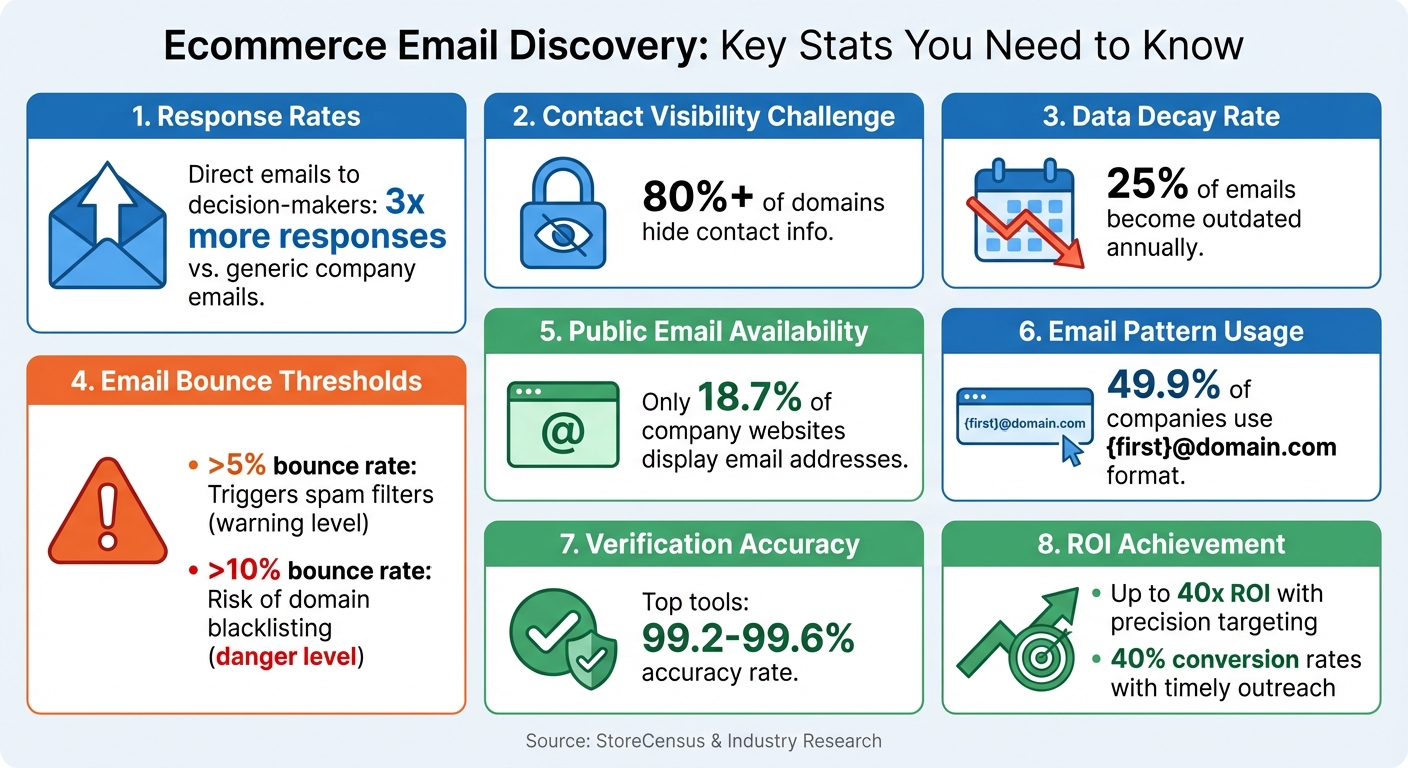
- Why It's Important: Direct emails to decision-makers (like founders or CMOs) get 3x more responses than generic company emails.
- Challenges: Over 80% of domains hide their contact info, and 25% of emails become outdated annually.
- Solutions: Use tools like StoreCensus for accurate, updated contacts or manual techniques like email pattern guessing and LinkedIn searches.
- Verification Matters: Always verify emails to avoid bounce rates over 5%, which can harm your sender reputation.
Key Statistics for Finding and Verifying Ecommerce Store Emails
How to find ecommerce company owner's emails and phone numbers
How to Use StoreCensus for Email Discovery
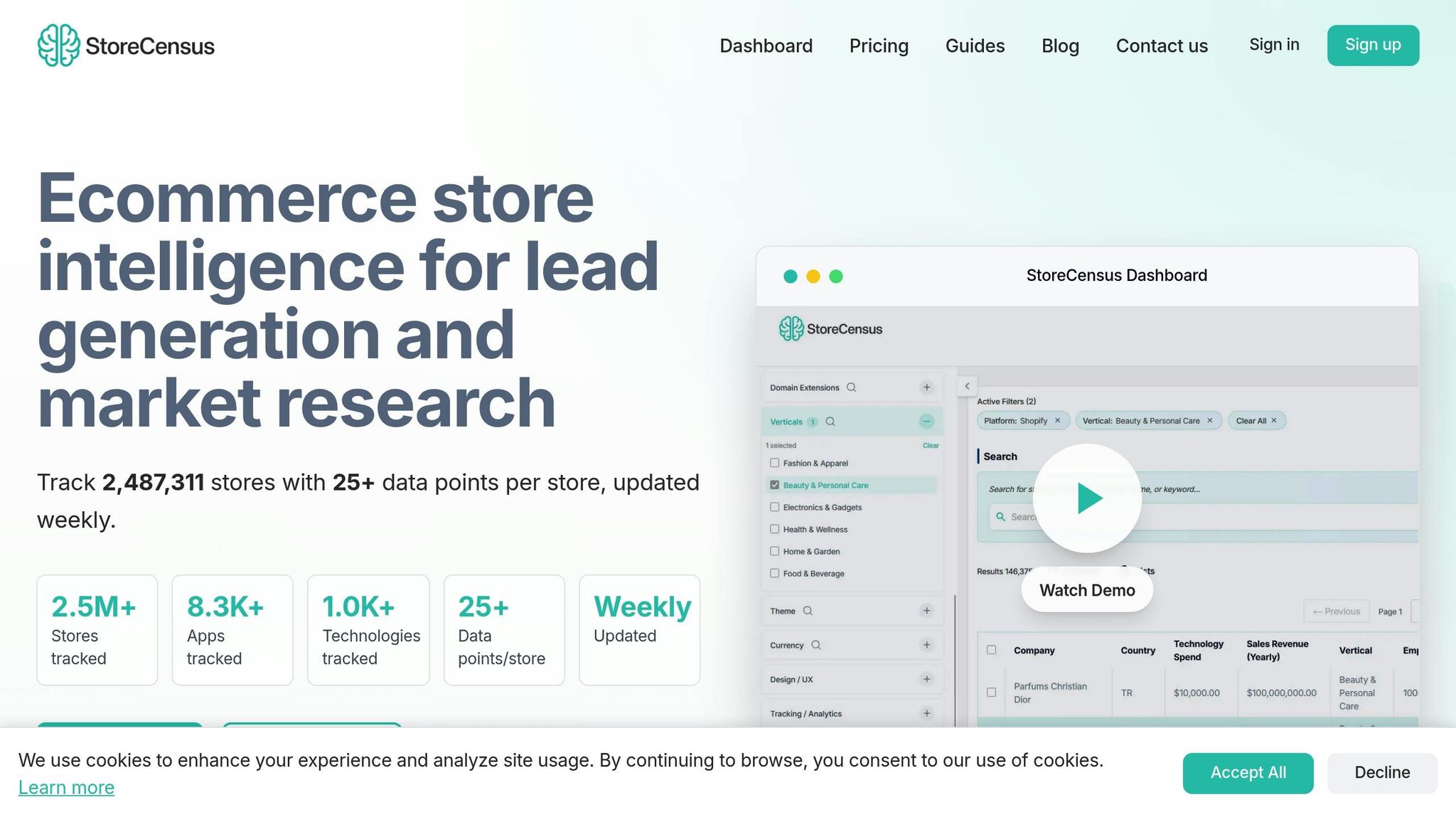
StoreCensus saves you from the hassle of manual research by providing verified contact details for over 2.5 million stores. Instead of spending hours guessing email formats or combing through data, you can create targeted lists in just minutes using its filters and real-time data updated weekly. Here’s how you can refine and export these lists effectively.
Filter Stores by Platform, Tech Stack, and Activity
Start with StoreCensus's powerful filtering system. You can narrow down stores based on platform (like Shopify, WooCommerce, or BigCommerce), apps (such as Klaviyo, ReCharge, or Yotpo), and activity signals like recent theme updates, new app installations, or product catalog growth. These filters help you zero in on stores that align with your ideal customer profile.
One standout feature is activity-based targeting. For example, users have reported achieving a 40x ROI by leveraging these filters for highly precise targeting.
"StoreCensus's installed-app filters let us zero in on high-potential prospects in a fraction of the time. It's become our go-to tool for precision targeting." - Noopur, Co-founder, Skailama
Export Verified Email Lists
Once you've filtered your target stores, use the Decision Maker Finder to pinpoint specific roles like Founders, CMOs, or Marketing Directors. This feature is not only effective but also costs half as much as using Apollo directly.
When your list is ready, click "Export CSV" to download it. The exported file includes brand names, verified email addresses, and LinkedIn profiles. If you're planning cold email campaigns, a pro tip is to avoid including links in your first email to keep deliverability rates high.
"I found 3 high-value Shopify stores needing my exact services in my first day. Landed a $5,000 project after just 10 outreach emails." - Tim K., Founder, Digital Marketing Agency
Monitor Stores for Updated Contact Information
StoreCensus performs daily crawls to capture updates like new app installations, uninstalls, or changes in social profiles. The entire database of over 2.5 million stores is refreshed weekly, ensuring the contact details stay accurate. You can even set up Evergreen Automations to get notified when a store's data changes - like moving into a higher revenue bracket or adding new marketing tools.
These automations help you act quickly. For example, you can use the API or Zapier integration to automatically update your CRM whenever StoreCensus detects changes in a prospect's tech stack or contact information. This keeps your outreach lists fresh without the need for manual updates. Plus, these updates feed directly into the email verification process, ensuring your campaigns are always based on the most current data.
Manual Methods for Finding Store Emails
While tools like StoreCensus simplify the process of finding emails, there’s still value in manual methods for verification and additional research. If you prefer a more hands-on approach or need to double-check information, manual investigation can be highly effective. Interestingly, about 18.7% of company websites publicly display at least one email address, making the store’s website a logical starting point.
"Before you fire up any tool, you should always manually look for the correct contact email yourself." - David Farkas, Founder, The Upper Ranks
Start by exploring the store’s website, focusing on contact pages or team bios.
Check Contact Pages and About Sections
The easiest way to locate contact details is to check the site’s header or footer for links like "Contact Us", "About Us", or "Our Team". If these aren’t readily visible, try manually entering common URL paths such as /pages/about, /pages/about-us, /pages/team, or /pages/leadership. Many ecommerce websites also have press or media pages that often include direct emails for PR representatives or founders.
For stores with blogs, clicking on an author’s name or photo might lead to a bio page with professional contact information. Another trick is subscribing to the store’s newsletter - sometimes, the welcome email includes a direct employee contact. If navigating the website feels tricky, you can use Google’s site search operator to find indexed contact pages. For example, search site:companydomain.com email or site:companydomain.com contact.
Identify Common Email Patterns
Once you’ve found one employee’s email - whether from a blog post, press release, or team page - you can often figure out the email pattern used across the organization. This is a helpful way to supplement both manual research and automated data from StoreCensus. For instance, nearly half (49.9%) of companies use the {first}@domain.com format (e.g., sarah@brand.com).
If you know a decision-maker’s name but not their exact email, you can generate common variations and verify them with tools like ZeroBounce or NeverBounce before reaching out. Keep in mind that generic addresses like info@ or hello@ are typically managed by teams, so they might not offer a personalized touch.
| Common Email Patterns | Example (Sarah Chen @ Brand) |
|---|---|
{first}@domain.com |
sarah@brand.com |
{first}.{last}@domain.com |
sarah.chen@brand.com |
{f}{last}@domain.com |
schen@brand.com |
{first}{last}@domain.com |
sarahchen@brand.com |
Advanced Email Discovery Techniques
When basic methods fall short, advanced strategies that tap into professional networks and technical tools can help you uncover the email addresses of key decision-makers. These approaches are especially effective when targeting high-value prospects at specific stores.
Use LinkedIn to Find Store Owners
LinkedIn is one of the best platforms for finding ecommerce decision-makers. Start by using advanced search filters with keywords like Founder, Owner, CEO, CMO, or Head of Growth, paired with terms such as Shopify, ecommerce, or DTC (Direct-to-Consumer). If you’re serious about narrowing your search, LinkedIn Sales Navigator (starting at $99 per month) is a powerful tool. It allows you to filter by company size - businesses with 11-50 employees are often ideal - and refine by location and industry, such as Retail or Consumer Goods.
If you can’t reach the founder, explore the company’s LinkedIn page and click "See all employees" to identify other key roles. Sometimes, contact details are tucked away in sections like "Contact Info", within profile bios, or even in banner images. To take it a step further, Chrome extensions like Datanyze (free 90-day trial), Skrapp, and Wiza (about $0.15 per lead) can extract and verify emails from LinkedIn profiles or Sales Navigator searches.
Another smart tactic is combining LinkedIn with the Facebook Ad Library. Use the Ad Library to spot brands actively running Shopify ads, then search for their owners or decision-makers on LinkedIn. This is a great way to focus on brands that are already investing in growth. Keep in mind, though, email databases degrade at a rate of about 25% annually, so sourcing emails in real time is crucial. Also, don’t just stop at contacting the founder - reaching out to two or three individuals within the same company can significantly boost your response rates.
Email Permutators and Validation Tools
If you have a decision-maker’s name but can’t find their email address, email permutators can save you time by generating likely variations of their email. Before you start, check the company’s email format by looking at other employees’ addresses - this helps you create accurate permutations.
Always validate permutated emails before sending any messages. Tools like ZeroBounce, NeverBounce, and Clearout can confirm whether an email address is valid. Avoid sending messages to "catch-all" addresses, as they often lead to high bounce rates. A bounce rate higher than 5% can trigger spam filters, while rates above 10% may even result in your domain being blacklisted.
"Only clean, validated data wins... a few bad addresses can tank deliverability, hurt your domain reputation, and send your messages straight to spam." - Marharyta Sevostianenko, SDR/SaaS Sales Expert
For systematic validation, tools like ZeroBounce and Generect offer accuracy rates of 99.5% to 99.6%. Given that email databases degrade by 25% to 30% annually, it’s a good practice to re-verify your lists every three to six months - or right before launching a new campaign if your list is more than 90 days old.
Up next, we’ll walk through multi-step processes for verifying email accuracy.
How to Verify Email Accuracy
Once you've gathered email addresses through tools or manual methods, the next critical step is verifying their accuracy. This helps protect your sender reputation and keeps your emails out of spam folders.
Use Multi-Step Validation Processes
Email verification typically involves four key checks: syntax accuracy, domain existence, MX lookup (to confirm active mail servers), and SMTP ping (to simulate sending and confirm the mailbox can receive messages). These steps classify emails into three categories:
- Valid: Safe to send.
- Accept-all/Catch-all: Risky because the domain accepts all emails, even if specific inboxes don’t exist.
- Invalid: Likely to bounce.
"Email verification checks whether an address exists and can receive emails before you send. It helps you avoid bounces, spam traps, and risky mailboxes that damage sender reputation." - Hunter.io
To protect your campaigns, only send to emails marked as "Valid." Remove "Invalid" addresses immediately, and approach "Catch-all" results with caution - they're unpredictable and can harm deliverability. Tools like ZeroBounce boast a 99.6% accuracy rate, while Clearout and QuickEmailVerification report 99% accuracy. If you're on a budget, QuickEmailVerification offers 3,000 free checks per month with credits that never expire. For larger campaigns, AbstractAPI starts at about $17/month after 100 free validations.
It’s crucial to verify emails before your first outreach - not after bounce-backs start piling up. If you’re using StoreCensus, which provides a 99.2% accuracy rate across its ecommerce intelligence platform, you already have a solid starting point. Still, adding a verification layer before launching campaigns will further safeguard your sender reputation.
Once your emails are verified, the next challenge is keeping your data fresh and accurate.
Maintain Clean and Updated Datasets
Even with verified emails, keeping your contact lists updated is essential for consistent deliverability. Roughly 25% of email addresses become outdated each year due to job changes, company closures, or updates. This means an email that worked three months ago might bounce today, making regular list cleaning a must.
Re-verify your lead lists every three to six months to account for this natural decay. If you're a StoreCensus user, the platform’s daily crawls and weekly updates track changes like tech stack adjustments, revenue shifts, and social presence updates. Setting up real-time alerts for significant changes - like when a competitor’s app is uninstalled - can give you a timely edge, with conversion rates reaching up to 40% when you act immediately.
To save on verification costs, filter out inactive or unengaged contacts before running bulk checks. You can also integrate verification APIs directly into your CRM using tools like Zapier. This automates the process, verifying new leads as soon as they’re captured. By verifying at the point of capture, you prevent bad data from entering your system, ensuring your datasets stay clean from day one.
Conclusion
Finding ecommerce store emails becomes much simpler when you blend automated tools with manual research. Start by narrowing down stores using factors like their tech stack, revenue, and activity signals to create a focused list. Then, dig deeper with manual tactics such as LinkedIn searches or reviewing contact pages to pinpoint the right decision-makers. This combination provides the perfect balance of scale and precision - something neither method can achieve on its own.
Keeping your data clean is critical. About 25% of email databases degrade every year, and bounce rates exceeding 5% can trigger spam filters. Regular email verification protects your sender reputation and ensures your messages actually land where they’re meant to.
Timing is everything when it comes to outreach. By acting on intent signals, you can significantly improve conversion rates. For instance, StoreCensus users who track competitor app uninstalls or theme changes have reported conversion rates as high as 40% by reaching out when stores are actively focused on growth. This strategy turns cold outreach into meaningful, well-timed conversations.
"We stopped guessing and started targeting stores based on niche, app usage stage, and real growth signals. Our install rates jumped." – Aditya Singh, Founder, Oxify
Focus on quality over quantity. Targeting the right person - like a founder, CMO, or ecommerce manager - leads to responses three times more often than sending emails to generic "info@" addresses. Use the STAMP framework to evaluate leads based on traffic levels and missing apps before diving into deeper research. And always ensure you're sending emails marked as "Valid" to maintain deliverability. By combining these strategies with strict verification processes, you’ll build a strong, high-performing outreach system. Keep these methods in play to ensure your efforts remain sharp and effective.
FAQs
How can I make sure the emails I find are valid and won't bounce?
To make sure the emails you gather are valid and won’t bounce back, it’s smart to use an email verification tool. These tools check if an email address is correctly formatted, active, and able to receive messages.
You can either upload your entire email list or manually enter addresses into the verification service. The tool will run checks like syntax validation, domain verification, and server confirmation. This helps reduce the chances of bounces. Regularly verifying and cleaning your email list not only improves deliverability but also safeguards your sender reputation.
By taking these precautions, your outreach efforts become more efficient, and you’re less likely to deal with undelivered emails.
What are the advantages of using automated tools instead of manual methods to find ecommerce store emails?
Using automated tools to find ecommerce store emails can save you a ton of time and effort compared to doing it manually. Platforms like StoreCensus give you quick access to accurate, up-to-date contact details for millions of ecommerce stores. Instead of painstakingly searching through websites or directories, these tools handle the heavy lifting for you. Plus, with features like advanced filtering and bulk exports, you can easily create highly targeted lead lists on a large scale.
On the other hand, manual methods - like browsing individual store websites or trying to guess email formats - are not only time-consuming but also prone to errors. They become especially inefficient when dealing with large datasets. Automation steps in to streamline the process, delivering better-quality data and boosting the success rate of your outreach efforts. This way, you can spend less time on tedious research and focus more on building meaningful connections.
How can I effectively reach decision-makers using email discovery tools?
To reach decision-makers effectively, consider using email discovery tools that provide precise and current contact details. For example, platforms like StoreCensus give you access to comprehensive data on ecommerce stores, including contact information for key decision-makers. These tools also include advanced filtering options, allowing you to narrow your search based on criteria like revenue, location, or social activity. This ensures your outreach is directed at the most relevant prospects.
By relying on tools that focus on verified email discovery, you can boost the accuracy of your contact lists. This precision allows you to craft tailored, meaningful emails, which can significantly improve engagement and drive better results from your outreach campaigns.