Best Ways to Enrich CRM Data with Store Intelligence
Add store intelligence to your CRM to enrich records with revenue, traffic, tech stack and decision-maker contacts, automate updates, and improve targeting.


Your CRM likely holds basic information like names and emails, but that’s far from enough. By integrating store intelligence, you can enhance your CRM with actionable insights like store attributes, revenue data, and decision-maker contacts. This enables smarter targeting, personalized outreach, and higher conversion rates.
Why it matters:
- Companies using enriched CRM data see up to 29% higher sales.
- Poor CRM data costs 44% of businesses over 10% of annual revenue.
- Data decays at 2.1% per month, making regular updates critical.
Key strategies:
- Use advanced filters to find target stores based on revenue, inventory, or tech stack.
- Gather detailed metrics like revenue, traffic, and tech stack for tailored pitches.
- Automate updates to keep CRM data accurate and current.
- Add decision-maker contacts for direct, personalized outreach.
Platforms like StoreCensus simplify this process with tools for filtering, enrichment, and automation. Accurate data transforms your CRM into a tool for better segmentation and higher-quality leads.
Why Add Store Intelligence to Your CRM
Relying solely on basic CRM records just doesn’t cut it anymore. By integrating store intelligence into your CRM, you give your team the insights they need to separate high-potential buyers from leads that are unlikely to convert. The result? Fewer wasted calls, more meaningful conversations, and, ultimately, more deals closed. This added layer of context sets the stage for the financial and operational benefits outlined below.
Here’s a staggering fact: chasing low-fit leads can cost businesses 12–15% of their annual revenue. On the flip side, CRMs enriched with accurate, actionable data have been shown to increase revenue by as much as 66%. The difference is stark - guessing who your prospects are (or manually building Shopify brand prospect lists) versus knowing exactly where they belong in your sales pipeline.
Store intelligence also transforms how you segment and personalize your outreach. Instead of sending out generic email blasts, imagine referencing a prospect’s specific tech stack, recent funding milestones, or key challenges. Marketers who take this personalized approach report an average 20% boost in sales. With detailed firmographic, technographic, and behavioral data, you can craft segments based on real indicators like purchase history, software compatibility, or active buying signals - not just broad categories like job titles or company names.
Timing is another game-changer. Store intelligence provides timely updates - like new hires, recent platform adoptions, or funding announcements - so you can reach out when prospects are most likely to engage. This approach can help counteract the notoriously low 8.5% response rate of cold emails.
Finally, store intelligence keeps your CRM fresh and accurate, addressing the inevitable 2.1% monthly data decay rate. Regular enrichment ensures your team isn’t wasting time chasing outdated records, calling disconnected numbers, or contacting people who’ve moved on. With up-to-date information, your outreach connects with the right people at the right companies, making every interaction count.
How to Enrich CRM Data with Store Intelligence
Enriching your CRM with store intelligence involves a structured approach. It starts with identifying the right stores, gathering critical metrics, and automating updates to keep your team equipped with actionable insights. Here's how to do it effectively.
Find Target Stores Using Advanced Filters
The first step is accessing a detailed database that tracks ecommerce stores on a large scale. For instance, StoreCensus monitors over 2.5 million stores, offering more than 25 data points per store, updated weekly with a 99.2% accuracy rate.
Use advanced filters to zero in on your ideal prospects. Instead of casting a wide net, combine multiple criteria to create highly focused segments. For example, if you sell inventory management software, you could filter for "Fashion retailers in North America with 50+ products and $100,000+ monthly revenue." This level of targeting has been shown to deliver a 40x ROI compared to non-segmented outreach.
Key filters include options for tech stack (like installed apps and themes), revenue ranges, geographic location, product catalog size, and social media presence. You can also track intent signals, such as when a store removes a competitor's app - an indicator they’re exploring alternatives. Automations triggered by these signals have achieved a 40% conversion rate.
StoreCensus even offers three free credits to test these filters before you commit.
Once you’ve identified your target stores, it’s time to dive deeper into their data.
Collect Key Store Data Points
After narrowing down your targets, gather the metrics that will inform your sales strategy. Focus on data like monthly and annual revenue estimates, inventory size (number of products), traffic metrics (visitor counts and cost-per-click data), and historical trends that reveal growth patterns.
These insights are invaluable for tailoring your approach. For example, logistics providers can assess operational needs, payment processors can customize pricing, and marketing agencies can identify areas where they can add value.
Beyond business metrics, technographic data is equally important. This includes details about the apps, themes, and integrations a store uses. Knowing their tech stack helps you identify gaps your solution can fill. Additionally, historical snapshots of this data can help you spot trends and target industries before they become oversaturated.
With these metrics in place, the next step is ensuring your CRM stays updated in real time.
Set Up Automated Data Enrichment
Manually updating your CRM is not only tedious but also prone to errors. Automation eliminates these issues, keeping your CRM current without constant manual effort. Set up workflows that detect real-time changes - like updates to a store's tech stack or revenue shifts - and automatically update your CRM.
"When a store removes a competitor's app, they're actively shopping for alternatives. Your message arrives exactly when they need it most."
Another effective method is waterfall enrichment, which verifies data sequentially from prioritized sources. Before diving into automation, audit your CRM to identify missing fields, such as job titles or company size. Then, establish measurable goals - like improving lead scoring accuracy - to guide your setup.
StoreCensus offers starter plans with two automation flows, while higher-tier plans support up to 50 flows for enterprise teams.
Connect Store Data to Your CRM
Once you’ve enriched your data, sync it with your CRM using built-in tools, direct API connections, or middleware solutions like Zapier. For more advanced needs, Reverse ETL can help maintain a single, accurate data source.
To ensure consistency, implement field-level governance rules. Decide whether enriched data should overwrite existing entries or only fill in missing fields. Additionally, set match confidence thresholds so high-confidence data is automated, while lower-confidence matches are flagged for manual review.
Add Decision-Maker Contacts
Store intelligence becomes far more impactful when paired with decision-maker contact details. Instead of sending generic emails to catch-all addresses, you can reach the individuals who make purchasing decisions - like founders, ecommerce directors, or operations managers.
Combine store intelligence with verified contact information to target key stakeholders. Enrich records with emails and phone numbers to craft personalized messages, such as congratulating a store on reaching $500,000 in revenue.
Use this enriched data to create advanced segments for targeted campaigns. Instead of broad categories like "ecommerce managers", build precise segments such as "Shopify Plus stores in the beauty industry with 100+ products and 25%+ revenue growth in the last quarter." StoreCensus integrates with tools like Apollo and Instantly.ai, allowing you to push these enriched contact lists directly into your outbound sequences.
How to Maintain Accurate CRM Data
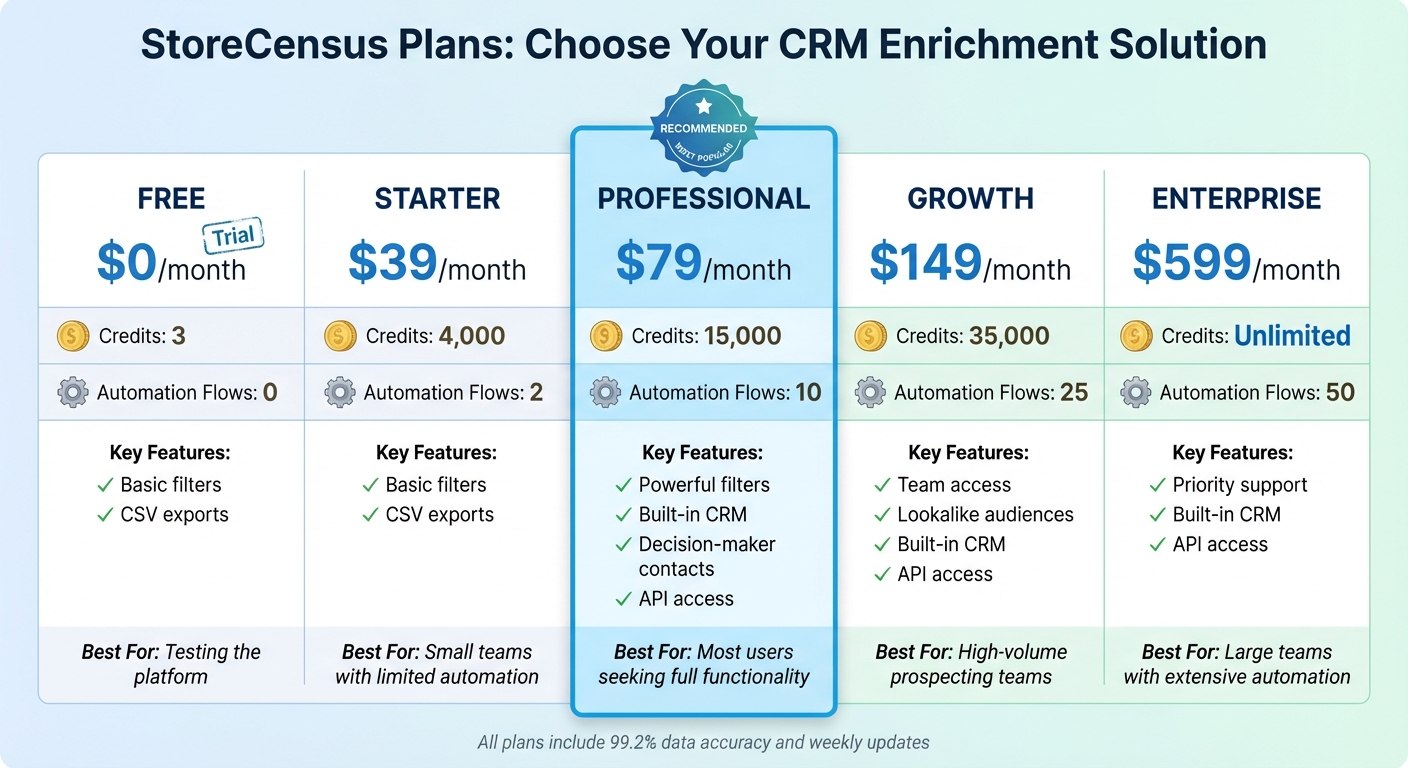
StoreCensus Pricing Plans Comparison for CRM Data Enrichment
Adding data to your CRM is just the beginning. Without ongoing care, that data can quickly become outdated. In fact, CRM data tends to decay at a rate of about 2% per month, leading to an annual decay of 22.5%. This decline in data quality isn’t just inconvenient - it’s costly, with companies losing over 10% of their revenue due to poor data quality.
To keep your CRM data fresh and reliable, you need a combination of regular audits and automated monitoring. Start by scheduling quarterly health checks to catch inaccuracies, duplicates, and outdated information. Between these audits, use real-time automation to update invalid information. For instance, workflows can be set up to automatically verify email addresses and phone numbers.
Another effective strategy is to use trigger-based updates for store intelligence. Tie your data enrichment efforts to key business events like store openings, product launches, or mergers and acquisitions. These events often signal shifts that could impact your sales strategies. By embedding enrichment processes directly into your workflows, you ensure your data stays accurate at every customer interaction.
Regular data cleansing is also crucial. This includes removing duplicate records, fixing typos, and deleting irrelevant entries before adding new data. Set standards for data completeness to ensure all records include essential details like contact information and store locations. For added accuracy, validate store addresses and postal codes against official databases during data entry.
To make these updates seamless, selecting the right StoreCensus plan is key.
Select the Right StoreCensus Plan
Maintaining accurate data requires a plan that matches your needs for credits and automation. Here’s a breakdown of StoreCensus plans:
| Plan | Price | Credits | Automation Flows | Key Features | Best For |
|---|---|---|---|---|---|
| Free | $0/month | 3 | 0 | Basic filters, CSV exports | Testing the platform |
| Starter | $39/month | 4,000 | 2 | Basic filters, CSV exports | Small teams with limited automation |
| Professional | $79/month | 15,000 | 10 | Powerful filters, built-in CRM, decision-maker contacts, API access | Most users seeking full functionality |
| Growth | $149/month | 35,000 | 25 | Team access, lookalike audiences, built-in CRM, API access | High-volume prospecting teams |
| Enterprise | $599/month | Unlimited | 50 | Priority support, built-in CRM, API access | Large teams with extensive automation |
If you’re just getting started, the Professional plan is a solid choice. It offers 15,000 credits and 10 automation flows, which is plenty for managing enriched data across hundreds of target accounts. For teams juggling multiple campaigns or larger databases, the Growth plan provides 35,000 credits and 25 automation flows - perfect for high-volume prospecting. And for large-scale operations with constant enrichment needs, the Enterprise plan offers unlimited credits and 50 automation flows, ensuring your workflows never hit a limit.
Conclusion
Say goodbye to incomplete or outdated records and hello to detailed store profiles packed with valuable insights - like tech stack information, revenue estimates, and key decision-maker contacts. This level of detail empowers your sales team to zero in on high-value prospects and create personalized pitches that truly connect. In fact, using CRM data effectively can increase sales by up to 29%, while poor-quality data can drain over 10% of your annual revenue.
By following the steps outlined earlier, automated workflows ensure your data stays accurate and up-to-date. StoreCensus simplifies this process with workflows that activate whenever stores show buying intent. Plus, with integrations to over 5,000 apps via Zapier and direct connections to Apollo and Instantly.ai, the platform keeps everything running smoothly. With a 99.2% data accuracy rate and weekly updates to counter the typical 2% monthly data decay most CRMs face, StoreCensus ensures you’re always working with reliable information.
Thanks to features like 20+ search filters, real-time monitoring, and trigger-based automation, you can connect with prospects at just the right time with the right message. Whether you're a small team on the Professional plan or managing enterprise-level operations with unlimited credits, StoreCensus equips you with the insights to turn your CRM into a powerful tool for targeted outreach.
FAQs
How can store intelligence improve CRM data?
Store intelligence takes CRM data to the next level by turning simple contact records into rich, detailed profiles. By weaving in store-specific insights - like sales trends, product preferences, and customer behaviors - you can patch up missing details, refresh outdated information, and dramatically improve data reliability.
This enhanced data means your CRM can now include things like purchase history, favorite products, average order value (in USD), and how often customers buy. Armed with this information, sales and marketing teams can better segment their audience, focus on high-value leads, and tailor their outreach. For instance, they might suggest complementary products based on a customer's recent purchases. These deeper insights pave the way for more meaningful communication, smarter lead targeting, and a more efficient sales pipeline - all of which contribute to higher conversion rates and better sales performance.
What are the main advantages of automating CRM data updates?
Automating CRM data updates turns your database into a dependable, always-current resource. By eliminating the need for manual data entry, automation cuts down on errors like typos, duplicate entries, and outdated records. This ensures your data stays accurate and consistent across all the tools your sales, marketing, and reporting teams rely on.
With real-time updates, any new leads, customer interactions, or order changes are instantly reflected in your CRM. This means your team always has access to the most up-to-date customer information, helping them make quicker and more informed decisions. On top of that, automation saves your sales and marketing teams valuable time, allowing them to concentrate on what matters most - building strong relationships and driving revenue.
Automating CRM updates offers three standout advantages: better data accuracy, real-time insights for smarter decisions, and time savings that contribute to revenue growth.
What’s the best way to keep CRM data accurate and up-to-date over time?
Keeping your CRM data accurate and up-to-date takes consistent effort and smart use of automation. Start by using tools designed to clean and standardize incoming data before it even enters your system. These tools can verify addresses, eliminate duplicates, and ensure consistent formatting across the board. Once your data is in the CRM, set up regular updates - like nightly or weekly syncs - to bring in the latest sales figures, product details, and customer insights from your ecommerce platform.
For long-term accuracy, validation methods like fuzzy matching can help catch errors or outdated information. Make it a habit to review data health reports regularly to spot missing fields or unusual entries. You can also set up anomaly detection to flag potential issues, such as unexpected drops in customer activity. To keep things organized, assign specific teams the responsibility of maintaining data and establish clear policies for how often critical information should be refreshed.
Take it a step further by integrating data enrichment directly into your CRM’s automation workflows. This way, processes like lead scoring, segmentation, and outreach will always rely on the most current information. By doing so, your business can deliver more personalized experiences and make better, data-driven decisions.