Top 5 Database Encryption Practices for Shopify Stores
Five essential encryption steps for Shopify stores: AES-256 at rest, TLS in transit, key management, data masking, and field-level encryption.

Your Shopify store holds sensitive customer data - like payment details and contact information - that needs protection. Encryption is a must to safeguard this data, comply with laws like GDPR and CCPA, and meet Shopify's security standards. Here are the five key practices you should follow:
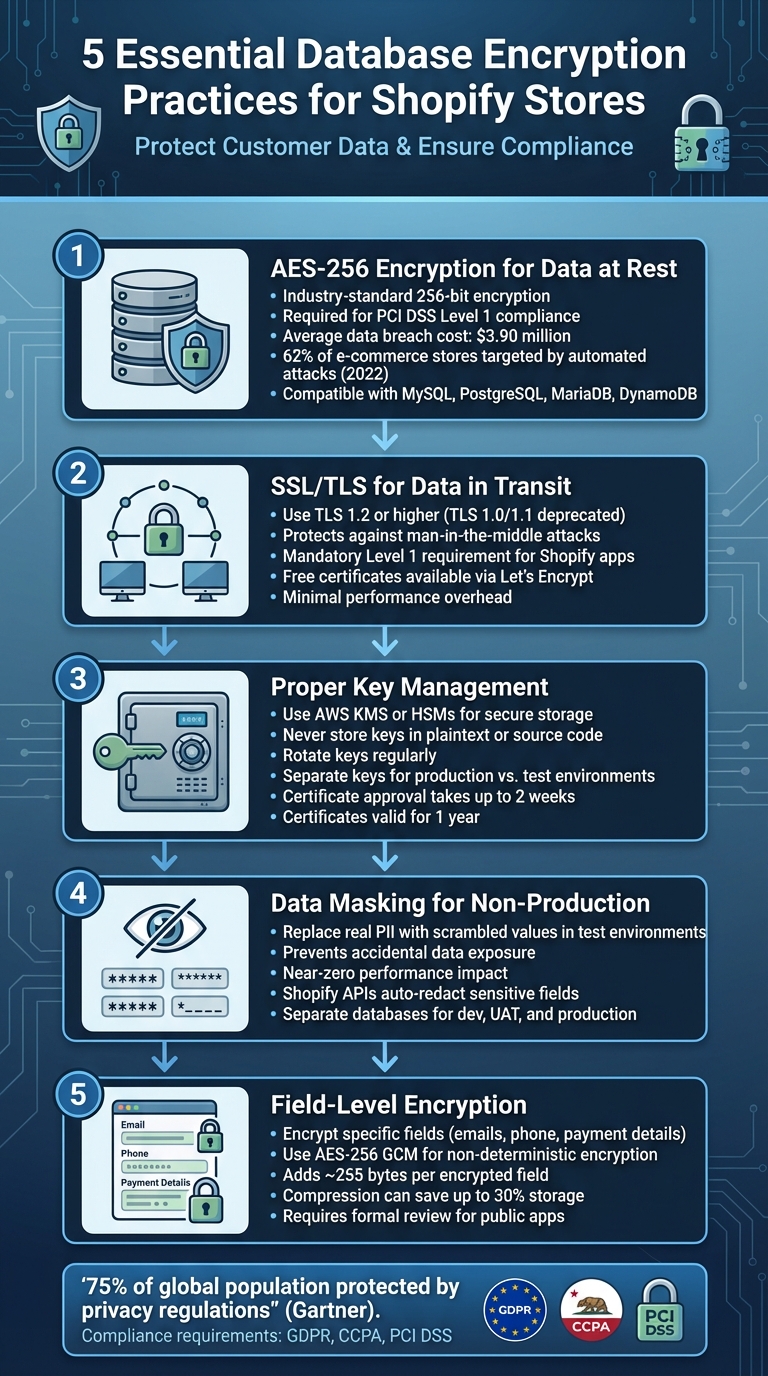
- AES-256 Encryption for Data at Rest: Use this industry-standard encryption to secure stored data. It’s efficient, integrates well with Shopify-compatible databases, and meets PCI DSS compliance requirements.
- SSL/TLS for Data in Transit: Protect customer data during transmission with TLS 1.2+ to prevent interception and ensure secure connections.
- Proper Key Management: Secure encryption keys using tools like AWS KMS or HSMs. Rotate keys regularly and store them separately from your database.
- Data Masking for Non-Production Environments: Replace sensitive data with scrambled values in test environments to prevent accidental exposure.
- Field-Level Encryption: Encrypt specific database fields, like emails and payment details, for added security in case of breaches.
Encryption ensures your store stays secure, builds customer trust, and avoids costly breaches or compliance issues.
5 Essential Database Encryption Practices for Shopify Stores
1. Use AES-256 Encryption for Data at Rest
AES-256, or Advanced Encryption Standard with a 256-bit key, is the trusted global standard for securing stored data. Developed by the National Institute of Standards and Technology (NIST), it’s relied upon by governments and enterprises worldwide for its robust protection. Shopify Plus, for example, uses AES-256 to keep customer data unreadable, even when stored in databases.
Security Strength
With its 256-bit key length, AES-256 offers a level of protection that’s practically impossible to crack. As a symmetric encryption algorithm, it uses the same key for both encrypting and decrypting data, ensuring efficiency when handling large volumes of information. This encryption is also necessary to meet PCI DSS Level 1 compliance, the highest security standard in e-commerce. Given that automated attacks targeted 62% of e-commerce stores in 2022, and a single data breach can cost an average of $3.90 million, robust encryption is more critical than ever.
Compatibility with Shopify Infrastructure

AES-256 integrates seamlessly with databases commonly used in Shopify apps, such as MySQL, PostgreSQL, MariaDB, and Amazon DynamoDB. Shopify mandates encryption at rest for apps managing "Protected Customer Data" (Level 1 Requirement #9). Additionally, major cloud providers like AWS support AES-256 natively in services like Amazon S3 and EFS, making it easy for developers to adopt without running into compatibility hurdles. This built-in support simplifies deployment, as we’ll explore further.
Ease of Implementation
Modern platforms make implementing AES-256 straightforward. Managed services like AWS Key Management Service (KMS) handle encryption without requiring developers to overhaul their application logic. For custom Shopify apps, store owners should verify that any external databases encrypt sensitive data using AES-256. Shopify also provides a free 256-bit SSL certificate to complement encryption for data at rest. By adopting AES-256, store owners not only protect their data but also align with Shopify’s high compliance standards.
"Creating an unbreakable algorithm is challenging - even for experts. What is hard is creating an algorithm that no one else can break, even after years of analysis." - James Hall, citing Schneier's Law
Performance Impact
AES-256 is designed to operate efficiently as a symmetric block cipher, minimizing computational strain. On modern CPUs with AES-NI (Advanced Encryption Standard New Instructions), cryptographic processing can be offloaded, further reducing latency. For custom implementations, it’s a good practice to rotate encryption keys regularly to reduce risks if credentials are ever compromised. The low overhead of AES-256 ensures that strong encryption doesn’t come at the cost of performance.
2. Enable SSL/TLS for Data in Transit
While AES-256 encryption secures data at rest, SSL/TLS protects data in transit across endpoints like checkout pages, login forms, and API calls. This ensures sensitive details - such as customer emails, addresses, and payment information - remain safe from threats like network eavesdropping or man-in-the-middle (MITM) attacks.
Security Strength
TLS does more than just encrypt data; it also authenticates your website, helping to establish trust with customers. This is especially critical for meeting Shopify’s strict certificate validation requirements. That little padlock symbol in the browser? It’s not just a visual cue - it’s a confidence booster during transactions. For apps handling sensitive customer data, encryption in transit is a mandatory Level 1 requirement.
"Encrypting data when stored and as it transits various networks helps to prevent bad actors from gaining access to it even if they have access to the application." - Shopify
It’s important to note that TLS 1.0 and 1.1 are no longer secure and have been deprecated. Modern security standards demand TLS 1.2 or higher to guard against known vulnerabilities. While many databases encrypt the initial connection handshake, the rest of the traffic often remains unprotected unless you explicitly configure TLS for the entire session. Fortunately, implementing TLS across your app is straightforward, as we’ll discuss below.
Compatibility with Shopify Infrastructure
Shopify apps must use certificates issued by trusted Certificate Authorities (CAs) - self-signed certificates simply won’t cut it. For payment apps, Shopify has additional requirements: asymmetric encryption certificates generated with the elliptic-curve algorithm (prime256v1), which are managed through the Partner Dashboard. These certificates are valid for one year, and the review process can take up to two weeks.
If your app accesses customer data through Shopify’s Admin or Customer Account APIs, TLS is non-negotiable - it’s a baseline security requirement.
Ease of Implementation
Getting started with TLS isn’t as complicated as it might seem. Let’s Encrypt offers free, automated TLS certificates that meet Shopify’s standards. Once installed, you can use tools like SSL Checker to confirm your certificate is properly configured on your app’s hostname. If your app is hosted on AWS, the AWS Certificate Manager provides free certificates for services like Elastic Load Balancing and API Gateway.
For payment apps, careful planning is essential for certificate renewal. Since approval can take over two weeks, you’ll want to start the renewal process well before your certificate’s one-year expiration date to avoid disruptions in payment processing. Shopify also recommends maintaining more than one valid certificate at all times.
Performance Impact
Worried about performance? Don’t be. When properly configured, TLS encryption adds only minimal overhead. To keep things running smoothly, use TLS 1.2 or higher along with modern ciphers like AES-GCM or ChaCha20. These ciphers are optimized for both speed and security. You can also reduce server strain by offloading TLS to your CDN or load balancer.
"By using TLS/SSL for all your connections, even the connection from your application server to your CDN (if you use one) is a surefire way to improve security and protect PII from tampering and logging." - James Hall, Shopify Partners Blog
The added protection far outweighs the slight performance trade-offs, making TLS a no-brainer for securing your app.
3. Set Up Proper Key Management
Managing encryption keys effectively is crucial for maintaining data security in your Shopify store. Even the best encryption methods won't hold up if key management is weak. A compromised key can render your encryption useless, so having a detailed plan for generating, distributing, storing, rotating, and eventually destroying keys is non-negotiable.
Security Strength
Avoid storing encryption keys in plaintext or embedding them in your source code. Instead, rely on secure solutions like cryptographic vaults, Hardware Security Modules (HSMs), or services such as AWS KMS. If you're building Shopify apps on Rails, you can use the bin/rails db:encryption:init command to generate secure 32-byte keys. These keys should be stored in encrypted credentials files like credentials.yml.enc and never be included in version control.
"A single key should be used for only one purpose (e.g., encryption, authentication, key wrapping, random number generation, or digital signatures)." - NIST/OWASP
To enhance security, use a Key Encryption Key (KEK) to encrypt individual data encryption keys. This approach simplifies key rotation and limits access. Adopt the principle of least privilege - only authorized personnel should have access to encryption keys, and access logs should be maintained to track interactions with sensitive material. It's also essential to separate encryption keys for production and test environments to minimize the risk of data leakage. These measures help balance security with operational efficiency.
Compatibility with Shopify Infrastructure
Key management practices must align with Shopify's infrastructure requirements to ensure smooth integration. For credit card payment apps, Shopify mandates generating a CSR using the prime256v1 elliptic-curve algorithm for certificate signing via the Partner Dashboard. These certificates are valid for one year, and the approval process can take up to two weeks.
"The private key that's used to generate ANY of your CSRs must be stored in a PCI compliant environment at all times." - Shopify
Plan your certificate rotation carefully. Shopify issues a warning 30 days before a certificate expires, giving you a window to renew it. If your certificate expires, your app will lose the ability to process payments.
| Certificate State | Description | Impact |
|---|---|---|
| Waiting for approval | Under review by Shopify (up to 2 weeks) | Cannot process payments yet |
| Usable | Approved and active | Fully compatible with Shopify payments |
| About to expire | 30 days or less remaining | High risk; initiate rotation immediately |
| Expired | Validity period has ended | App loses ability to process payments |
Performance Impact
While key management does introduce some overhead, it's manageable. During key rotations, systems may attempt to decrypt data using multiple keys in a sequence until the correct one is found. This trial-and-error process can slow things down. To avoid this, enable key references in Rails-based apps by setting config.active_record.encryption.store_key_references = true, allowing the system to fetch the correct key directly.
Another factor is storage overhead. Encryption metadata, such as initialization vectors and authentication tags, adds about 255 bytes per field. However, compression can help mitigate this - some systems achieve up to 30% storage savings for larger datasets. Transparent Data Encryption (TDE) typically results in only a 3% to 10% performance hit, making the trade-off for enhanced security well worth it.
4. Use Data Masking for Non-Production Environments
Using real customer data in non-production environments is a risky move you should avoid at all costs. Instead, rely on data masking, which replaces sensitive details like personally identifiable information (PII) with scrambled or redacted values. This approach minimizes the chance of accidental PII exposure and keeps your users' trust intact.
"One small mistake in this area [PII] can cost you the trust of your users, and damages the trust in the Shopify app ecosystem as a whole." – James Hall, Shopify Partner Blog
Security Strength
Data masking isn't just a precaution - it's an essential layer of defense. Even if something goes wrong in your development environment, like a misconfigured framework or a vulnerability such as XSS, real customer data stays safe. Shopify enforces strict rules to separate test and production data, ensuring PII remains protected. For instance, Shopify's Admin API and Customer Account API automatically redact sensitive customer fields (like name, email, and phone) unless your app has been explicitly approved to access them. Shopify even provides tools to help you integrate data masking into your development process seamlessly.
Compatibility with Shopify Infrastructure
Shopify takes compatibility seriously by offering built-in features to support data masking in test environments. For example, if you're building credit card payment apps, you can use test certificates instead of waiting up to two weeks for production certificate approval. Test certificates let you start development and testing right away. If you're working with Ruby on Rails apps, Shopify automatically filters encrypted attributes from logs, displaying them as "[FILTERED]" to prevent accidental leaks. Tools like console1984 can also help by restricting or auditing access to decrypted data in your app's console.
Ease of Implementation
To stick to best practices, always keep production and test data environments separate. Only request access to the specific customer data fields your app needs, and make sure your app can handle redacted data (returned as null) without breaking workflows. Maintaining separate databases and accounts for development, UAT, and production environments is also crucial. If you're using Rails, you can enable global filtering by setting config.active_record.encryption.add_to_filter_parameters to true, adding an extra layer of protection for sensitive data.
Performance Impact
The good news? Data masking has almost no impact on performance. It allows you to test encryption and security setups in a staging environment without risking a production failure. Just make sure your code is prepared to handle null values in redacted fields to keep everything running smoothly.
5. Add Field-Level Encryption in Custom Apps
Field-level encryption is a way to secure specific database fields, like customer emails, phone numbers, and payment details. This ensures that even in the event of a breach or unauthorized access, sensitive data remains protected.
Security Strength
To maximize security, use AES-256 GCM for non-deterministic encryption. This method ensures that the ciphertext is unique every time, making it resistant to cryptanalysis. Deterministic encryption, while less secure, might be necessary if you need to query encrypted fields (e.g., using WHERE clauses on emails).
"Non-deterministic encryption is recommended for all data unless you need to query by the encrypted attribute." – Ruby on Rails Guides
For apps handling credit card payments, Shopify requires asymmetric encryption using the prime256v1 elliptic-curve algorithm. This setup ensures that only your app can decrypt card data, using Shopify-signed certificates. Certificates are valid for one year, and the approval process can take over two weeks. To avoid disruptions, plan to rotate certificates at least 30 days before they expire.
"The private key that's used to generate ANY of your CSRs must be stored in a PCI compliant environment at all times." – Shopify Dev Docs
Compatibility with Shopify Infrastructure
Shopify supports field-level encryption through its "Protected Customer Data" framework, which is a key part of the Shopify tech stack for secure app development. Custom apps automatically get Level 1 and Level 2 data access, while public apps need to go through a formal review process. Before encrypting specific fields (like Name, Address, Email, or Phone), you’ll need to request access via the Partner Dashboard’s API access requests section. Without approval, these fields will return null in API responses.
For developers using Ruby on Rails, the built-in encrypts method in Active Record simplifies encryption and decryption. If your app relies on managed services like AWS KMS for DynamoDB, Shopify’s Level 1 encryption requirements for data at rest are already met. Additionally, Rails filters encrypted attributes from logs, replacing them with "[FILTERED]" to prevent accidental exposure.
Ease of Implementation
Adding field-level encryption does require some planning, particularly around database changes. Encrypted fields take up more space - Active Record, for example, adds about 255 bytes per field. Be sure to adjust column sizes accordingly.
Keep encryption keys separate from the database. Use secure storage methods like environment variables or secret management systems, and never hardcode keys. Implement key rotation by encrypting with the latest key while retaining older keys for decryption. For larger data sets, enabling compression (e.g., Zlib) can reduce storage needs by up to 30%.
Performance concerns should also be addressed during implementation. With proper planning, even processes like key rotation can remain efficient.
Performance Impact
Field-level encryption introduces more performance overhead compared to encrypting an entire database. Each encrypted field requires application-level processing, which can slow things down. During key rotation, performance may suffer if the system has to test multiple keys to decrypt data. To avoid this, include "key references" in the encrypted payload. These references point directly to the correct encryption key, eliminating the need for trial-and-error decryption.
While this method may impact performance, its granular protection of sensitive data makes it worthwhile. Field-level encryption works alongside other security measures to strengthen your Shopify store’s data protection and regulatory compliance.
Conclusion
Database encryption plays a critical role in safeguarding customer data and staying compliant with regulations like GDPR, CCPA, and PCI DSS. As cyber threats grow more sophisticated, adopting these practices is not just about meeting legal requirements - it’s about strengthening your overall security posture.
The five strategies discussed earlier work together to create a robust, layered defense. AES-256 encryption protects data at rest, SSL/TLS protocols secure data during transmission, proper key management blocks unauthorized access, data masking shields non-production environments, and field-level encryption ensures granular security for sensitive information. These measures demonstrate responsible data handling, foster customer trust, and reinforce compliance efforts. According to Gartner, 75% of the global population now benefits from privacy regulations protecting their personal data.
"Ensuring great app security not only earns you the trust of your customers, it also greatly increases the long term chances of success for your business." – James Hall, Shopify App Development
Failing to prioritize encryption can lead to fines, damage to your reputation, and interruptions in payment processing. By adopting these practices, you’re not just adhering to compliance - you’re protecting your business and building a foundation of trust with your customers.
FAQs
What Shopify data should be encrypted first?
To protect sensitive information, make sure to encrypt customer personal data, payment details, and store information - both when it's stored and while it's being transmitted. Implement protocols like TLS (Transport Layer Security) and rely on industry-standard encryption algorithms to maintain security and meet compliance requirements.
What’s the easiest way to manage and rotate encryption keys?
Managing and rotating encryption keys effectively starts with a well-organized key management process. This process involves key generation, distribution, rotation, and secure storage. By automating key rotation schedules, you can significantly lower the chances of human error and help mitigate potential risks.
For stronger security, you might want to use dedicated key management systems or hardware security modules (HSMs). These tools streamline key handling and ensure every stage of the key lifecycle is managed properly, including the secure destruction of keys when they’re no longer in use.
How can I keep encrypted data searchable without weakening security?
To make encrypted data searchable without compromising its security too much, you can use methods like data masking or specialized encryption techniques such as searchable encryption. These methods strike a balance by enabling searches on encrypted data while keeping potential security risks as low as possible.