API Integration for CRM Data Enrichment
Enrich CRM leads automatically with real-time ecommerce data, verified contacts, activity signals, and webhooks to improve scoring, routing, and outreach.

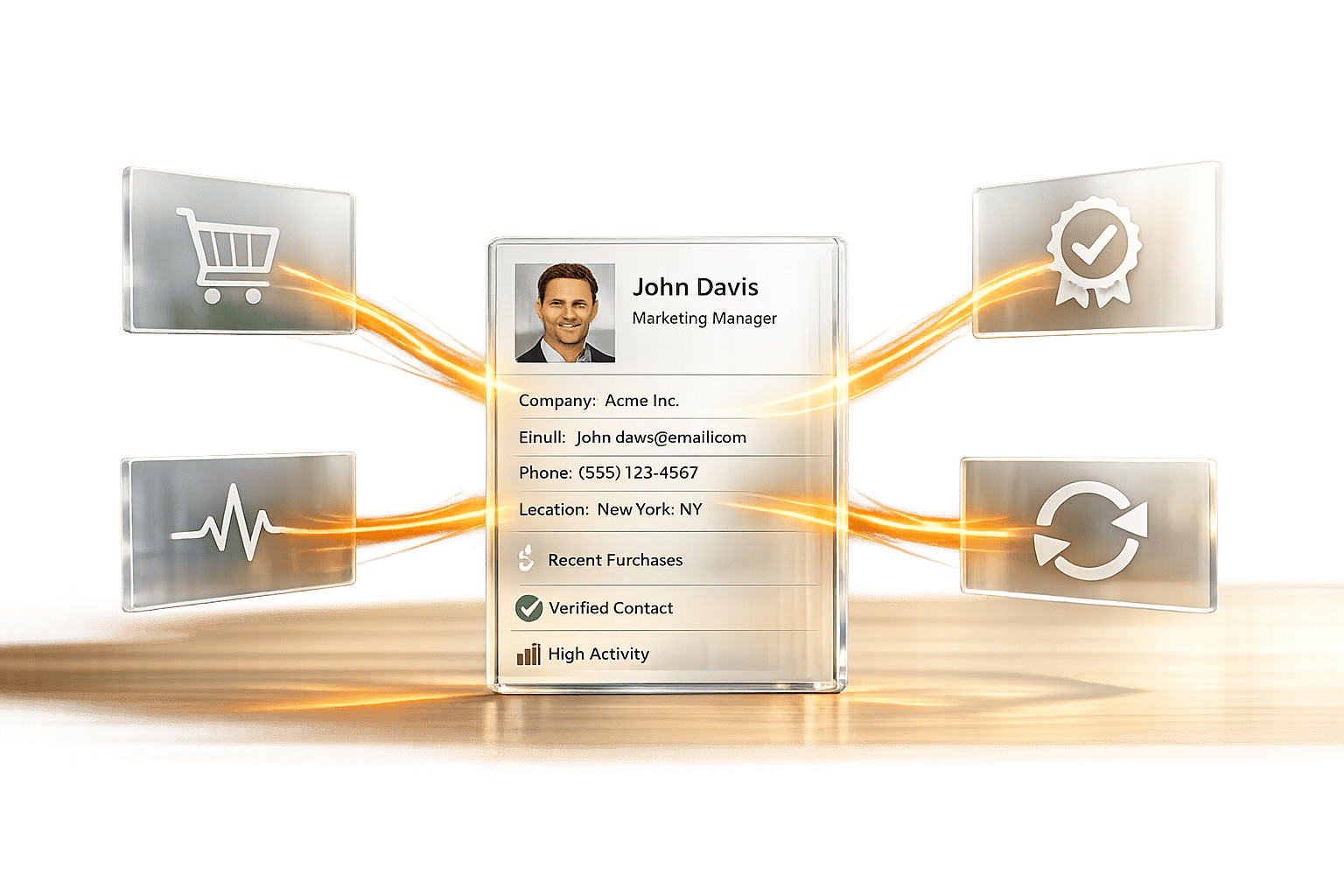
Want to save time and close more deals? API integration can automatically enrich your CRM with detailed data - like tech stacks, revenue, and installed apps - right when a lead enters your system. This eliminates manual data entry, improves lead prioritization, and enables timely, data-driven outreach.
Key Benefits:
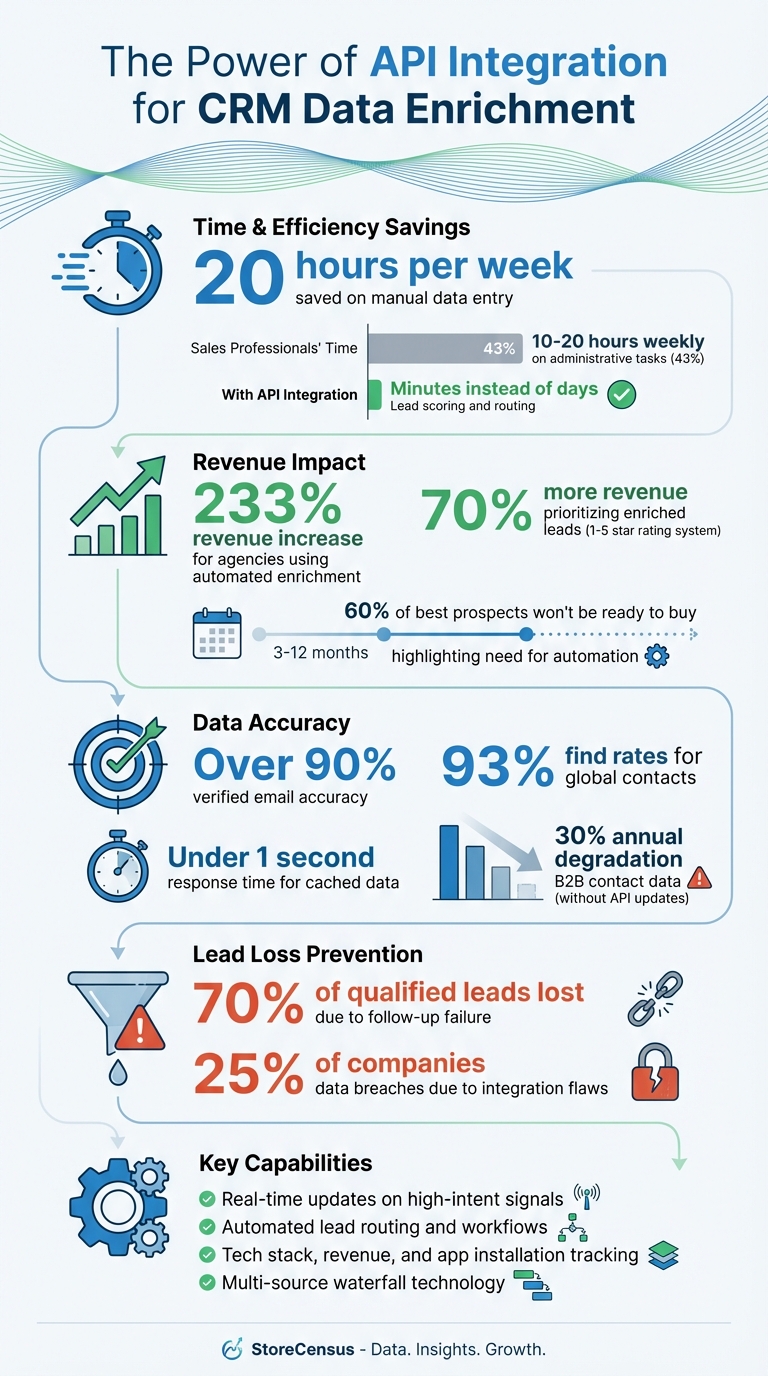
- Save Time: Sales teams lose up to 20 hours weekly on manual data entry.
- Boost Revenue: Prioritizing enriched leads can increase revenue by 70%.
- Actionable Insights: APIs deliver real-time updates on high-intent signals like traffic spikes or app installations.
- Automated Workflows: Route leads instantly and trigger follow-ups based on specific buyer behaviors.
With tools like StoreCensus, you can connect APIs to CRMs like Salesforce or HubSpot for instant lead enrichment. This ensures you’re always working with accurate, current data and targeting the right prospects at the right time. Let’s dive into how it works.
API Integration Impact on CRM Performance and Sales Efficiency
How To API Leads Into Your Clients CRM 🤓
How API Integration Improves CRM Performance
API integration transforms your CRM into a powerhouse by funneling in ecommerce-specific data - like tech stacks, revenue estimates, installed apps, and growth indicators - as soon as a lead enters your system.
And the results speak volumes. Sales teams leveraging enriched data to prioritize leads using a 1–5 star rating system see 70% more revenue from the same outreach efforts compared to treating all leads equally. The magic isn't in finding more leads - it’s about identifying the ones that matter most and knowing the perfect moment to reach out.
Better Lead Qualification and Targeting
APIs deliver firmographic and technographic data that automatically scores leads against your Ideal Customer Profile (ICP). For instance, when a store URL enters your CRM, the API instantly fetches details like estimated monthly revenue, employee count, platform type, and installed apps. This means you can assign a qualification score without lifting a finger.
This opens the door to micro-niche targeting using a "Platform + Revenue + Industry + Problem" framework. Imagine identifying beauty brands on Shopify generating $1M–$5M annually that use ReCharge but don’t yet have Klaviyo. That’s precision targeting.
Modern APIs use a waterfall architecture, querying multiple data sources in sequence to ensure high match rates. If an email lookup comes up short, the system switches to domain-based or approximate matching to fill in the gaps. This process not only boosts profile accuracy but also enables timely outreach based on high-intent signals. APIs can monitor changes like product counts, traffic spikes, or new app installations, helping you act on opportunities when they’re fresh. If a store installs a competitor’s app or sees a sudden traffic surge, that’s your cue - not months later when the moment has passed.
Automated Sales Workflows
API-enriched data powers automated workflows that eliminate the need for manual intervention. When a lead enters your CRM, systems can instantly assign it to the right territory manager based on location or industry data. No delays, no manual routing.
Signal-based triggers take automation to the next level. Workflows can activate when specific buyer signals appear: a company installs a competitor’s app, secures funding, or changes its headcount. For example, if a store’s contract is set to expire in two weeks, your CRM can automatically send a follow-up message like, "Your contract ends soon. Ready to explore alternatives?" These aren’t generic drip campaigns - they’re targeted, timely outreach tied to real business events.
This is especially crucial because 60% of your best prospects won’t be ready to buy for 3 to 12 months. Automated reminders tied to enriched data ensure you stay on their radar. The time savings are massive: 43% of sales professionals spend 10–20 hours per week on administrative tasks like manual data entry. By automating enrichment, leads are scored and routed in minutes instead of days.
More Accurate and Current Data
B2B data becomes outdated quickly. In the U.S., professionals change jobs every 3.9 years on average, making static databases unreliable almost immediately. APIs solve this by pulling fresh data in real time, rather than relying on quarterly updates.
For ecommerce leads, APIs track growth indicators that static lists completely miss - like tech stack changes, revenue shifts, traffic fluctuations, and app installations. These insights reveal whether a store is scaling up, stagnant, or declining - information a spreadsheet simply can’t provide.
Top-tier APIs deliver over 90% verified email accuracy and 93% find rates for global contacts using multi-source waterfall technology. Cached data responds in under a second, allowing you to qualify leads instantly when they submit a form.
APIs also maintain lead context - such as notes, tech stack history, and activity signals - throughout long sales cycles. Six months later, when you revisit a prospect, all the intelligence is still attached to their record, not buried in someone’s inbox.
"The average agency loses 70% of qualified leads not because of bad outreach, but because of catastrophic follow-up failure." – StoreCensus
These advancements in data accuracy and timeliness lay the groundwork for seamlessly integrating API solutions, which we’ll dive into next.
Getting Started with API Integration
Before diving into integration, it's important to have a few essentials ready. Setting these up beforehand can save you from unnecessary troubleshooting later.
What You Need Before Starting
First, make sure you have an active StoreCensus subscription. Only Professional and Enterprise plans offer API access - Free and Starter plans don’t include this feature.
Your CRM must also support API connections. Popular options like Salesforce, HubSpot, Pipedrive, and Zoho work seamlessly. If your CRM doesn’t natively support APIs, you can use middleware platforms like Zapier or Make to bridge the gap.
You’ll also need some initial identifiers, such as website domains or company names, to trigger enrichment. These data points in your CRM allow StoreCensus to pull in additional insights.
Depending on your technical expertise, you can either use a no-code tool for simpler workflows or involve a developer for customized, multi-step configurations.
Finally, secure your API credentials to get started with the integration process.
Getting Your StoreCensus API Credentials
To retrieve your API credentials, log in to your StoreCensus account and head to the API page in your dashboard. From there, generate your API key to obtain your Bearer Token.
This token is essential - it authenticates every request you send to StoreCensus. Always include it in the header of your API calls using this format:
Authorization: Bearer your.api.key
All requests should be directed to the base URL:
https://www.storecensus.com
It’s crucial to keep your API key secure. Avoid hardcoding it into public scripts or committing it to Git repositories. Instead, use environment variables or a secrets manager. This is particularly important, as 25% of companies experience data breaches due to integration flaws. Protecting your credentials is a key step in safeguarding your data.
Once your key is ready, you can start exploring the key endpoints.
Key API Endpoints to Know
StoreCensus provides several endpoints designed to streamline CRM enrichment workflows. Here’s a quick overview of the most commonly used ones:
| Endpoint | Method | Purpose |
|---|---|---|
/api/v1/website/{domain} |
GET | Fetch detailed information about a domain or lead ID |
/api/v1/stores |
POST | Discover and filter Shopify stores using over 100 criteria |
/api/v1/enrich |
POST | Retrieve verified emails and phone numbers for specific leads |
/api/v1/apps |
GET | Access details about active Shopify apps, including ratings and developer information |
The /api/v1/website/{domain} endpoint is particularly versatile. You can pass a store URL (e.g., "example.com") or a lead ID, and it returns detailed data such as the technology stack, revenue estimates, installed apps, and contact details. To optimize performance, use the sections query parameter (e.g., ?sections=basic_info,crm) to request only the data you need, reducing response time and payload size.
The /api/v1/stores endpoint is ideal for filtering and discovery. By sending a POST request with parameters like location, revenue range, or technology stack, you can generate lists of Shopify stores matching your criteria.
For retrieving verified contact details, the /api/v1/enrich endpoint is your go-to. It works on a "smart credit" system - 1 credit is used per lead when contact information is found. If you’ve already unlocked a lead, you can access it again without additional charges.
Finally, the /api/v1/apps endpoint (along with /api/v1/app-categories, as detailed in the API documentation) provides a directory of active Shopify apps and their categories. This is especially useful if you’re building tools that target businesses based on app usage.
Rate Limits:
Professional plans allow up to 6 requests per second, while Enterprise plans support 30 requests per second. If you exceed these limits, the API will return a "429 Too Many Requests" response, along with a "Retry-After" header indicating when you can resume. To handle this smoothly, implement exponential backoff in your code.
Step-by-Step Integration Guide
With your credentials and endpoints ready, it's time to connect StoreCensus to your CRM. This process starts with proper authentication and leads to setting up real-time updates.
Authenticating Your API Requests
Every interaction with the StoreCensus API requires authentication using a Bearer token. The request header must follow this format: Authorization: Bearer your.api.key. If the "Bearer" prefix is missing or the header is formatted incorrectly, you’ll encounter a 401 Unauthorized error.
For security, always store your API key in environment variables or a secrets manager - never hardcode it. If you suddenly start seeing 401 errors, it’s worth checking whether your account subscription is active, as inactive accounts also trigger authentication failures.
Here’s an example of a properly authenticated request to retrieve data for a specific domain:
curl -X GET "https://www.storecensus.com/api/v1/website/example.com" -H "Authorization: Bearer your.api.key"
If authentication fails, the API provides a JSON error message explaining the issue, such as {'error': 'Invalid Authorization header format...'} or {'error': 'Invalid API key or inactive subscription'}. It's a good idea to set up alerts for 401 errors so your team can address them quickly.
Once authentication is secured, you’re ready to start enriching lead data in your CRM.
Fetching and Enriching CRM Leads
After authenticating, you can begin importing ecommerce store data into your CRM. The GET /api/v1/website/{domain} endpoint is the go-to tool for this, allowing you to query by a store's domain (e.g., "example.com") or a numeric lead_id.
StoreCensus organizes its responses into sections like basic_info, ecommerce_info, financial_info, and activity_signals. To optimize performance, use the sections query parameter to request only the data you need. For instance: ?sections=basic_info,ecommerce_info.
When integrating this data into your CRM, use the store’s URL or domain as the unique identifier instead of the company name. This avoids duplicate entries and keeps your database clean. Configure your system to fill only empty fields or append new data, ensuring manual notes remain untouched.
For bulk data discovery, the POST /api/v1/stores endpoint allows filtering by over 100 parameters, including location, revenue, and technology stack. It uses cursor-based pagination, so be sure to include the nextCursor from each response in subsequent requests.
If you need verified contact details, the POST /api/v1/enrich endpoint can provide emails and phone numbers for up to 1,000 lead_ids at a time. Credits are only charged when contact information is found, and previously unlocked leads can be reaccessed at no additional cost.
Automated enrichment has proven to be a game-changer for sales teams. Agencies leveraging this feature have reported a 233% increase in revenue, largely due to reduced lead loss.
Once static data is mapped, the next step is setting up webhooks for real-time updates.
Setting Up Webhooks for Automatic Updates
Webhooks are where the StoreCensus API shines, enabling real-time updates for changes like app installs, removals, and catalog modifications through the activity_signals data section. By configuring webhooks, you can sync these updates directly to your CRM as they happen.
To receive webhook data, you’ll need a publicly accessible HTTPS endpoint in your CRM or middleware. StoreCensus sends POST requests in JSON format to this URL whenever a tracked event occurs. Your endpoint must respond with a 200 OK status within 5 seconds to confirm receipt. To avoid timeouts, process the payload asynchronously.
Map specific activity signals to CRM workflows based on your sales strategies. For example, an app_installed event might trigger a "New Integration" outreach, while an app_uninstalled event could flag a churn risk or competitor switch. The activity_signals.changes object provides both old_value and new_value fields, giving your sales team precise context for follow-ups.
To ensure security, your webhook endpoint should:
- Use HTTPS.
- Validate incoming requests with HMAC-SHA256.
- Implement idempotency checks to prevent duplicate entries.
For high-volume integrations, consider using a message queue like RabbitMQ or AWS SQS to handle incoming webhooks and prevent connection timeouts. Most webhook systems retry failed deliveries for up to 48 hours using exponential backoff, so your endpoint should handle retries gracefully.
Here’s a quick reference for how various StoreCensus activity events can be used in your CRM:
| StoreCensus Activity Event | Description | CRM Use Case |
|---|---|---|
app_installed |
New Shopify app detected | Trigger "New Integration" workflow |
app_uninstalled |
Shopify app removed | Flag churn risk or competitor switch |
tech_installed |
New technology (e.g., Analytics) detected | Update lead technical profile |
products_changed |
Product count or catalog updated | Signal business growth or inventory shift |
emails_changed |
New contact information found | Update lead contact records |
theme_changed_7d |
Website theme updated in the last 7 days | Indicate a rebrand or major site update |
Best Practices for API Integration
Once your API integration is live, keeping it reliable and efficient becomes a top priority. By implementing safeguards, you can ensure your CRM stays accurate and your API connection remains steady.
Handling Errors and Rate Limits
StoreCensus applies rate limits based on your subscription tier: 6 requests per second for Professional accounts and 30 requests per second for Enterprise users. If you exceed this limit, you'll receive a 429 "Too Many Requests" response along with a Retry-After header, which tells you when to try again.
To handle these limits effectively, use exponential backoff. Start with a 2-second delay, doubling it with each retry. For high-volume tasks, a Redis-backed job queue like Bull can help manage requests automatically and handle enrichments asynchronously.
Set request timeouts between 3–5 seconds to avoid slow API responses from disrupting your CRM workflows. If you encounter a 500 error, log the issue and retry after a brief delay - these errors are often temporary.
Keep an eye on your "hit rate" - the percentage of successful enrichment requests. If this rate falls below 60%, it might indicate issues with your input data, such as malformed domains or invalid entries. Cleaning up your data can improve accuracy and keep your CRM effective for lead qualification.
With error management in place, it’s time to focus on choosing the best synchronization strategy for your needs.
Choosing Your Synchronization Method
Your sync strategy should align with your sales cycle and how quickly you need updated data. Here are three common options:
- Real-time webhooks: These provide instant updates but require hosting a public HTTPS endpoint. Ideal for change alerts.
- Scheduled batch processing: Efficient for handling large data volumes, though it may leave data outdated between runs.
- On-demand API calls: Perfect for sales reps who want control over when to enrich records, especially during prospecting.
For ecommerce data, a monthly sync often works well since store details don’t change frequently. If you’re running fast-paced prospecting campaigns, consider syncing weekly instead.
| Sync Method | Use Case | Pros | Cons |
|---|---|---|---|
| Real-time Webhooks | Change alerts | Immediate updates | Requires endpoint hosting |
| Scheduled Batch | Daily enrichment | Handles large volumes | Data may become outdated |
| On-Demand API | Lead qualification | Flexible, rep-driven | Needs manual triggers |
When configuring your integration, ensure it updates only blank fields or appends new data, preserving manual notes and verified contacts. Add a last_updated timestamp to enriched fields so your team can easily spot outdated information and prioritize follow-ups.
Testing and Monitoring API Performance
Once your sync method is set, ongoing testing and monitoring will help maintain the reliability of your integration.
Start by piloting your integration with 50–100 records. This test run ensures field mappings are correct and prevents accidental overwriting of critical data.
Enhance your CRM by adding metadata fields like enrichment_attempted, enrichment_success, enriched_at, and enrichment_provider. These fields allow you to track enrichment coverage and quickly identify any issues with data sources.
To optimize performance, implement a caching layer using Redis. Set a Time-To-Live (TTL) of 7–14 days for active deals and 90+ days for cold contacts. This reduces API costs and speeds up response times for frequently accessed records. Additionally, validate email formats and phone numbers before saving them to your CRM to ensure data quality.
Keep in mind that B2B contact data tends to degrade by about 30% annually. Schedule regular database refreshes to maintain accuracy. Use unique identifiers, such as store URLs or domains, instead of company names, to avoid duplicates and ensure clean record matching.
Conclusion
Integrating the StoreCensus API can revolutionize how your ecommerce business approaches lead generation. By eliminating the need for manual data entry - which can eat up 10–20 hours of your sales team's week - your team gains more time to focus on selling, all while enjoying over 90% data accuracy and access to 100% ESP-verified business emails.
What truly sets this integration apart is its ability to enable highly precise targeting. With over 100 filter parameters, you can pinpoint opportunities, such as Shopify beauty brands generating $1M–$5M in revenue that use ReCharge but haven’t adopted Klaviyo yet. Imagine triggering automated outreach the moment they install a new app or update their theme. This level of precision ensures you’re engaging prospects at the exact moment they’re most likely to convert.
Don’t forget, many high-value prospects require consistent nurturing over time. With automated follow-ups and real-time activity tracking, you can stay connected with these leads without missing a beat. Agencies already using automated enrichment have reported an impressive 233% increase in revenue compared to manual tracking methods.
Start using the StoreCensus API today and turn your CRM into a lead generation powerhouse.
FAQs
Which CRM fields should I map first for enrichment?
Mapping out key fields is the first step to effective lead qualification and segmentation. Start with the basics: store name, website URL, technology stack, contact person, and decision-maker details. These core elements are crucial for building accurate lead scoring systems, precise targeting, and seamless automation processes.
Once you've enriched these foundational fields, you can dig deeper by adding layers like activity signals, growth trends, and store updates. This extra data helps fine-tune your sales and marketing strategies, making them even more effective.
How do I prevent duplicate leads when enriching by domain?
When performing domain-based enrichment, it's important to use the domain as a unique identifier to prevent duplicate leads. By checking for existing records in your CRM using the domain, you can update the relevant record instead of creating a duplicate. Tools like StoreCensus and other APIs are designed to handle this process efficiently, matching leads based on unique identifiers. This approach helps maintain clean data and ensures your workflow stays organized.
When should I use webhooks vs scheduled syncs?
Webhooks are perfect for real-time updates. They work by instantly pushing data whenever a specific event happens, such as processing an order or tracking changes in store activity. This makes them ideal for workflows where timing is critical and immediate action is required.
On the other hand, scheduled syncs are better suited for periodic updates. These run at fixed intervals - like hourly or daily - and are commonly used for tasks such as bulk CRM updates or lead enrichment. Since they don't require constant monitoring, they help conserve API calls and ease server load, making them a practical choice for less time-sensitive operations.