Segmenting Prospects by Technology Stack
Best prospects are companies using the wrong or outdated tools—segment by tech stack to spot gaps, reach high-intent buyers, and shorten sales cycles.


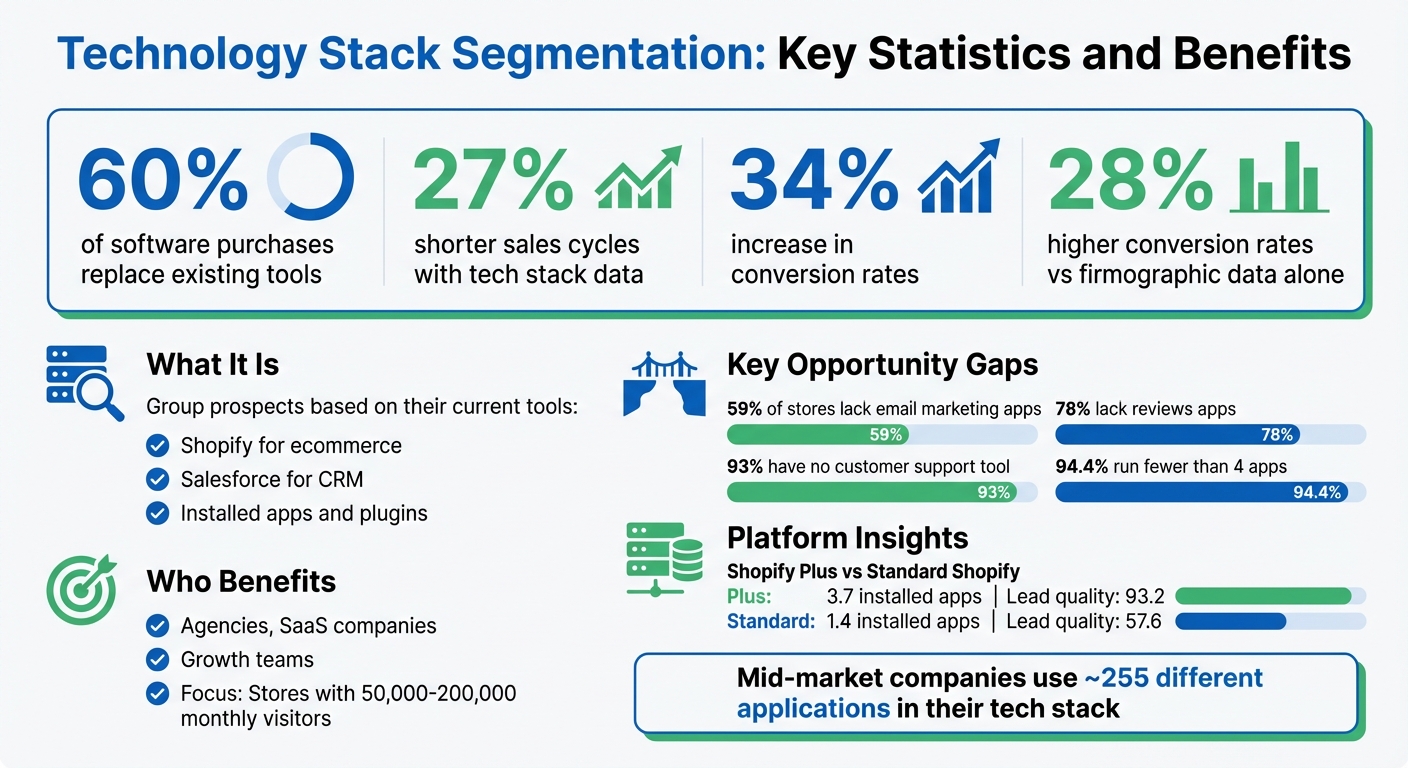
Segmenting prospects by their technology stack helps businesses target the right customers with tailored solutions. Instead of relying on basic data like company size or revenue, this method focuses on the tools, platforms, and apps a company uses. Why does this matter? Because 60% of software purchases replace existing tools, and understanding a prospect's tech stack can highlight gaps or inefficiencies you can address.
Here’s what you need to know:
- What It Is: Group prospects based on their current tools, like Shopify brand prospect lists for ecommerce or Salesforce for CRM.
- Why It Works: Tech stack data shortens sales cycles by 27% and increases conversion rates by 34%.
- Who Benefits: Agencies, SaaS companies, and growth teams can identify high-potential leads using Shopify store guides, like stores with 50,000 to 200,000 monthly visitors, who often need scalable solutions.
- Key Opportunities: Look for gaps, like stores using basic email tools but lacking popup tools or advanced integrations.
Technology Stack Segmentation: Key Statistics and Benefits
Simple tech stack for outbound sales that generates over $1M
Technology Stack Categories for Segmentation
Breaking down a prospect's technology stack into categories can offer valuable insights into their operations and highlight opportunities for targeted pitches. The key areas to focus on are ecommerce platforms, installed apps and plugins, and infrastructure details. Each category sheds light on different aspects of a business's approach and potential needs, forming the foundation for the data-driven strategies covered in this guide. Let’s dive into these categories to uncover opportunities for personalized outreach.
Ecommerce Platforms
The ecommerce platform a business uses speaks volumes about their technical capabilities and budget. For instance, a Shopify Plus store, which costs upwards of $2,000 per month, operates very differently from a standard Shopify or WooCommerce setup. Shopify Plus merchants, on average, use 3.7 installed apps and score 93.2 on lead quality, compared to just 1.4 apps and a 57.6 score for standard Shopify users. This stark difference highlights how higher-tier merchants are more inclined to invest in their tech stack and additional services.
Platform selection also reflects a store's technical preferences. Shopify users often prefer managed solutions with minimal upkeep, making them ideal customers for plug-and-play tools. On the other hand, WooCommerce or Magento users lean toward in-house development and customization, making them better suited for advanced integrations or custom development services.
Installed Apps and Plugins
The apps a store uses - or doesn’t use - can reveal operational priorities and gaps. For example, Klaviyo leads with 25.8% adoption across stores, yet 59% of stores lack any email marketing app. This creates a significant opportunity for email service providers or agencies specializing in retention marketing. Similarly, 78% of stores lack a reviews app, and 93% have no customer support tool, pointing to clear pain points waiting to be addressed.
App adoption also varies by traffic levels. Stores with 50,000 to 200,000 monthly visitors show higher adoption rates for email apps (51%) and reviews apps (26%) compared to smaller stores, which lag behind at 31% and 17%, respectively. This mid-tier traffic group represents businesses that have validated their model but still need to strengthen their operational infrastructure. Interestingly, only 5.6% of ecommerce stores run four or more apps, leaving 94.4% with clear gaps in their tech stack.
Infrastructure and Hosting Details
While apps reveal operational gaps, infrastructure details highlight a store's focus on growth. For instance, tracking pixels and themes provide clues about a store's investment in customer acquisition and design. The average Shopify store uses 4.6 tracking pixels, but Shopify Plus stores use 3.5x more. Popular tools like Meta Pixel and Google Analytics 4 are adopted by 46.8% and 69.6% of stores, respectively. Stores running multiple ad pixels, such as Meta, TikTok, and Google Ads, are actively investing in customer acquisition, making them strong candidates for tools that boost conversions or cut ad costs.
Theme choices also offer insight into design investment. While 45.6% of Shopify stores still use free themes, paid themes priced between $150 and $350 see 45% adoption among growing stores. Custom themes dominate at 36% among enterprise-level merchants. Interestingly, Shopify Plus stores paying $2,000 or more per month but still using free themes represent businesses with significant budgets yet untapped design potential - an ideal opportunity for agencies offering premium themes or custom development services.
How to Build and Use Technology Stack Segments
Creating effective technology stack segments begins with understanding your target audience and why their tech choices are important. On average, mid-market companies use around 255 different applications in their tech stack. This reveals mismatches, gaps, and areas ripe for upgrades. By segmenting these prospects, you can tailor your outreach and seamlessly integrate your strategy with your CRM.
Defining Ideal Technology Profiles
Start by mapping out three key profiling strategies that align with your product:
- Competitive Displacement: Target prospects using a competitor's tool. This is especially effective since over 60% of B2B software purchases involve replacing existing solutions. For instance, if you offer advanced email marketing services, focus on businesses currently using basic email apps that lack segmentation or automation features your platform provides.
- Integration-Based Compatibility: Look for prospects already using platforms your product integrates with. For example, if your product includes a Salesforce plugin, target accounts using Salesforce that lack complementary tools in their stack.
- Technology Gap Identification: Identify businesses with advanced tools in one area but clear gaps in another. For example, 92.7% of ecommerce stores using email marketing apps lack a dedicated popup or email capture tool. This presents an opportunity for agencies offering list-building services.
"Your best prospects aren't companies with no solution - they're companies with the wrong solution, or one they've outgrown." - Jan, Databar
Additionally, watch for infrastructure mismatches. For example, Shopify Plus merchants paying $2,000+ per month but still using free themes may indicate budget availability but a lack of investment in design sophistication.
Filtering and Scoring Prospects
Once you’ve defined your profiles, filter for leads that are both high-fit and high-intent. Sales teams using technographic data in outreach report 34% higher conversion rates and 27% shorter sales cycles. Focus on businesses in the "sweet spot", such as ecommerce stores with 50,000 to 200,000 monthly visitors. These stores often have the budget for advanced services but may lack the internal expertise to address complex tech gaps. For example, mid-tier stores show higher adoption rates for email apps (51%) and reviews apps (26%) compared to smaller stores (31% and 17%, respectively).
Prioritize prospects by evaluating overlapping signals. A store running ads, generating high traffic, and lacking email marketing scores higher than one with only a single gap. The STAMP framework can help qualify leads effectively:
- Size: Traffic or revenue tier
- Tech: Current stack composition
- Activity: Recent changes or launches
- Multiple Contacts: Accessibility of decision-makers
- Pain Points: Identified gaps
| Lead Quadrant | Fit / Intent Level | Action |
|---|---|---|
| High Fit / High Intent | Perfect match + active signals | Immediate outreach |
| High Fit / Low Intent | Perfect match + passive signals | Automated nurture with educational content |
| Low Fit / High Intent | Poor match + active signals | Archive or refer to partner |
| Low Fit / Low Intent | Poor match + passive signals | Remove from active pipeline |
Integrating Segments into CRM and Automation Tools
Once your segments are defined, integrate them into your CRM to trigger outreach at the right time. Automation workflows can be set up for specific scenarios, such as app installations, product launches, or seasonal business cycles. For instance, if a store installs an app that complements your service, you could send an immediate message like: "We noticed you're using [App A] but not [App B]. Most brands see a [X%] improvement when they connect the two".
Contract renewal periods are another excellent opportunity. Reach out about two weeks before a competitor's contract ends, focusing your messaging on migration paths and specific benefits. For seasonal businesses, time your outreach 30 days ahead of their busy season to position your product as essential before demand spikes.
Tools like StoreCensus can automate much of this process. By monitoring real-time changes - such as app installs, removals, or store updates - across over 2.5 million ecommerce stores, it can trigger alerts and workflows at the exact moment intent is highest. With CRM integrations and API access, you can enrich leads with detailed store-level intelligence, syncing this data directly into your sales systems. This eliminates manual research and ensures your team works with accurate, up-to-date information.
Using StoreCensus for Technology Stack Segmentation
StoreCensus simplifies technology stack segmentation by analyzing over 2.5 million ecommerce stores, each enriched with more than 25 structured data points. Instead of relying on manual research or outdated databases, you get live insights into installed apps, platform usage, growth trends, and activity changes. This means you can zero in on prospects that align perfectly with your criteria, enhancing the segmentation process with precise, up-to-date information.
Advanced Filtering and Data Enrichment
Through web scraping and API analysis, StoreCensus identifies JavaScript-based app signatures, offering a detailed view of each store's technology stack. You can filter prospects by factors like installed apps, platform type, store activity, growth signals, location, and accessibility. These dynamic data points go far beyond static firmographic data, enabling actionable filtering in real time. For instance, 59% of Shopify stores currently lack a detected email marketing app, highlighting a significant opportunity for service providers. This kind of advanced filtering allows you to act quickly and connect directly to automated outreach systems.
Real-Time Monitoring and Alerts
StoreCensus tracks changes in ecommerce stores, such as app installations, removals, and theme updates, and sends real-time alerts when these changes occur. For example, if a store installs a new app, it could signal a growing interest in expanding their tech stack - an ideal moment to offer complementary services. Similarly, a theme change, like switching to the "Dawn" design, might indicate a redesign project, creating an opportunity to pitch design-related services. By automating the monitoring process, StoreCensus ensures you’re always reaching out at the right time, eliminating the need for manual tracking and aligning perfectly with previously defined tech profiles.
Automating Outreach Using Technology Stack Signals
Real-time alerts integrate seamlessly with your CRM and outreach tools, enabling precise, automated engagement. For instance, when a store installs a relevant app, you can instantly send personalized messages highlighting how your solution meets their needs. Verified decision-maker contacts further improve outreach success, as decision makers are three times more likely to respond than generic company emails. Tim K., a digital marketing agency owner, shared how he found three high-value stores on his first day using StoreCensus. After sending just 10 targeted emails, he closed a $5,000 project. By combining real-time technology stack data with activity signals, cold outreach transforms into warm, timely conversations that align with the prospect’s intent.
Measuring the Impact of Technology Stack Segmentation
After implementing technology stack segmentation, it’s crucial to measure its impact. Companies that incorporate technographic signals into their outreach see 28% higher conversion rates compared to those relying solely on firmographic data. Additionally, B2B sales teams leveraging technographic insights report 27% shorter sales cycles. These benchmarks provide a solid reference point for evaluating your segmentation strategy.
Key Performance Metrics to Track
To gauge the success of your segmentation efforts, focus on specific metrics that highlight its effectiveness. For instance, keep an eye on sales cycle length. If your sales cycles aren’t getting shorter, it might be time to refine your segmentation approach. On average, technographic targeting can reduce sales cycles by 27%, so anything less may indicate room for improvement.
Another critical metric is conversion rates at every stage of your funnel - from initial outreach to closed deals. Sales teams using technographic data often achieve a 34% boost in conversion rates, which can help you determine whether your messaging is resonating with the right audience.
Don’t overlook lead engagement metrics such as email open rates, response rates, and meeting acceptance rates. If engagement is low, it could mean your messaging isn’t aligned with prospects’ actual technology needs. Additionally, track cost per acquisition (CPA) and return on investment (ROI). Effective segmentation should reduce outreach inefficiencies and lower acquisition costs. If unqualified leads are driving up your CPA, it’s a sign your filtering criteria need tightening.
Refining Segmentation Models Over Time
The work doesn’t stop after initial implementation. Continuous refinement is essential to keep your segmentation effective as technology stacks evolve. Updating technology stack data at least monthly helps you catch prospects at the right moment - such as when they’re dissatisfied with their current solution.
Look for signs of underperformance, such as mismatched messaging. If prospects frequently mention that they already use a tool or that your solution isn’t compatible, it’s a clear indication that your filtering criteria need adjustment. Automating CRM syncing can also streamline the process, ensuring tech stack data flows directly into your sales system and eliminates manual delays.
Finally, review your segmentation criteria every quarter. Adjust based on successful technology combinations. For example, businesses running Meta Pixel ads without dedicated analytics tools represent a 97.7% opportunity gap - a clear indicator of where targeted outreach could succeed.
Conclusion
Technology stack segmentation shifts the way prospects are engaged by prioritizing operational gaps over generic data points. Instead of leaning on firmographics like company size or location, this method allows you to focus on what businesses are actually using - and, more importantly, what they’re missing. Considering that around 60% of B2B software purchases are replacements, understanding a prospect’s current tech stack opens the door for competitor replacements.
This approach isn’t just theoretical - it delivers measurable results. Technographic targeting has been shown to shorten sales cycles by 27% and increase conversion rates by 34%. For instance, if you notice a store using ReCharge but not Klaviyo, you can craft outreach that directly addresses this gap. It’s a practical way to uncover missed opportunities in a prospect’s existing setup.
Tools like StoreCensus make this process seamless by eliminating the need for manual research or outdated databases. With real-time insights into app installs, removals, and technology changes, you can identify high-intent prospects at the perfect moment. Whether it’s targeting Shopify brands lacking email automation or spotting high-traffic stores with minimal app usage, advanced filtering transforms technographic data into actionable leads.
To get started, define a clear technology profile - a specific combination of apps, platforms, or missing tools that signals a strong match for your solution. Build your segment, monitor for key changes, and sync these insights with your CRM. As you track results, refine your criteria to focus on what truly drives conversions.
This isn’t just another tactic - it’s a smarter way to target prospects who are ready to buy. By embracing technology stack segmentation, you can streamline your sales process and consistently connect with high-intent buyers.
FAQs
How can I reliably find a company’s tech stack?
If you want to pinpoint a company’s tech stack, specialized platforms that track ecommerce data in real-time are your best bet. Take StoreCensus, for example. This tool offers detailed insights into over 2.5 million ecommerce stores, including the technologies they use and the apps they’ve installed.
What makes it stand out? Advanced filtering options. You can zero in on stores based on specific apps, platforms, or even their revenue. Plus, with real-time monitoring, the data stays fresh. Whether apps are being installed or removed, you’ll always have accurate, up-to-date information to work with. Perfect for making informed decisions.
What tech signals show a prospect is ready to buy now?
Tech signals that show a prospect might be ready to make a purchase include actions like recent app installs or removals, shifts in revenue or growth trends, and frequent use of specific marketing or analytics tools. These real-time indicators provide valuable insights into buyer intent and operational activity, making it easier to spot high-potential leads.
How do I sync tech-stack segments into my CRM automatically?
To automatically sync tech-stack segments into your CRM, consider using a platform like StoreCensus. This tool lets you filter and segment ecommerce stores based on their technology stack. Once you've identified your target segments, you can export the data and integrate it with your CRM using built-in tools or API access.
StoreCensus also provides real-time updates and alerts, which means your CRM stays current with any changes in the tech stack. This makes it easier to maintain automated workflows and keep your data accurate and up-to-date.