Handling Third-Party API Rate Limits
Monitor and manage third-party API rate limits using headers, throttling, caching, exponential backoff with jitter, batching, and tier upgrades.


API rate limits can disrupt your application if not managed properly. They control how many requests you can send within a set time, often returning a 429 error when exceeded. Here's what you need to know:
- Why Rate Limits Exist: To prevent server overload, protect against abuse, and ensure fair usage.
- Common Parameters: Limits vary by provider (e.g., GitHub: 5,000 requests/hour for authenticated users; Stripe: 100 requests/second). Key metrics include request quotas, time windows, and concurrency limits.
- How to Monitor: Use response headers (
X-RateLimit-Remaining,Retry-After) to track usage and avoid hitting limits. - Handling Errors: Use exponential backoff with jitter for retries and implement a circuit breaker to pause requests during failures.
- Solutions to Stay Within Limits: Throttle requests, cache data to reduce redundant calls, and batch operations when possible.
Key Tip: Regularly monitor usage, optimize requests, and consider upgrading to a higher API tier if your needs exceed current limits. These strategies ensure smoother integrations and fewer disruptions.
The subtle art of API Rate Limiting
Understanding API Rate Limit Parameters
Getting a clear grasp of API rate limit parameters is crucial for managing them effectively. By understanding these metrics, you can design integrations that stay resilient and avoid service disruptions.
Common Rate-Limiting Metrics
The primary parameter to consider is the request quota - the maximum number of requests allowed within a set timeframe. This is often measured as requests per second (RPS), per minute (RPM), or per hour (RPH). Limits vary widely: some providers allow thousands of requests per hour for authenticated users, while free tiers might only permit a handful of requests per minute.
Time window types dictate how quotas reset. A fixed window resets at specific intervals, like the start of each hour. This approach has a known vulnerability - users can send maximum requests right before and after the reset (e.g., at 11:00:59 AM and 11:01:00 AM), effectively doubling their limit. A sliding window, on the other hand, calculates limits based on activity over the past N seconds, reducing the risk of such exploits.
Some APIs implement concurrency limits, which cap the number of simultaneous requests, regardless of the total volume over time. For example, Twilio enforces a rate limit of 1,000 requests per second while also restricting concurrent requests to 100. Even if your app stays within its per-minute quota, it could still fail if it exceeds the concurrency threshold.
Resource-based limits are becoming more common, especially in AI APIs, where usage is measured by data volume instead of request counts. For instance, Anthropic's Claude API limits usage to 50,000 tokens per minute, aligning limits with the actual resource cost.
Lastly, many APIs allow for burst capacity, often managed using the Token Bucket algorithm. This lets you handle temporary traffic spikes above the regular limits without triggering errors, which is vital for managing surges in legitimate traffic.
How to Find Rate Limit Information
Start by checking the API provider's official documentation. This should include details like request quotas, limit scopes (e.g., per API key, user, or IP address), and window types. However, documentation alone might not cover everything. Inspect response headers for real-time rate limit updates. Common headers include:
X-RateLimit-Limit(total allowed requests)X-RateLimit-Remaining(remaining requests)X-RateLimit-Reset(time until quota resets)
Keep in mind that header naming conventions differ across providers. For example, the Retry-After header might return either a plain integer (indicating seconds to wait) or an HTTP date (e.g., Mon, Mar 29, 2021 04:58:00 GMT). Your code needs to handle both formats.
Many providers also offer developer portals or dashboards where you can monitor usage trends, remaining quotas, and the frequency of 429 errors (rate-limit errors). GitHub, for example, provides a dedicated endpoint (/rate_limit) that returns detailed JSON data about current usage across various API categories. These tools are invaluable for keeping track of your integration's performance and spotting potential issues before they escalate.
To stay organized, document all discovered limits in your application configuration or environment variables. This ensures you can implement client-side controls programmatically and adjust your strategy as your usage grows. Additionally, check whether specific endpoints have unique limits - write or search operations often have stricter quotas than basic read operations.
Monitoring and Handling Rate Limits in Real Time
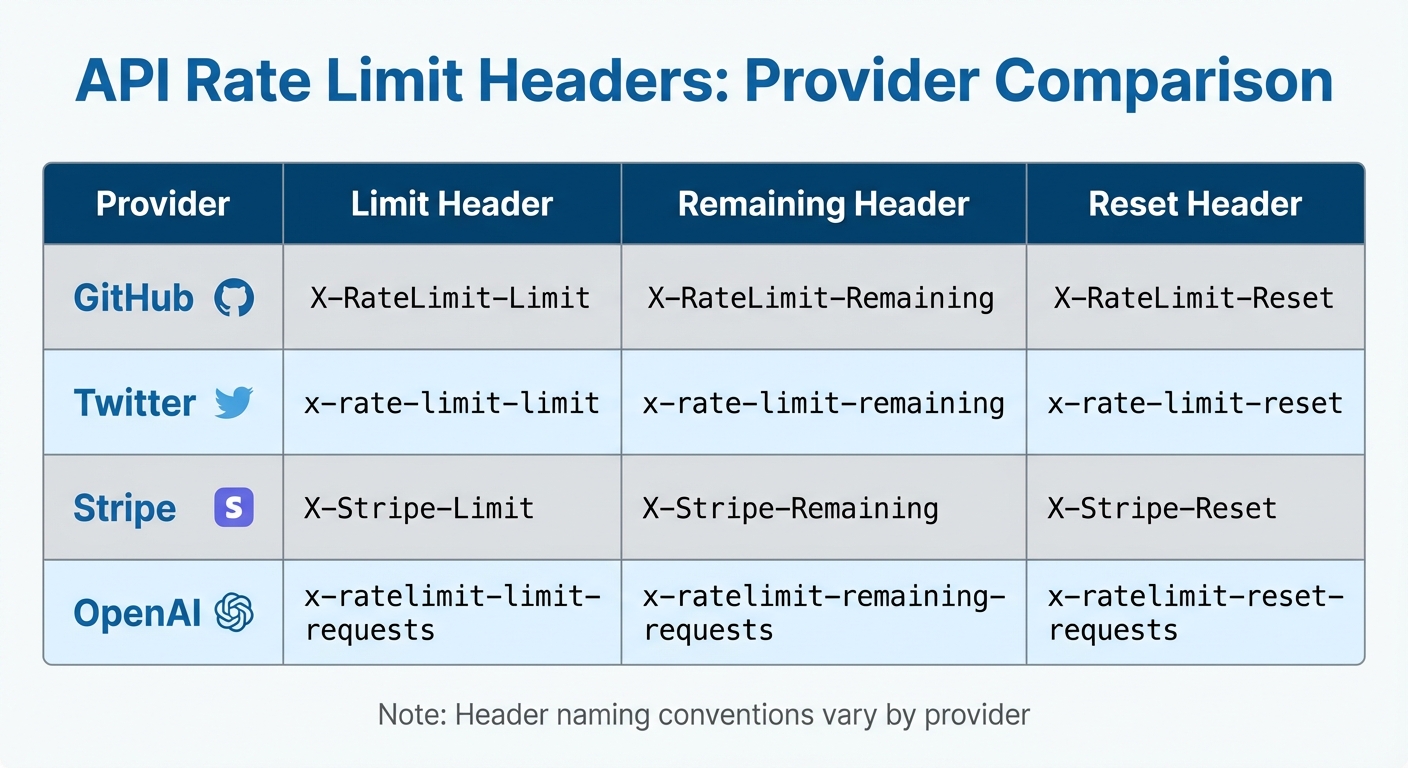
API Rate Limit Headers Comparison Across Major Providers
Once you understand the parameters, the next step is to actively track your usage and respond appropriately when you hit limits. Real-time monitoring is key to avoiding disruptions and keeping your integration running smoothly.
Using Response Headers to Monitor Limits
Every API response comes with headers that show your current quota status. The three most important headers to watch are:
X-RateLimit-Limit: The total number of requests allowed.X-RateLimit-Remaining: How many requests you have left.X-RateLimit-Reset: A Unix timestamp indicating when your quota will be refreshed.
By parsing these headers, you can stay on top of your usage without making extra status-checking requests. Here's a quick look at how major APIs structure these headers:
| Provider | Limit Header | Remaining Header | Reset Header |
|---|---|---|---|
| GitHub | X-RateLimit-Limit |
X-RateLimit-Remaining |
X-RateLimit-Reset |
x-rate-limit-limit |
x-rate-limit-remaining |
x-rate-limit-reset |
|
| Stripe | X-Stripe-Limit |
X-Stripe-Remaining |
X-Stripe-Reset |
| OpenAI | x-ratelimit-limit-requests |
x-ratelimit-remaining-requests |
x-ratelimit-reset-requests |
Keep in mind: Different providers use their own naming conventions, so your code should account for these variations.
To avoid surprises, set up proactive alerts based on X-RateLimit-Remaining. For example, trigger a warning when you’ve used 80% of your quota and a critical alert at 95%. This gives you enough time to throttle requests or queue operations before hitting the limit.
Handling 429 Too Many Requests Errors
When you exceed your rate limit, the API will typically return an HTTP 429 status code. Along with this, you'll usually find a Retry-After header that tells you how long to wait before trying again. This value might be in seconds (e.g., 60) or as an HTTP date (e.g., Wed, Feb 24, 2026 07:28:00 GMT). Always honor this value - ignoring it can lead to longer lockouts or even account suspension.
For retrying failed requests, use exponential backoff with jitter. This method starts with a short delay and doubles the wait time after each failure. Adding a random delay (jitter) helps prevent multiple clients from retrying at the same time. Many modern libraries already include this functionality. For example:
- Python's
urllib3offers a built-inRetrystrategy. - Node.js developers can use packages like
Bottleneck.
If errors persist, consider implementing the circuit breaker pattern. When an API repeatedly returns 429 or 5xx errors, pause all requests for a set period. This prevents wasting resources on calls that are likely to fail and gives the API provider time to recover.
"Rate limits represent fundamental constraints in modern API ecosystems. By embracing them as design parameters rather than obstacles, engineering teams can build more resilient systems." - API7.ai
Client-Side Rate Limiting Solutions
After setting up proactive monitoring, client-side strategies can help you stay within API limits. Instead of reacting to a 429 error, these measures ensure your requests remain within safe boundaries before they even reach the API provider's infrastructure.
Throttling and Queuing API Requests
Throttling limits the number of requests sent, while queuing holds back extra requests until the quota resets.
One effective method is the Token Bucket Algorithm, where each request uses a token from a bucket that refills steadily over time. This approach allows controlled bursts of activity while maintaining a consistent request flow. For example, using a token bucket can significantly reduce delays compared to sending unthrottled, parallel requests.
Libraries like Node.js's Bottleneck or Python's ratelimit can simplify throttling implementation.
"The ideal solution hides the details of the API's limits from the developer. I don't want to think about how many requests I can make, just make all the requests efficiently and tell me the results." - Ben Ogle, Engineering, Anvil
You can also prioritize critical API calls, ensuring the most important requests are handled first. For applications running across multiple nodes, using Redis to store the token bucket state can help manage a global request rate across all instances.
Beyond throttling, caching is another powerful tool to minimize redundant requests.
Caching Responses to Reduce Redundant Requests
Caching frequently accessed data locally can dramatically reduce the number of API calls, helping you avoid hitting rate limits.
"The best API call is one you don't make. Aggressive caching reduces rate limit pressure." - API Status Check
Set a Time-to-Live (TTL) for cached data, such as 5 minutes for weather updates or 1 hour for product catalogs. Once the TTL expires, the cache refreshes automatically. You can also use conditional requests with headers like ETag and If-None-Match. This lets your client check if the data has changed; if not, the server responds with a 304 Not Modified, saving bandwidth and often reducing the impact on rate limits.
For distributed systems, tools like Redis and Memcached are excellent options. For local, in-memory caching, consider NodeCache (JavaScript) or Python's functools.lru_cache. Using a Least Recently Used (LRU) eviction policy ensures stale entries are removed automatically when the cache is full. Additionally, when performing write operations (POST/PUT/DELETE), make sure to update or clear the cache to avoid serving outdated data.
Finally, test your caching logic carefully to prevent unintentional rapid polling that could undermine its benefits.
Advanced Rate Limit Management Strategies
After implementing client-side throttling and caching, you can take your API usage to the next level with techniques like batching requests and evaluating tier upgrades. These approaches help you maximize your quotas while maintaining efficiency.
Batching and Combining Requests
Many APIs offer batch endpoints that let you bundle multiple operations into a single HTTP request. For example, instead of making 100 individual calls to create user records, you can send one batch request with all 100 operations. This significantly reduces the number of requests you make.
Some APIs also let you retrieve related objects in a single call using parameters like the expand option (e.g., Stripe). This eliminates the need for separate requests to fetch linked resources. Similarly, GraphQL allows you to query precisely the data you need in one request, replacing multiple REST API calls to different endpoints.
Take a close look at your code - loops that make individual API calls are often perfect candidates for batching. By limiting responses to only the fields you need, you might also lower the "cost" of each request in systems that use resource-based rate limits. Always check the provider's documentation for details like maximum payload sizes or limits on the number of operations per batch.
If batching doesn’t fully resolve your rate limit challenges, it might be time to consider upgrading your API tier.
Upgrading to Higher API Tiers
Even with optimized calls, you might still encounter limits during high-demand periods. If you’re consistently using over 80% of your quota or frequently running into 429 errors, upgrading to a higher tier could be a practical solution. Higher tiers often come with increased quotas and better capacity to handle traffic surges.
For example, GitHub offers 5,000 requests per hour for authenticated users compared to just 60 per hour for unauthenticated ones. OpenAI’s GPT-4 scales from 3 requests per minute on the Free tier to 10,000 requests per minute at Tier 5. Similarly, Stripe enforces a default limit of 100 requests per second per account.
Before upgrading, verify that the new tier’s limits cover all the endpoints your application uses. Some APIs, like Anthropic’s Claude, limit usage by tokens per minute instead of requests. For instance, a small request might use just 0.2% of your limit, while a larger one could consume 10%. Upgrading often makes financial sense for applications that already minimize redundant calls through efficient caching, batching, and event-driven architectures.
Key Takeaways
Effectively managing third-party API rate limits requires a watchful eye and proactive measures. Keep an eye on response headers like X-RateLimit-Remaining and Retry-After to monitor your quota usage. These headers act as your early warning system, reinforcing the monitoring practices discussed earlier. If you encounter a 429 error, use exponential backoff with jitter to avoid overwhelming the API with retries, which can lead to the "thundering herd" problem.
"Mastering rate limits is essential for building resilient, production-ready applications." - API7.ai
To reduce unnecessary requests, incorporate techniques like caching, batching, and webhooks. These strategies help eliminate redundant API calls, especially for infrequent updates. For distributed systems, using a shared state store such as Redis can synchronize rate limit management across multiple application instances. These optimizations work hand-in-hand with alerting systems to ensure swift action when you're nearing quota limits.
Set up alerts for 80% and 95% of your quota usage to enable manual intervention before hitting the limit. Additionally, implement a circuit breaker pattern to pause requests to APIs that frequently return 429 or 5xx errors. This approach prevents cascading failures and keeps the rest of your application stable.
Once you've implemented these defenses, reassess whether your traffic demands a higher API tier. Combining client-side optimizations with real-time monitoring ensures your application can handle rate limits effectively. If you're still bumping into limits despite these efforts, upgrading to a higher plan - like the tier differences seen in GitHub and OpenAI - might be the solution. The goal is to align your architecture and API tier with your traffic patterns for a resilient system.
FAQs
How can I calculate safe request rates from rate-limit headers?
To determine safe request rates, pay attention to headers such as X-RateLimit-Remaining and Retry-After. Here's how it works:
- Use
X-RateLimit-Remainingto check how many requests you can still make within the current time window. - Divide the remaining requests by the time left in the window to calculate a safe rate. For instance, if you have 50 requests left and 60 seconds remaining, you can make roughly 1 request every 1.2 seconds.
- If the
Retry-Afterheader is included, it indicates how long you need to wait before making more requests. Always respect this value to avoid exceeding limits and triggering errors.
By following these steps, you can maintain a steady request rate and stay within the allowed limits.
What’s the best retry strategy when 429 keeps happening?
When dealing with persistent 429 errors, the most effective approach is to use exponential backoff with jitter, honor the Retry-After header, and incorporate caching and request queuing to manage request frequency. These strategies work together to prevent overloading the API and minimize the chances of encountering additional rate limit errors.
How can I enforce a single rate limit across multiple app servers?
To manage a single rate limit across multiple app servers, it's essential to use a centralized solution. An API gateway or a shared datastore can act as the control hub, ensuring all servers funnel requests through a unified system. This setup allows for tracking and enforcing limits consistently across the servers.
Another option is to use tools like Redis, which can synchronize request counts between servers. This approach ensures that no individual server exceeds the shared quota, maintaining consistent rate limit enforcement across the entire system.