How CRM Integration Improves Data Sync
Link your ecommerce store, CRM, and tools to eliminate data silos, enable real-time API/webhook syncing, reduce errors, and improve team efficiency.


CRM integration solves one of the biggest challenges for ecommerce businesses: fragmented data. By connecting tools like your online store, CRM, and support systems, it ensures customer data stays consistent and updated in real time. This eliminates manual data entry, reduces errors, and improves team efficiency.
Here’s what you need to know:
- Only 28% of business applications are integrated, creating data silos that slow workflows.
- Integration cuts manual processing time - one company saved over 2,000 hours annually and achieved a 247% ROI in 18 months.
- Tools like APIs and webhooks enable instant updates, so your CRM reflects changes (like orders or customer info) across all platforms immediately.
- Unified customer profiles help sales, marketing, and support teams work smarter, not harder.
The result? Faster operations, fewer errors, and better customer experiences. CRM integration isn’t just helpful - it’s a game-changer for ecommerce businesses looking to stay competitive.
From Order to CRM Automatically (E-Commerce Automation)
Common Data Synchronization Problems in Ecommerce
Running an ecommerce business on disconnected systems can lead to significant challenges that affect sales, customer satisfaction, and team productivity. Let’s break down some of the most common issues.
Data Silos and Fragmentation
Did you know the average organization uses over 900 applications, yet only 28% of them are able to communicate with each other? For ecommerce businesses, this disconnect can create a host of problems. For example, your marketing platform might not show real-time inventory levels, your CRM could miss out on tracking customer browsing habits, and your support team might struggle to access order statuses.
When departments pick tools independently, it only adds to the fragmentation. Customer data gets scattered across multiple systems, making it harder to provide a seamless experience. This often forces customers to repeat information - like their order details - because support agents lack access to a complete purchase history. Meanwhile, your marketing team might accidentally target customers who’ve already bought a product, simply because that data lives in a different system.
Manual Data Entry and Human Errors
Without automated synchronization, teams are left to manually transfer data between platforms. This can lead to inconsistencies, like one system recording a phone number as +1-555-123-4567 while another uses (555) 123-4567. The same customer might even end up with multiple profiles across your systems.
Manual data entry doesn’t just eat up time - it also hurts data quality. For instance, sales teams might receive incomplete leads, with only a name and email address, leaving them without the context needed for personalized follow-ups. This lack of detail can lower conversion rates. Similarly, marketing teams often struggle to measure campaign effectiveness because the link between marketing efforts and closed sales is broken.
To make matters worse, outdated batch updates only amplify these problems, further delaying critical real-time data.
Real-Time Update Delays
Many older systems rely on batch processing, syncing data only at specific times, like overnight. This delay can wreak havoc on your operations. Imagine your website showing products as "in stock" when they’ve already sold out. This not only leads to overselling but also frustrates customers. Similarly, sales teams might miss out on hot leads because website activity from earlier in the day hasn’t yet synced with the CRM.
Take DARCHE, an outdoor equipment supplier, as an example. In 2025, their fragmented systems caused stock discrepancies, forcing customers to place orders manually over the phone. After integrating their ERP for real-time inventory updates, they saw a 3x boost in B2B sales and a 59% increase in annual web traffic. Finn Christensen, their Digital Marketing Coordinator, shared:
Shopify has completely changed the way we do business. Now, retailers feel comfortable placing orders online... This provides them with an easier, more seamless sales experience.
Similarly, SANJO, a footwear brand, modernized their operations in 2025 by integrating their heritage systems with a modern ERP. This enabled real-time inventory updates and cut logistics processing times by 50%.
These examples highlight how crucial real-time data synchronization is for improving efficiency and customer experience. Proper CRM integration can make all the difference in streamlining data flow.
How CRM Integration Fixes Data Synchronization Issues
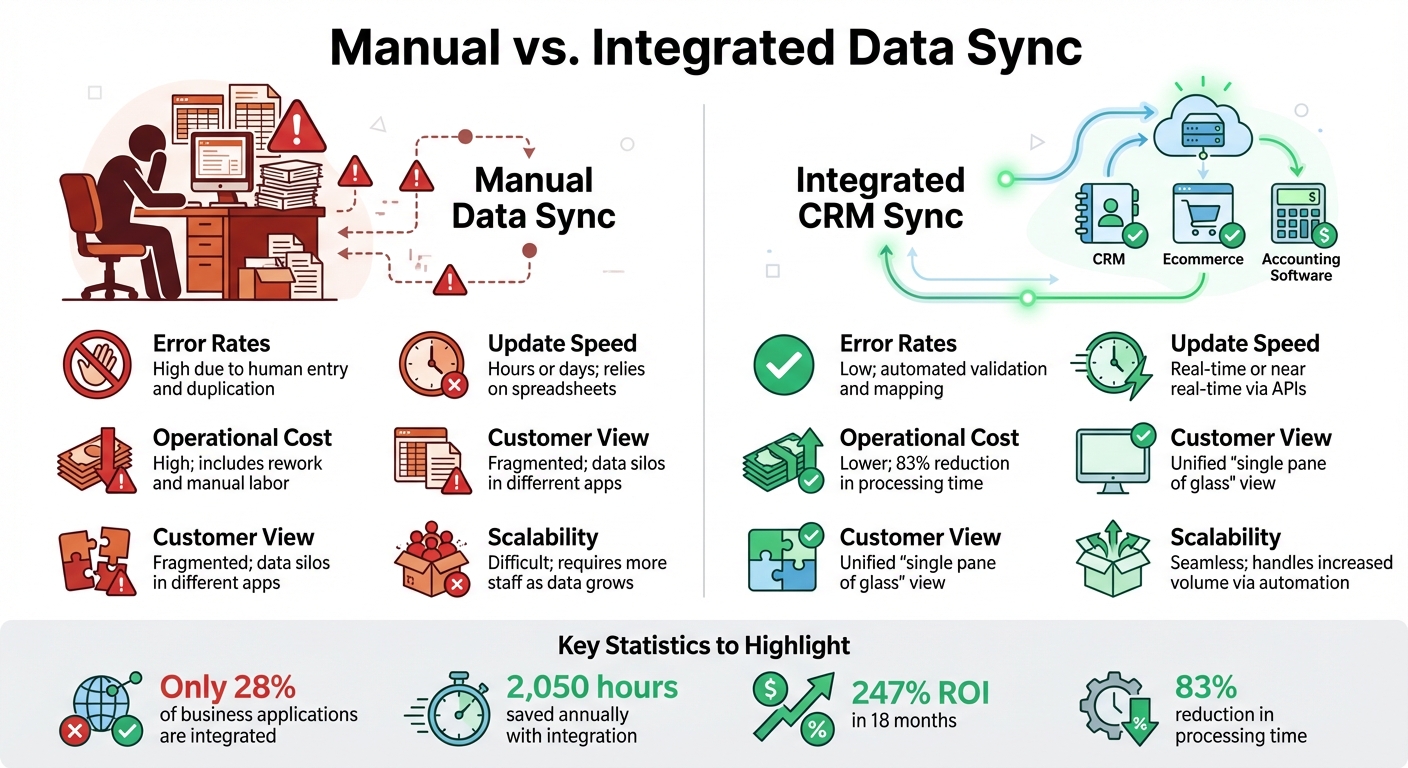
Manual vs Integrated CRM Data Sync Comparison for Ecommerce
CRM integration simplifies and automates data synchronization, cutting down on manual errors and inefficiencies.
Automating Data Sync with APIs and Webhooks
APIs work as connectors between your business tools, ensuring seamless data sharing. For instance, when a customer makes a purchase on your ecommerce site, an API can instantly send that information to your CRM, marketing platform, and support systems - no manual input required.
"Think of a CRM integration as building bridges between your business systems so they can share information automatically."
– Danika Rockett, Sr. Manager, Technical Marketing Content, RudderStack
Webhooks, on the other hand, provide real-time updates. Imagine a customer submitting a form or changing their shipping address. The webhook triggers immediate updates across all connected platforms, eliminating delays caused by batch processing. This instant synchronization ensures inventory accuracy and prevents missed sales opportunities. Together, APIs and webhooks create a system where customer data flows effortlessly, enabling a unified view across platforms.
Creating Unified Customer Views
CRM integration pulls together fragmented customer data into a single, comprehensive profile. When your ecommerce platform, CRM, email marketing tool, and support system all share data, your team gets a complete picture of customer interactions. This includes purchase history, support tickets, email engagement, and even browsing behavior.
With this unified view, customer support can easily reference recent orders without asking repetitive questions. Sales teams can see which products a lead has explored, and marketing teams can target campaigns based on actual buying patterns. To make this happen, data mapping aligns fields like "First Name" in your storefront with "Contact Name" in your CRM, while standardizing formats such as phone numbers to E.164 and timestamps to UTC for consistency across systems.
By unifying data, integration also addresses errors and redundancies.
Eliminating Redundancies and Errors
Manual data entry often leads to duplicate records and inconsistent information. CRM integration solves this by syncing updates across all platforms. If a customer updates their email address in one system, that change is instantly reflected everywhere else.
Advanced tools now use AI-powered deduplication to merge duplicate records, even when they appear in slightly different formats. Additionally, validation rules help catch errors before they enter your database - for example, ensuring email addresses include an "@" symbol or phone numbers are purely numeric. These proactive measures prevent the common "garbage in, garbage out" issues that plague manual processes.
With 91% of businesses relying on CRM systems and the average company juggling over 900 applications, integrating your CRM isn’t just helpful - it’s essential for maintaining accurate, actionable customer data.
Steps to Implement CRM Integration for Ecommerce
Getting your CRM integration right requires a clear plan to avoid messy data and wasted time. Here’s how to tackle it step by step.
Assess Data Synchronization Needs
Before you start connecting systems, figure out your goals. Are you trying to speed up order processing, improve customer support, or ensure your data is accurate? Define specific, measurable objectives upfront.
Bring key stakeholders together and review your current data for duplicates, outdated records, or inconsistent formatting. Decide which system will act as the primary source for different types of data. For instance, your CRM might handle contact and sales data, while your ecommerce platform or marketing tools manage behavior and engagement metrics.
Set up clear synchronization rules early on. Will data flow one way or both ways? Use inclusion lists to ensure only qualified, sales-ready leads are synced, keeping your CRM clean and focused.
"A successful CRM and marketing automation integration is 90% strategy and only 10% technology." – MarTech Do
Choose the Right CRM and Tools
Pick a CRM that integrates smoothly with your ecommerce platform. For instance, HubSpot offers a free version with paid plans starting at $20/month, while Salesforce begins at $19/month. If you need a retail-focused solution, Endear CRM starts at $60/month. Choosing the right CRM helps prevent the manual errors and data silos that can derail your efforts.
The integration method you choose also matters. Native apps are quick and require little technical expertise, while iPaaS platforms like Zapier or Patchworks can handle multiple apps with setup times ranging from hours to days. API integrations, though more complex, offer highly customizable workflows and typically take weeks. For unique or legacy systems, custom code might be your best option, but expect it to take months.
For businesses focused on lead generation and market research, tools like StoreCensus can be a game-changer. It integrates with your CRM while providing insights on over 2.5 million ecommerce stores, including real-time updates and workflows to automate lead enrichment - saving time and eliminating manual data entry.
Set Up and Test Real-Time Data Syncing
Start by cleaning your data. Remove duplicates, outdated entries, and inconsistencies. Test everything in a sandbox environment to avoid disruptions.
Align key fields like customer names, emails, and account IDs across platforms, and enforce consistent formatting. Use validation rules to maintain data integrity. Set automation rules to distinguish between updates that need immediate syncing - like new leads - and those that can follow a scheduled cadence for reporting.
Enable bidirectional syncing to ensure updates in one system automatically reflect in the other. For example, if a customer updates their contact details in your support system, your CRM should reflect that change instantly. Use incremental loading to update only changed records, reducing system strain.
Before going live, run user acceptance tests to mimic real-world scenarios. Test creating new leads, verifying data accuracy, and syncing unsubscribe requests. Once live, keep an eye on sync performance to maintain accuracy.
Monitor and Optimize Integration Performance
After setting up real-time syncing, ongoing monitoring is essential. Use a dashboard to track key metrics like sync latency, error rates, and data freshness. Set alerts to notify you if sync delays exceed 15 minutes or if error rates rise above 2%, so you can fix issues quickly.
Schedule quarterly maintenance to update connectors, review performance, and audit data quality. Conduct a full review of integration settings and error logs annually. Many tools now include automated logging and issue detection to flag problems like failed updates or duplicate records before they escalate.
To maintain data quality and security, enforce validation rules and role-based access. Ensure data in transit uses TLS 1.2 or higher and that stored data is encrypted with AES-256. Keep audit logs to track data access and meet compliance standards like GDPR and CCPA.
On average, businesses see a full return on investment (ROI) for CRM integrations in about 11.8 months. For every dollar spent on integration and automation, companies typically gain $5.44 in return.
Benefits of CRM Integration for Ecommerce Businesses
Improved Data Accuracy and Consistency
When you integrate your systems, you eliminate the need for tedious manual spreadsheets and copy-paste workflows. Instead, automated data flows keep everything updated in real time. For example, if a customer updates their shipping address, that change instantly reflects across your CRM, help desk, and marketing platform. This ensures everyone in your business - from customer service to marketing - has access to the same accurate information.
Standardized data mapping and AI-powered deduplication further ensure that your records are error-free and consistent across all systems. Considering that 91% of businesses with more than 11 employees now use a CRM, and 53% of small and medium-sized business leaders struggle with inconsistent data across tools, this kind of synchronization is no longer optional. It’s essential. With error-free data, your sales and marketing teams can operate more efficiently, building on a solid foundation of reliable information.
Better Sales and Marketing Efficiency
CRM integration doesn’t just organize your data; it makes that data actionable. By combining information like purchase history, browsing behavior, and engagement signals, your team can personalize outreach at scale. For instance, marketing teams can sync audience segments directly with platforms like Google or Facebook Ads. This allows them to target high-value prospects while avoiding wasted ad spend on existing customers. Meanwhile, sales representatives gain instant access to critical insights like billing status, inventory levels, and previous customer support interactions. This means they can resolve service issues on the spot and avoid selling items that are out of stock.
The results speak for themselves: a 2025 study found that CRM integration reduced order-processing times from 18 minutes to just 3, saving businesses 2,050 hours annually and delivering a 247% ROI. For ecommerce businesses focused on lead generation, tools like StoreCensus take it a step further by enriching CRM data with real-time insights. This platform provides data on over 2.5 million stores, eliminating the need for manual research. It can even trigger outreach when prospects install new apps or update their tech stack, making your sales and marketing efforts even more precise.
Scalable and Streamlined Operations
As your business grows, CRM integration ensures you won’t be bogged down by increasing data volume or operational complexity. By automating processes, it reduces staffing needs and keeps everything running smoothly, even as your workload scales. API-led architectures make it easy to add or upgrade tools without disrupting your existing workflows, so your tech stack remains flexible and ready for the future. It’s no wonder that 66% of growing SMB leaders depend on an integrated tech stack to maintain efficient operations, and 74% of salespeople say CRM systems dramatically improve their access to customer data.
A real-world example? SANJO, a heritage footwear brand, integrated their ecommerce platform with their ERP system to automate internal processes. According to Sofia Abreu Camarinha, their Head of Marketing and Ecommerce, syncing inventory between online and physical stores cut logistics time by 50% and boosted B2B sales by 10%. This kind of integration bridges the gap between front-office functions like sales and marketing and back-office operations like inventory and finance. The result? Faster close-to-ship cycles and smoother collaboration across departments.
Comparison Table: Manual vs. Integrated Data Sync
| Feature | Manual Data Sync | Integrated CRM Sync |
|---|---|---|
| Error Rates | High due to human entry and duplication | Low; automated validation and mapping |
| Update Speed | Hours or days; relies on spreadsheets | Real-time or near real-time via APIs |
| Operational Cost | High; includes rework and manual labor | Lower; 83% reduction in processing time |
| Customer View | Fragmented; data silos in different apps | Unified "single pane of glass" view |
| Scalability | Difficult; requires more staff as data grows | Seamless; handles increased volume via automation |
Conclusion
Data synchronization problems can drain your resources, inflate costs, and weaken customer relationships. By integrating a CRM, these challenges are tackled head-on - eliminating manual data entry, breaking down departmental silos, and ensuring everyone works with accurate, real-time information. This shift from reactive to proactive system communication can be a game-changer.
The benefits are clear. Businesses that integrate their systems report noticeable gains, such as drastically reduced processing times in connected workflows. Even small changes, like sending cart recovery emails within the first hour, can boost conversions by as much as 20%. These improvements lay the groundwork for adopting advanced tools that elevate ecommerce operations even further.
For ecommerce businesses looking to maximize their CRM integration, tools like StoreCensus provide an edge. StoreCensus delivers real-time insights on over 2.5 million stores, enriching your CRM with actionable data. This means your sales team can zero in on high-intent prospects - those actively refining their operations - and engage them with precision.
"CRM integration is the foundation for building a truly connected business." - Salesforce
Whether you're just beginning your integration journey or refining existing processes, a few key steps can make all the difference: start by cleaning your data, focus on API-driven connections, and regularly monitor performance. A well-integrated CRM turns scattered data into actionable insights, providing the unified customer view and operational efficiency that ecommerce businesses need to thrive. By connecting the dots, you're setting the stage for scalable, long-term success.
FAQs
How does CRM integration help unify ecommerce data?
CRM integration brings ecommerce data together by linking systems like sales, marketing, and customer support. This connection ensures that information moves smoothly between platforms, creating a single, unified view of customer data. By breaking down silos, teams gain access to real-time updates, making collaboration and decision-making much more efficient.
With automated data transfers, CRM integration minimizes manual input and reduces the risk of errors, keeping information consistent and accurate. This streamlined process helps businesses tailor customer experiences, refine targeting efforts, and achieve growth more efficiently.
How do APIs and webhooks enhance CRM integration?
APIs and webhooks are game-changers when it comes to CRM integration, making communication between systems faster and smoother. APIs enable systems to share data effortlessly - think customer details, sales leads, or transaction records - cutting down on manual data entry and reducing errors. Meanwhile, webhooks step in to provide instant updates. For example, they can notify your CRM to update a customer profile or kick off a marketing campaign the moment a specific event happens.
When used together, these tools keep your data synced across platforms, giving you a single, up-to-date view of your customers. This not only sharpens decision-making but also powers automated workflows, helping your sales and marketing teams operate more efficiently and engage with prospects more effectively.
How does integrating a CRM system enhance the ecommerce customer experience?
Integrating a CRM system with your ecommerce platform can greatly improve how you interact with customers. By ensuring a smooth flow of data, it keeps customer information accurate and up-to-date, eliminating the need for manual data entry and reducing the chance of errors. This unified view of each customer allows businesses to tailor their marketing, sales, and support efforts in ways that feel more personal and effective.
On top of that, CRM integration takes care of routine tasks and simplifies communication, which leads to quicker response times and more consistent interactions. Customers enjoy experiences that are timely, relevant, and customized to their needs, which builds satisfaction and loyalty. By breaking down barriers between departments and offering a complete view of customer interactions, a CRM system helps ecommerce brands create a seamless and engaging customer journey - one that supports lasting growth and keeps customers coming back.