Best Practices for Outbound Sales Automation
Guide to setting KPIs, cleaning data, integrating tools, and crafting targeted, AI-driven multi-channel campaigns to scale outbound sales.


Outbound sales automation simplifies repetitive tasks like prospecting, email follow-ups, and CRM updates. This lets sales teams reach more prospects, save time, and focus on closing deals. Here’s the core takeaway:
- Boost productivity: Automation increases efficiency by up to 60%, saving over 15 hours a week.
- Scale outreach: Without automation, reps reach 50–100 prospects. With it? 300–500.
- Shorten sales cycles: Some companies cut cycles from 30–60 days to just 10–20 days.
- Improve accuracy: Clean, enriched data reduces errors and ensures better targeting.
To get started:
- Set clear KPIs: Track activity, engagement, and conversion metrics.
- Clean your data: Remove duplicates and enrich records with firmographic and behavioral details.
- Use the right tools: Choose platforms with multi-channel outreach and CRM integration.
- Segment and personalize: Tailor campaigns using dynamic lists and AI-driven insights.
- Test and refine: Launch pilot campaigns, run A/B tests, and adjust workflows based on results.
Automation isn’t just about speed - it’s about doing more with less effort while maintaining precision and consistency.
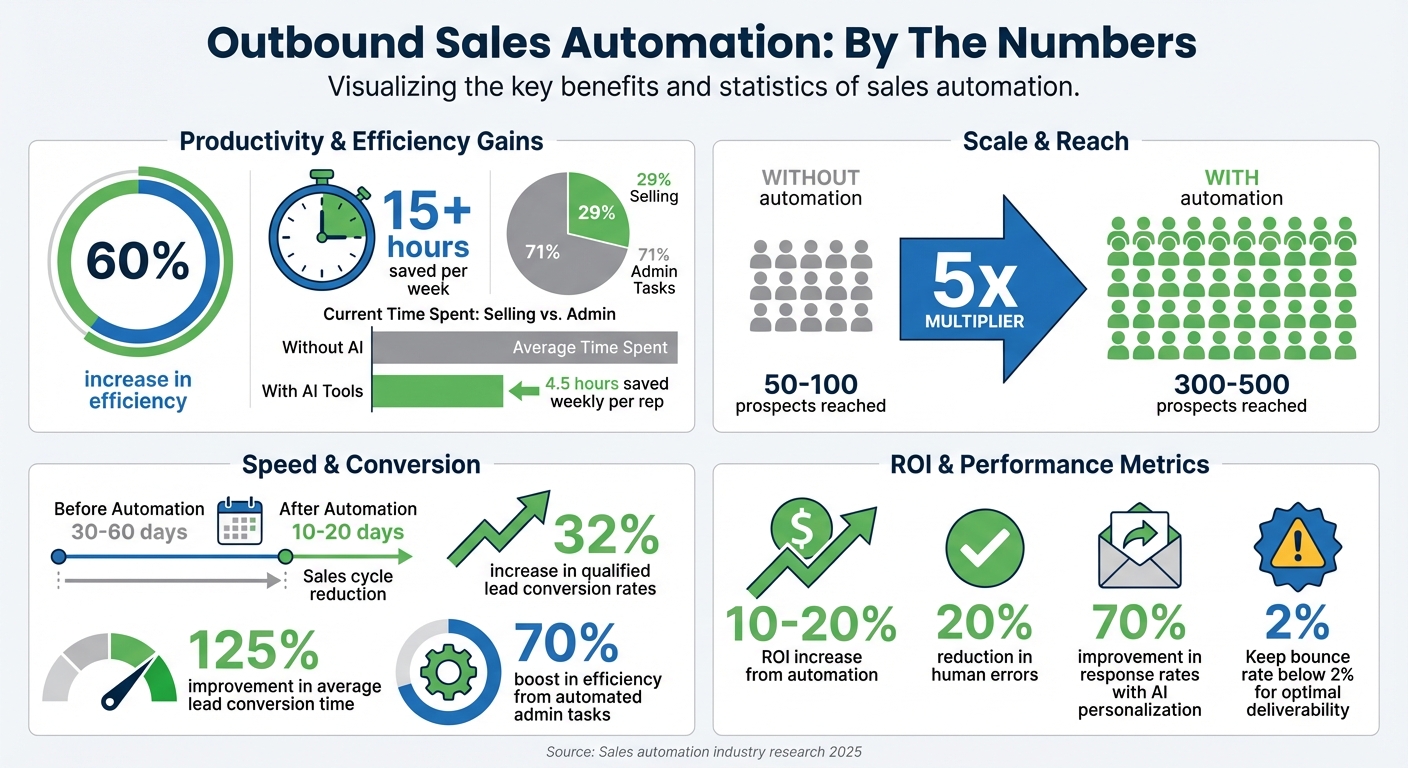
Outbound Sales Automation Impact: Key Statistics and Benefits
Step 1: Set Goals and Prepare Your Data
Define Your KPIs
Before diving into automation, it's crucial to define clear KPIs that outline what success looks like. Did you know sales teams spend only 29% of their time actually selling? The rest is eaten up by tasks like manual data entry and administrative work. Automation can help, but only if you track the right numbers.
Focus on three key areas:
- Activity metrics: Keep tabs on calls made, emails sent, and follow-ups completed.
- Engagement metrics: Measure open rates, click-through rates, and response rates.
- Conversion metrics: Include meetings booked, lead-to-opportunity rates, and calls-to-close ratios.
Don't forget financial metrics like cost per opportunity and customer acquisition cost to ensure automation boosts profitability, not just productivity. And keep a close eye on your email bounce rate - keeping it below 2% is critical for maintaining your domain reputation and ensuring your emails land in inboxes.
Here’s a real-world example: Companies using predictive models tied to well-defined objectives have reported a 32% jump in qualified lead conversion rates and a 125% improvement in average lead conversion time. In 2025, Snowflake teamed up with Outreach to automate account-based selling, leading to a 15% increase in sales reps hitting their quarterly quotas and a 20% average prospect reply rate.
Once your KPIs are set, the next step is to make sure your data is accurate and actionable.
Clean and Enrich Your Data
Bad data isn’t just annoying - it can cost you. Poor data quality can slash revenue by up to 20%. Before launching any campaign, clean up your CRM by removing duplicates, verifying contact details, and standardizing formats.
But cleaning isn’t enough. Data enrichment adds the context you need to personalize your outreach at scale. Instead of working with just a name and email, enrich your records with details like firmographics, technographics, and behavioral signals - things like recent funding rounds or hiring sprees. This extra context helps you target the right prospects at the right time.
For ecommerce sales teams, tools like StoreCensus (https://storecensus.com) can provide real-time insights on over 2.5 million ecommerce businesses. You can filter prospects by installed apps, platform usage, growth trends, and recent tech changes, adding over 25 data points per store. This eliminates the need for manual research and ensures your outreach is based on up-to-date signals instead of outdated spreadsheets.
"CRM data enrichment is the process of adding extra, helpful details to the contact data in your CRM. Instead of working with just a name and email, you add context... Because in sales and marketing, context is everything." - Marharyta Sevostianenko, SDR/SAAS & B2B Sales, Generect
To keep your data fresh, set up real-time syncs and always verify emails before launching campaigns. Use enriched data to segment your leads based on factors like tech stack, company size, or recent activity. This allows you to craft tailored messages instead of sending out generic pitches.
Accurate and enriched data lays the groundwork for effective segmentation and personalized outreach in the next steps.
Step 2: Choose and Connect Your Tools
Compare Automation Platforms
When selecting an automation platform, focus on what genuinely enhances your workflow instead of getting distracted by flashy extras. A good platform should enable multi-channel orchestration, letting you manage outreach across email, LinkedIn, phone, SMS, and WhatsApp within a single workflow. This eliminates the hassle of switching between multiple tools and ensures your messaging remains consistent across channels.
Modern AI-powered personalization goes far beyond basic features like merge tags. Today’s tools can analyze company news, gather insights about prospects, and draft highly tailored messages. Sales reps using AI for outreach have seen response rates improve by 70%, while automation saves them an average of 4.5 hours each week.
Make sure the platform offers native CRM integration with bidirectional sync, automated field mapping, and deduplication. This creates a unified data source and prevents silos. Advanced features like lead scoring and intent detection can help rank prospects based on their behavior - such as website visits or email engagement - and their company profile. Additionally, tools with drag-and-drop visual workflow builders allow your sales team to quickly design and tweak automation sequences.
Once you’ve chosen a platform, integrate it with your CRM to streamline your sales processes.
"Automation scales what works and what doesn't. Automate broken processes, and you just scale the mess." - Sean O'Connor, Revenue Specialist
Connect Tools to Your CRM
After picking your platform, proper integration is key. Start by confirming API requirements based on the edition of your CRM.
Create a dedicated Integration User profile with permissions to access and modify essential objects like Accounts, Contacts, Leads, and Opportunities. Set up bi-directional field mapping so updates sync seamlessly in both directions. Use advanced settings to skip empty fields, ensuring valid data isn’t overwritten.
To avoid sync issues, limit API calls to 20–30% per operation and keep global usage under 70–80%. Enable features like "Sync Merge and Delete" to handle merged or deleted records efficiently, keeping your data clean.
Set up sync conditions using AND/OR logic to filter out unnecessary data. For example, sync only leads with an email address who haven’t opted out. Use filters to prioritize sales-ready replies or high-intent leads instead of syncing all interactions. Regularly check plugin error logs to catch and resolve sync issues early.
Native integrations typically outperform third-party connectors, offering quicker sync speeds, better field mapping, and more reliable error handling. Organizations that automate administrative tasks report a 70% boost in efficiency, while smart workflows can increase sales rep productivity by 60%.
"With monday CRM, we're finally able to adapt the platform to our needs - not the other way around. It gives us the flexibility to work smarter, cut costs, save time, and scale with confidence." - Samuel Lobao, Contract Administrator & Special Projects, Strategix
AI Outbound 101: The Ultimate Course on Automated Lead Generation (2 HOURS)
Step 3: Build Targeted Campaigns
Now that you’ve enriched your data and integrated the right tools, it’s time to create highly targeted campaigns that resonate with your audience.
Segment Your Audience
To truly connect with your prospects, segmentation needs to go beyond the basics. Instead of just grouping by industry, consider layering in firmographic data (like company size, revenue, and location), technographic details (such as their tech stack), and behavioral signals (like website visits or email interactions). Static lists are a thing of the past - dynamic segmentation updates automatically as your CRM data changes. For instance, if you’re targeting mid-sized ecommerce companies using specific payment processors, your lists should adjust in real time as new businesses qualify or existing ones evolve.
Intent-based scoring is another powerful tool. By combining explicit signals (like demo requests or visits to your pricing page) with implicit ones (such as content downloads or time spent on your site), you can rank prospects based on their likelihood to convert. Amazon, for example, saw a 32% boost in qualified lead conversions by using predictive prospecting models. Set clear thresholds for action - prospects scoring 80 or higher could trigger immediate sales alerts, while those below 50 might stay in nurturing sequences.
For ecommerce outreach, platforms like StoreCensus can help you filter over 2.5 million stores by factors like installed apps, platform changes, and growth indicators. Automated campaigns can then target prospects when they show key buying signals - like installing new apps or updating checkout systems - or during pivotal moments, such as after funding rounds or leadership changes.
| Segmentation Type | Data Points Included | Purpose |
|---|---|---|
| Firmographic | Industry, company size, revenue, location | Ensures the company aligns with your ideal customer profile (ICP) |
| Technographic | Software stack, hardware used | Evaluates compatibility or potential for displacement |
| Behavioral | Email opens, link clicks, pricing page visits | Measures interest and intent to purchase |
| Trigger-Based | Funding rounds, leadership changes, new hires | Targets prospects at moments when they’re most open to engagement |
Once your audience is properly segmented, you can craft messaging that speaks directly to their unique challenges and goals.
Personalize Your Messages
Segmentation lays the groundwork, but personalization is what makes your campaigns stand out. Go beyond simply adding a name - use AI to analyze company news, LinkedIn activity, or recent behaviors to craft contextual, attention-grabbing openers. Personalized subject lines can double reply rates, jumping from 3% for generic emails to 7% for tailored ones. Even better, AI-generated openers have been shown to increase first-message replies by 61%.
Keep your emails concise - ideally 3–5 sentences (under 150 words) - and follow this structure:
- Acknowledge something specific about the company or prospect.
- Highlight a pain point they’re likely facing.
- Offer your solution.
- Provide a proof point or example of success.
- End with a clear call to action.
Before hitting send, ask yourself: Why am I reaching out to this company? How can I help them?.
Behavioral triggers can also guide your follow-ups. For example, if a prospect clicks a pricing link, notify your sales team to follow up immediately. If they only open emails without clicking, send them a relevant case study a couple of days later. Coordinating outreach across multiple channels - email, LinkedIn, phone, and even voicemail - can significantly improve response rates. Campaigns that combine LinkedIn messages with website visits have achieved an 11.87% reply rate, while adding voicemail to your sequence can nearly double responses, from 2.73% to 5.87%.
Timing matters, too. Schedule emails for mornings in the recipient’s local time zone, ideally on Tuesdays, Wednesdays, or Thursdays, to maximize engagement. And don’t overlook the basics - verify email addresses to keep bounce rates below 2% and protect your domain reputation. Clean data also prevents embarrassing mistakes like broken personalization tags (e.g., "Hi [FIRST_NAME]").
For high-value prospects, invest in deeply personalized outreach. For lower-priority leads, use semi-personalized messaging tailored to their persona. This tiered approach ensures you’re allocating your resources where they’ll have the greatest impact.
Step 4: Test, Improve, and Expand
After crafting your targeted campaigns, the next step is to launch them thoughtfully. A gradual rollout is often the best approach. Starting small allows you to gather real-world performance data, refine your strategy, and scale up effectively. This method protects your sender reputation, conserves resources, and ensures you're building on a solid foundation.
Start with Pilot Campaigns
Begin with pilot campaigns targeting 100–200 prospects. This smaller scale helps establish baseline metrics while minimizing risks. You'll be able to monitor key performance indicators like open rates, reply rates, click-through rates (CTR), and meetings booked. Plus, it ensures your domain reputation stays intact. If your bounce rate exceeds 2%, hit pause and validate your lead list immediately.
Keep an eye on both engagement metrics (e.g., open rates) and business outcomes (e.g., meetings scheduled, lead-to-opportunity conversions, pipeline velocity). For instance, in 2025, Rootly implemented automated sales sequences and focused on their most effective content during a pilot phase. The results? A 41% increase in prospects contacted, a 69% boost in meetings scheduled, and a staggering 640% rise in LinkedIn outreach.
Structure your testing into phases:
- Days 1–30: Audit and set up workflows.
- Days 31–60: Test initial sequences and scoring models.
- Days 61–90: Analyze results and scale based on what's working.
Run A/B Tests
A/B testing is crucial for figuring out what resonates with your audience. Start by testing one element at a time - subject lines are a great place to begin. Personalized subject lines, for example, can dramatically improve reply rates, jumping from 3% to 7%. Test each variation with at least 100 recipients over the course of a week. Once you identify a winning version, make it your default and move on to testing the next element.
"The keys to successful A/B testing are clearly defining the success metric, such as click-through or conversions, and measuring all samples in a group in real time." - Salesforce
Don't stop at subject lines. Experiment with other factors like opening sentences, call-to-action (CTA) formats, and send times to pinpoint what drives the best results. Modern AI tools can even handle multiple tests simultaneously, providing faster insights. In 2025, Snowflake worked with Outreach to automate sales processes and apply data-driven strategies. The result? A 15% increase in sales reps meeting their quotas and an average prospect reply rate of 20%.
Track and Adjust Your Workflows
Performance tracking doesn't end after the launch - it’s an ongoing process. Use automated dashboards to monitor metrics in real time, and schedule quarterly reviews to assess performance across different segments. Look for patterns: which industries are closing deals faster? Which personas respond better to certain messages? Behavioral branching can also help. For example, if someone opens your email but doesn't click, you can trigger a follow-up email featuring a relevant case study.
Break your pipeline into micro-stages to identify where prospects drop off. For instance, differentiating between "Initial Proposal Viewed" and "Negotiation Pending" can help you zero in on problem areas. Then, use CRM rules to automatically enroll prospects into sequences that have proven successful for their role. This kind of automation can boost ROI by 10–20% while reducing human errors by 20%.
As you scale, maintain high standards. Every message should have a single, clear call to action. Use email validation tools to protect deliverability and monitor unsubscribe rates closely. The ultimate goal isn’t just to reach more people - it’s to connect with the right people, delivering messages that drive action. By doubling down on what works and cutting what doesn’t, you can expand your efforts with confidence and precision.
Conclusion
To sum it up, successful outbound sales automation hinges on a few key elements: setting clear goals, working with accurate data, using well-integrated tools, and crafting targeted campaigns. By automating the right processes, your team can shift their focus to building strong customer relationships, with productivity gains of up to 60%.
Start by ensuring your CRM is populated with clean, enriched data - it’s the backbone of any successful campaign. Keep your bounce rate under 2%, and make it a habit to validate your contact lists regularly to maintain high performance.
Simplify your tech stack to minimize complexity and cut down on training time. Look for platforms that integrate effortlessly with your CRM and support multi-channel outreach. This can help you reclaim the 29% of selling time that’s often lost to administrative tasks.
Finally, automation works best when it’s smart and adaptive. Run weekly A/B tests on subject lines, track campaign performance monthly, and fine-tune your messaging based on behavioral triggers. Regular testing and adjustments are non-negotiable for keeping your strategies effective.
FAQs
How does outbound sales automation help improve data accuracy?
Outbound sales automation takes data accuracy to the next level by using AI-driven tools to manage tasks like lead enrichment, data validation, and cleaning. These tools keep critical information - such as contact details, company profiles, and engagement metrics - current and dependable, cutting down on errors from outdated or incorrect data.
When paired with CRM systems, automation workflows ensure records are continuously validated and updated without requiring manual effort. This reduces inconsistencies and sharpens the focus of outreach efforts, paving the way for more precise campaigns and improved conversion rates. By automating these processes, you not only maintain accurate, actionable data but also save valuable time while increasing overall efficiency.
What metrics should you track to evaluate the success of outbound sales automation?
To evaluate how well your outbound sales automation is working, keep an eye on these key performance metrics:
- Email open rate and reply rate: These show how engaged your audience is with your outreach efforts.
- Positive response rate: A great indicator of lead quality and interest level.
- Call pickup rate: Helps you measure the success of your phone outreach.
- Pipeline growth and revenue generated: These reveal the overall impact of your automation on sales performance.
- Customer retention: A solid measure of long-term success and relationship-building.
By tracking these metrics regularly, you’ll gain valuable insights into how efficient your automation processes are and where you can make improvements. Staying on top of these numbers ensures your strategies stay effective and aligned with your sales objectives.
How does data enrichment improve outbound sales efforts?
Data enrichment takes outbound sales efforts to the next level by supplying detailed, accurate, and current information about your prospects. This means your team can create messaging that feels personal and relevant, driving better engagement and higher response rates.
With enriched data at their fingertips, sales teams gain deeper insights into prospect needs, spot high-value leads more effectively, and refine their outreach strategies. The result? Time saved, campaigns that deliver stronger results, and more meaningful connections that lead to higher conversion rates.