Best Practices for Ecommerce API Data Standardization
Practical best practices for designing standardized ecommerce APIs: clear schemas, OpenAPI docs, JSON validation, secure data, versioning, and performance.


Your ecommerce API's success depends on data standardization. Without it, your product catalog risks being invisible on AI-driven platforms like ChatGPT, Gemini, and Perplexity. Here's why it matters:
- 67% of mid-market catalogs lack proper GTIN coverage (below 80%), limiting visibility.
- Inconsistent naming and data types create integration headaches, costing businesses up to 25% of annual revenue.
- AI tools rely on structured, machine-readable data - if your data isn't standardized, you’re out of the game.
To fix this, focus on:
- Schema design: Use clear naming conventions, standard data types (e.g., ISO 8601 for dates), and logical nested structures.
- Documentation: Provide OpenAPI specs, error codes, and clear pagination/filtering guidelines.
- Validation & Security: Enforce strict JSON schema validation, required fields, and encrypt sensitive data.
- Interoperability: Use semantic versioning and standardized formats for dates, currencies, and product IDs.
- Performance: Implement smart pagination, caching, and rate limiting to handle high traffic and large datasets.
AI shopping tools and platforms like the Universal Commerce Protocol (UCP), backed by Google and Shopify, now set the standard for data exposure. If your API doesn’t meet these standards, your catalog could be left behind.
API Modelling Using Standards
Schema Design Best Practices
A solid schema is the backbone of any dependable ecommerce API. When your data structure is predictable and consistent, integration becomes smoother, minimizing the need for manual adjustments. Following these practices ensures compatibility and improves machine-readability across ecommerce platforms.
Use Consistent Naming Conventions
How you name things in your API matters - a lot. Clear and consistent naming conventions make it easier for developers to navigate and use your data. For instance, use snake_case for response properties like product_variant_id and camelCase for request parameters such as pageSize. StoreCensus, for example, follows this widely accepted pattern for ecommerce APIs.
When designing routes, focus on nouns rather than verbs. Instead of /getProducts, go with /products, and always use plural nouns for resource endpoints like /orders or /customers. For boolean fields, use prefixes like is_, has_, or can_ to make their purpose clear (e.g., is_taxable or has_variants).
Avoid using dynamic keys, as they can complicate integration. Instead, opt for arrays of objects with explicit ID fields. Always rely on immutable internal IDs, like customer_id, as primary keys instead of changeable data like email addresses.
Define Standardized Data Types
Standardized data types help your API "speak the same language" as other systems. For timestamps, stick to the ISO 8601 standard in UTC format (e.g., 2026-03-20T14:30:00Z) to avoid timezone issues. When handling monetary values, include both a numeric amount and an ISO 4217 currency code, such as USD, EUR, or JPY.
Dimensional attributes should also be explicit. For example, instead of saving "5kg" as a string, use an object like {"value": 5, "unit": "kg"}. For product identifiers, prioritize GTINs (Global Trade Item Numbers) to ensure compatibility with global catalogs and AI-driven shopping tools.
To maintain consistency across datasets, normalize attribute values. For example, map variations like XL, X-Large, and Extra Large to a single standardized token. This step is crucial for preventing broken storefront filters and enabling accurate search functionality.
Using standardized types also paves the way for logical data organization through nested structures.
Adopt Nested Resource Structures
Nested structures mirror the natural relationships within ecommerce data. A product, for instance, might include variants with specific attributes, while an order could contain line items, fulfillment statuses, and transaction details. Structuring your API this way reduces the number of requests clients need to make, improving performance.
Group related fields into logical nested objects. For example, separate contact_info, ecommerce_info, and financial_info into distinct blocks. When dealing with collections like tags or categories, use arrays of objects with consistent property names, such as [{"slug": "tag-name", "name": "Tag Name"}]. This approach keeps large datasets manageable and allows developers to fetch only the sections they need. Many modern APIs use nested structures to let clients retrieve all relevant data with a single, efficient call.
Documentation Best Practices
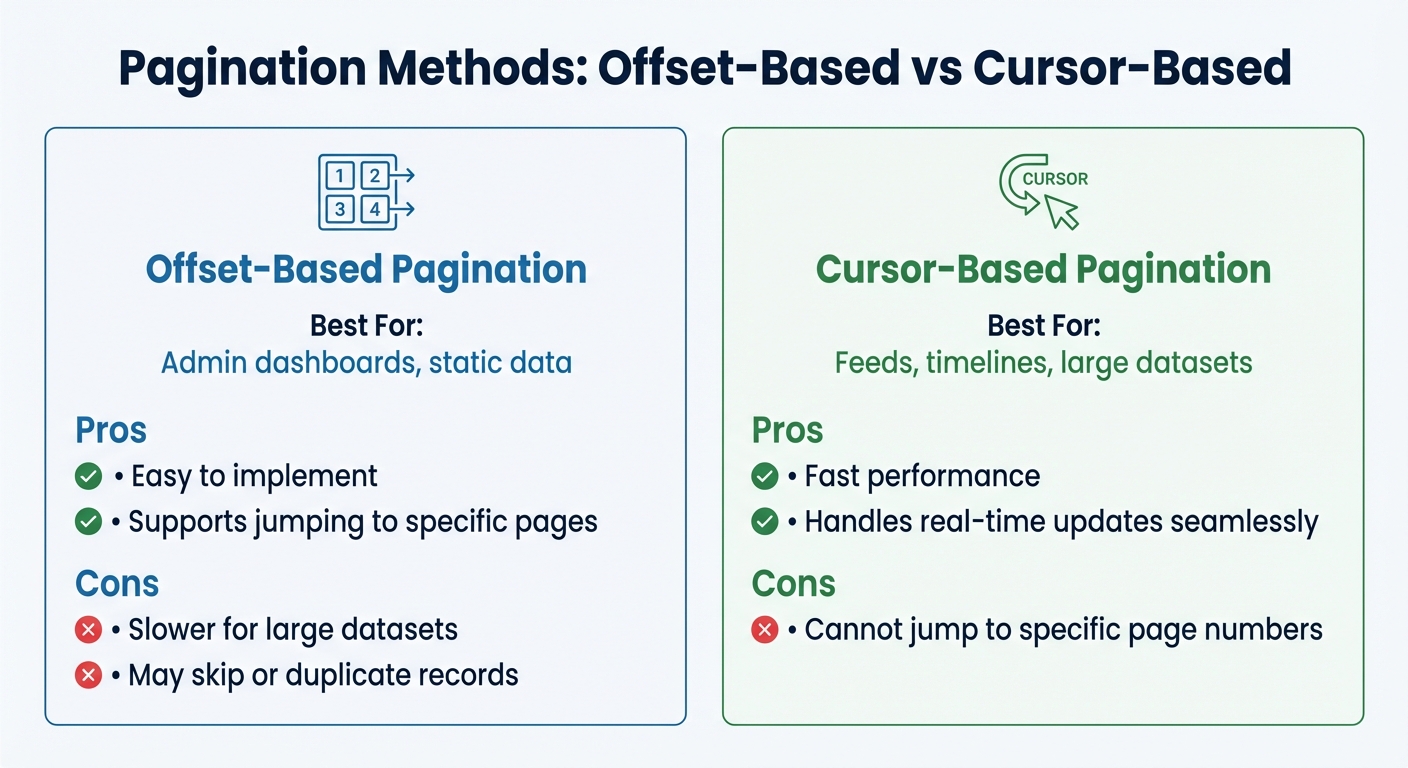
Pagination Methods for Ecommerce APIs: Offset vs Cursor-Based Comparison
Clear and detailed documentation is the backbone of a smooth integration process for your ecommerce API. When developers have access to precise instructions, they can get started faster, avoid common mistakes, and build reliable connections. A well-documented API not only reduces setup time - sometimes from weeks to just a few hours - but also simplifies troubleshooting and ensures consistent integration.
Provide OpenAPI Specifications
Using OpenAPI (formerly Swagger) is like creating a blueprint for your API. This machine-readable specification outlines exactly what data your API accepts and returns, removing any guesswork for developers. It also enables tools like SDKs and API explorers to automate tasks, making the development process even smoother.
In 2024, 74% of organizations identified as "API-first," with those leading the way being 83% more likely to restore a failed API within one hour. OpenAPI specs provide an extra layer of validation, catching errors like mismatched data types or missing fields before they reach production. For ecommerce APIs, which often handle sensitive data like product catalogs or customer information, this is especially important.
Your OpenAPI documentation should include practical, developer-friendly examples. For instance, provide cURL snippets for common requests and complete JSON response examples. These can demonstrate how to handle product variants, order details, or customer addresses. A great example is StoreCensus, which offers comprehensive OpenAPI specs that show developers how to filter ecommerce stores using parameters like installed apps or growth metrics.
Document Pagination and Filtering
When working with large datasets, like a product catalog with millions of items, clear pagination and filtering guidelines are crucial. Without them, developers may struggle to retrieve data efficiently, wasting valuable time.
Be explicit about which pagination method your API uses - cursor-based or offset-based - and include examples to show when each is most useful. Cursor-based pagination is ideal for large, dynamic datasets (like order histories), as it seamlessly handles new records without skipping or duplicating entries. Offset-based pagination, on the other hand, works well for smaller, static datasets like admin dashboards.
| Pagination Method | Best For | Pros | Cons |
|---|---|---|---|
| Offset-based | Admin dashboards, static data | Easy to implement; supports jumping to pages | Slower for large datasets; may skip or duplicate records |
| Cursor-based | Feeds, timelines, large datasets | Fast; handles real-time updates | Cannot jump to specific page numbers |
Also, make sure to specify default pageSize values (typically 50) and maximum limits (often 100–500). For filtering, provide clear examples for different parameter types, like date ranges, boolean toggles, or multi-select options. If your API supports extensive filter options, group them into logical categories - such as Location, Business, or Financial - to keep the documentation easy to navigate.
Specify Error Codes and Responses
When things go wrong, developers need clear, actionable error messages. Vague responses like "Bad Request" can lead to hours of unnecessary debugging. Instead, provide structured error codes and detailed descriptions to help developers quickly identify and resolve issues.
Adopt the RFC 7807 standard for structuring error responses. This format includes a type URI, title, HTTP status, and field-specific validation details. For example, instead of a generic 400 error, return something like woocommerce_rest_invalid_product_id to make the issue immediately identifiable.
Document all common HTTP status codes your API returns, along with explanations for when they occur:
| HTTP Status Code | When It Occurs |
|---|---|
| 200 OK | Request succeeded |
| 201 Created | A new resource was successfully created (e.g., a cart item added) |
| 204 No Content | Resource successfully deleted |
| 400 Bad Request | The request was malformed or missing parameters |
| 401 Unauthorized | Authentication failed or API key is missing |
| 429 Too Many Requests | Rate limit exceeded |
| 500 Internal Error | An error occurred on the server |
For rate limits, clearly outline the thresholds for each subscription tier. Include a Retry-After header in 429 responses so developers know when they can try again. By being transparent about these limits, you can help integration teams avoid unnecessary frustration.
Data Validation and Security
Data validation is essential for protecting your business from potentially expensive mistakes. When working with ecommerce APIs that process sensitive customer details and payment data, the risks are even higher. Below, we'll cover methods to validate data effectively and secure sensitive information.
Use JSON Schema Validation
JSON Schema acts as a gatekeeper for your API by validating incoming payloads before they’re processed. Each API route should have a clearly defined schema to ensure data meets specific rules. For example, you can set constraints like minLength and maxLength for strings, define minimum and maximum values for numbers, and use regex patterns to enforce formats like email addresses or phone numbers.
"APIs MUST be strict in the information they produce, and they SHOULD be strict in what they consume as well (where tolerance cannot be applied). Since we are dealing with programming interfaces, we need to avoid guessing the meaning of what is being sent to us as much as possible." – SPS Commerce API Standards
Pay close attention to global identifiers like GTIN, EAN, and UPC, ensuring they align with GS1 standards and include proper check-digit validation. Logical inconsistencies, such as a product marked "in stock" but showing a zero quantity, should trigger conflict resolution rules.
Precision also matters when handling data types. For example:
- Booleans should strictly be
trueorfalse(not"true"as a string). - Use strings for 64-bit integers to avoid precision errors.
- Always format dates in ISO 8601 (
YYYY-MM-DDTHH:mm:ss.sssZ) and store them in UTC.
If validation repeatedly fails, route the affected events to a Dead-Letter Queue for further inspection. After validation, enforcing mandatory fields is the next step to safeguard data accuracy.
Enforce Required Fields
Strict schema validation should be paired with clearly defined required fields to ensure data completeness. Your JSON schema should specify mandatory fields, such as product name, price, and availability, and return a structured 400 Bad Request error if any are missing. Validation callbacks can further confirm the data is in the correct format before processing.
When handling PATCH operations, distinguish between null and missing fields. Use null to explicitly clear a field, while omitting the field means no changes are being made. Avoid ambiguous codes or "magic numbers" for state values; instead, use clear string enums like STATUS: "PROCESSING" for better readability and maintenance.
Another crucial step is implementing idempotency, which ensures that processing the same event multiple times (common with webhook retries) doesn’t result in duplicate orders or customer profiles. This is especially important for APIs tied to revenue, as 21% of companies report that APIs generate over 75% of their total revenue as of 2024.
Encrypt Sensitive Data
Once data integrity is ensured, the next priority is securing sensitive information to build trust and meet compliance standards. Always use HTTPS/TLS for data in transit and encrypt sensitive data, such as PII and payment details, at rest. For payment processing, compliance with PCI DSS Level 1 is non-negotiable.
Minimize risk by transmitting only the necessary fields. Redact or mask PII in application logs to prevent accidental exposure during debugging. Store API keys and secrets in a secure secrets manager - never in your codebase or shared documents - and rotate them regularly.
For webhooks, verify the HMAC signature in the header to confirm the request’s authenticity and integrity. Use OAuth for user-based permissions instead of broad admin keys, following the principle of least privilege to grant only the access required for each task.
Keep audit logs for any action that creates, updates, deletes, or exports sensitive data to ensure traceability. It’s worth noting that 85% of consumers consider accurate product data a key factor in their purchasing decisions, emphasizing the importance of protecting data at every stage.
Interoperability and Versioning Standards
To keep your API functional and dependable, it's crucial to focus on interoperability and versioning alongside strong schema and security practices. This approach ensures compatibility and smooth updates, which are essential for managing ecommerce APIs. Without clear versioning rules or standardized formats, even small updates can disrupt integrations, leading to revenue loss. In 2024, 74% of organizations identified themselves as "API-first", with leaders in this group being 83% more likely to recover from API failures within an hour. On the flip side, inconsistent updates can cause poor data quality, potentially costing up to 25% of annual revenue when breaking changes disrupt established data structures and endpoints.
Implement Semantic Versioning
Semantic versioning uses a three-part structure: major, minor, and patch versions. Major versions should only change when introducing breaking updates, such as modifying schema formats, removing properties, or deprecating routes. Non-breaking changes, like adding new properties, endpoints, or optional parameters, don’t require a major version update.
"A breaking change is anything that changes the format of existing Schema, removes a Schema property, removes an existing route, or makes a backwards-incompatible change to anything public that may already be in use by consumers." – WooCommerce Store API Guiding Principles
There are several ways to manage versioning, including URL paths (e.g., /v1/products), custom headers (e.g., Accept-Version: v2), or query parameters (e.g., ?version=2). Each method has its pros and cons. For instance, URL paths are straightforward and easy to test but might lead to duplicated URLs. A notable example is Shopify’s 2025 transition to requiring the GraphQL Admin API for all new public apps, phasing out the older REST Admin API. This shift came with a cost-based rate-limiting model (50 points per second) and tools like a CLI and GraphiQL explorer to ease migration.
To avoid disruptions, establish a deprecation schedule that gives developers enough time to adapt before retiring old versions. Monitoring version usage through your API gateway can also help pinpoint clients relying on outdated endpoints.
Enable Field Selection
Clear versioning not only prevents integration issues but also sets the stage for efficient data delivery through field selection. This feature allows API consumers to request only the data they need, improving performance by reducing payload sizes. Sparse fieldsets can be implemented using query parameters (e.g., ?fields=name,email) or by organizing data into logical sections that can be toggled on or off. For instance, in 2026, StoreCensus introduced an API endpoint (/api/v1/website/{domain}) that lets users request specific data blocks by passing a comma-separated list to the sections parameter. This allows access to 12 distinct categories, including contact_info, technical_info, and apps_integrations.
GraphQL naturally supports field selection, enabling precise data queries. Regardless of the approach, it’s essential to validate field selection requests (e.g., via JSON schema) to ensure clients only access existing and authorized fields. Additionally, implement performance safeguards like cost-based rate limiting to prevent overly complex queries from affecting system performance.
Standardize Date and Currency Formats
Inconsistent formats for dates and currencies can lead to confusion and errors. To prevent this, use the ISO 8601 standard (YYYY-MM-DDTHH:mm:ss.sssZ) for all dates, representing them in UTC to avoid time zone issues. For example, March 20, 2026, at 2:30 PM UTC should be formatted as 2026-03-20T14:30:00Z. Using clear field names like xxxDateTime for time-specific data and xxxDate for date-only data helps clarify the expected level of precision.
For currency, stick to the ISO 4217 three-letter codes (e.g., USD, EUR, GBP) and avoid floating-point numbers to prevent rounding errors. Instead, represent monetary values as strings (e.g., "19.99") or integers in minor units (e.g., 1999). Similarly, quantities and dimensions should be structured as objects with both a numeric value and a unit (e.g., {"value": 15, "unit": "cm"}).
In January 2026, the Universal Commerce Protocol (UCP) launched its version 1.0, supported by major players like Google, Shopify, Etsy, Target, Wayfair, and Walmart. This protocol introduced machine-readable product data schemas and required merchants to expose specific capability endpoints, including standardized attribute normalization and variant structures.
These practices for interoperability and versioning align seamlessly with the performance optimization strategies discussed in the next section.
Performance Optimization and Scalability
Even with a well-versioned API, poor performance under heavy loads can lead to failures. To keep your ecommerce API responsive regardless of traffic, it’s crucial to optimize its performance. This ensures your standardized ecommerce data is delivered quickly and reliably, even at scale. Integration failures during peak loads can lead to poor data quality, potentially costing businesses up to 25% of their annual revenue. To manage high traffic effectively, focus on techniques like smart pagination, caching, and rate limiting.
Implement Pagination Defaults
When dealing with large datasets - such as extensive product catalogs or years of customer records - returning all results in a single response can overwhelm both servers and clients. Cursor-based pagination is a better solution for managing large result sets. It avoids the inefficiencies and performance issues caused by deep offsets. Instead of calculating offsets, clients use a nextCursor to fetch the next set of records. StoreCensus suggests page sizes of 50–100 for interactive use and up to 500 for bulk exports. Similarly, WooCommerce limits the maximum per_page parameter to 100 to maintain server stability.
For operations involving massive data imports, such as adding thousands of products, rely on bulk APIs rather than standard pagination. Shopify’s Michael Keenan advises:
"For big jobs, like importing thousands of products, use asynchronous bulk operation APIs".
Shopify’s infrastructure can handle an average of 40,000 checkouts per minute per store. Once pagination is optimized, server loads can be further reduced by caching static data.
Use Caching for Static Data
Static data that is frequently accessed but rarely changes - like product categories, tax rates, or enrichment data - should be cached to improve response times and reduce server strain. Consider implementing a tiered TTL (time-to-live) strategy based on how often data changes. For example:
- Use seconds for highly dynamic data like carts or inventory.
- Set minutes for personalization segments.
- Apply hourly or daily TTLs for static metadata.
Compression tools like Gzip can also help, reducing JSON payload sizes by 70–90%.
To keep cached data accurate, use webhooks to immediately invalidate caches when updates occur. Shopify highlights:
"Modern API integrations... are built for immediacy. They use webhooks to react to events, like a new order or an inventory update, the second they happen".
This event-driven approach minimizes unnecessary API calls and ensures data freshness. For security, always verify HMAC signatures in webhook headers before accepting cache updates. Paired with caching, rate limiting is another critical step to maintain API performance during high traffic.
Enforce Rate Limiting
Rate limiting prevents system overloads by controlling the number of requests clients can make. Without it, a single misbehaving client or sudden traffic spike could disrupt your API. Shopify’s GraphQL Admin API, for instance, uses a cost-based rate-limiting model. Developers are assigned a 1,000-point "bucket" that refills at 50 points per second.
StoreCensus uses tiered rate limits to balance resource allocation: Professional plans allow 6 requests per second, while Enterprise plans permit up to 30, using a 1-second sliding window. When limits are exceeded, return a 429 Too Many Requests status code and include a Retry-After header to inform clients when they can try again. Encourage clients to implement exponential backoff, which spaces out retries progressively to avoid further strain on the API.
Conclusion
Standardizing your ecommerce API data is all about setting up a strong, scalable base for your business. By sticking to consistent naming rules, defining clear data types, and using solid validation methods, you can establish a predictable data framework. This eliminates the need for manual mapping and reduces integration headaches. Following best practices in schema design and documentation creates a smoother integration process and opens the door to smarter data use.
Fast forward to 2026, and the stakes are even higher. AI shopping tools like Gemini, ChatGPT, and Perplexity aren’t browsing websites - they’re pulling from structured data endpoints. The Universal Commerce Protocol (UCP), introduced in January 2026 with backing from Google, Shopify, and Walmart, now sets the bar for machine-readable product data. If your catalog isn’t standardized, it risks being overlooked in these rapidly growing channels. A 2026 audit revealed that 67% of mid-market ecommerce catalogs had GTIN coverage below 80%, creating significant visibility challenges.
Tools like StoreCensus highlight the power of standardized APIs to deliver real-time insights at scale. StoreCensus uses consistent JSON structures - such as ecommerce_info, financial_info, and activity_signals - to monitor over 2.5 million stores with more than 25 data points. This level of standardization allows agencies, SaaS developers, and growth teams to analyze stores based on installed apps, growth indicators, and tech updates without needing custom parsers or dealing with messy data formats. The payoff? Faster lead generation, better market research, and automation workflows that react to real-time store changes.
FAQs
What are the minimum required product fields for AI shopping visibility?
The core product fields that boost AI shopping visibility are name, image, description, SKU, GTIN-13, brand, offers, price, priceCurrency, availability, and aggregateRating. These elements play a critical role in setting up structured data, refining search result performance, and improving how AI identifies and understands products.
How can I migrate to standardized IDs (like GTIN) without breaking integrations?
Migrating to standardized IDs like GTIN requires careful planning to avoid disruptions. Start by updating your data schema to accommodate both the old and new IDs, ensuring backward compatibility. During this transition, API versioning is essential to maintain seamless communication between systems.
Keep stakeholders in the loop by notifying them early about the changes. Before rolling out updates, test everything thoroughly in a staging environment. Gradually phase out the old IDs to minimize risks and monitor the health of integrations throughout the process.
Lastly, implement strong validation measures to protect data integrity and ensure the migration goes smoothly.
When should I use cursor-based pagination vs offset-based pagination?
For handling large datasets or real-time data streams, it's best to use cursor-based pagination. This method ensures better consistency, handles scalability well, and is more efficient when dealing with constantly changing data.
On the other hand, offset-based pagination is a good choice for smaller, static datasets. It’s simpler to implement and easier to work with when data doesn’t change frequently.