How Accessibility Improves UX and Conversions
Accessibility is a growth strategy: removing barriers in checkout and navigation boosts UX, cuts support costs, and increases conversions.

Did you know 27% of U.S. adults have disabilities, yet only 2.2% of ecommerce sites meet accessibility standards (WCAG 2.1 AA)? This gap isn't just a missed opportunity - it's a business risk. Poor accessibility frustrates users, drives away potential customers, and leads to lost revenue. But fixing these issues can transform your site into a better experience for everyone, boosting conversions and reducing costs.
Here’s why accessibility matters for ecommerce:
- Missed Revenue: People with disabilities control $13 trillion in global disposable income. Ignoring them means losing access to a massive market.
- Common Issues: 94% of top ecommerce sites fail on basics like alt text, keyboard navigation, and clear form labels, frustrating users.
- Conversion Boosts: Simple fixes like larger buttons, better error messages, and high contrast can increase revenue by up to 4.8%.
- Cost Savings: Accessibility improvements reduce customer service tickets by 22.3% and slash maintenance costs by up to 66%.
Accessibility isn’t just about compliance - it’s about creating a better user experience for everyone, from assistive tech users to busy mobile shoppers. Fixing critical barriers like navigation and checkout forms not only improves usability but also drives loyalty and long-term growth. Can your business afford to ignore this?
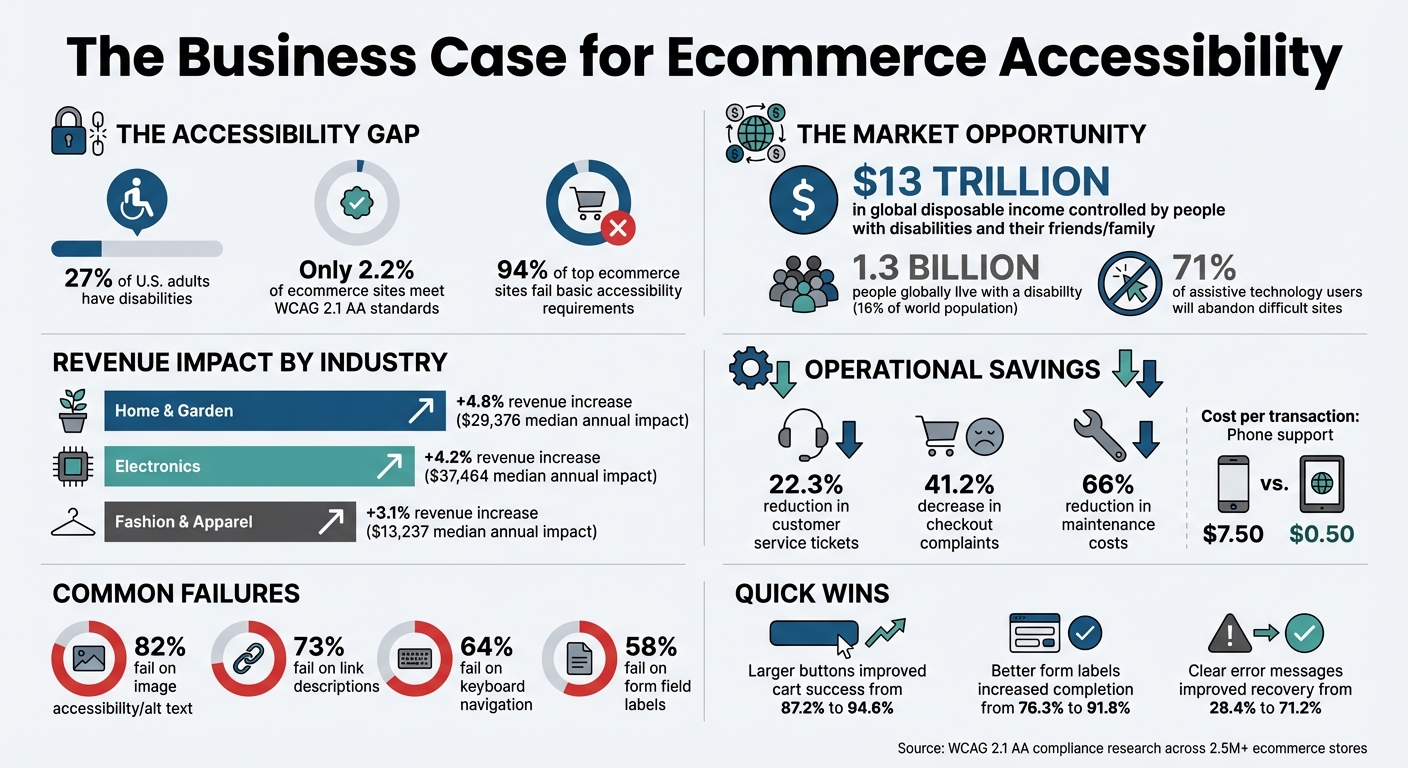
The Business Case for Ecommerce Accessibility: Revenue Impact and Market Opportunity
Accessibility Problems in Ecommerce
Common Accessibility Barriers
A staggering 94% of the top 33 highest-grossing ecommerce sites fail to meet basic WCAG 2.1 AA standards. This isn't just an oversight - it’s a systemic issue affecting millions of potential customers daily.
One of the most prevalent problems is image accessibility, which impacts 82% of major ecommerce sites. For example, product images often lack descriptive alt text or include embedded text (like a "Spring Sale 50% Off" banner) without proper labeling. This leaves screen reader users unable to access key information.
Keyboard navigation is another common challenge. About 64% of top sites have issues in this area, with 45% being entirely unusable via keyboard. This creates significant barriers for users who can't use a mouse, making dropdown menus, product filters, and checkout processes inaccessible.
Forms and input fields are problematic for 58% of leading ecommerce sites. Checkout forms with disappearing placeholder text as the sole label can leave users guessing what to enter. On top of that, vague error messages like "Invalid input" or missing group labels for sections like "Shipping Address" confuse screen reader users, making the checkout process unnecessarily complicated.
Visual design flaws affect an even wider audience. Low color contrast - like light gray text on a white background - makes content hard to read for users with low vision, older adults, or anyone shopping on a mobile device in bright light. Additionally, small touch targets (buttons smaller than 44×44 pixels) often lead to accidental clicks, causing frustration and what some analysts call "rage clicks".
| Accessibility Barrier | Percentage of Top Sites Failing | Impact on Shopping Experience |
|---|---|---|
| Image Markup/Alt Text | 82% | Screen reader users cannot identify products or sales |
| Link Descriptions | 73% | Ambiguous link texts leave users uncertain of destination |
| Keyboard Navigation | 64% | Users without a mouse cannot navigate or activate buttons |
| Form Field Labels | 58% | Users enter incorrect data or abandon checkout due to errors |
These issues don’t just affect users relying on assistive technologies - they create a frustrating experience for everyone.
How Accessibility Issues Affect All Users
Accessibility problems go beyond users with disabilities. For instance, low-contrast text and tiny buttons frustrate older adults and mobile shoppers alike. Even one-handed shoppers - like those holding a child or a coffee - face challenges similar to users with temporary impairments.
The disparity in performance is hard to ignore. On well-optimized sites, screen reader users can complete purchases in under 3 minutes with an 81.4% success rate. On poorly designed sites, the same task can take over 14 minutes, with success rates plummeting to 4.9%. This isn’t just about accessibility - it’s a business risk.
"If sites fail to accommodate these users, it's the same, for many of them, as being locked out from using the site at all."
- Alex Krzyminski, UX Researcher, Baymard Institute
The takeaway is clear: accessibility barriers don’t just exclude users with disabilities - they alienate a significant portion of the customer base, leading to lost revenue and damaged brand reputation.
How Accessibility Issues Reduce Conversions
Revenue Loss from Accessibility Gaps
Accessibility issues can severely impact sales. Research shows that 37% of consumers will abandon an ecommerce site if they encounter poor navigation. Forms are another common pain point - missing labels and unclear error messages can drop completion rates from 71.2% to just 28.4%. Then there’s the issue of keyboard traps, which affect 64% of sites. These traps can block transactions entirely, leading to an estimated annual loss of up to $6.9 billion.
The scale of abandonment highlights just how widespread these problems are. For instance, 71% of assistive technology users will leave a digital experience if it’s difficult to use. On mobile devices, small touch targets can increase misclick rates by as much as 14.3%. However, the solution is clear: making buttons larger, improving labels, and refining error messages can lead to significant improvements. Some retailers have even seen conversion rates more than double after addressing these friction points.
Fixing these accessibility barriers doesn’t just stop revenue loss - it opens the door to capturing a much larger audience.
The $8 Trillion Market Opportunity
Accessibility isn’t just about avoiding losses; it’s about tapping into a massive, underserved market. People with disabilities collectively control $8 trillion in annual disposable income. Factor in their friends and family - who often shop together - and that figure grows to over $13 trillion. Globally, 1.3 billion people live with a disability, representing 16% of the population. In the U.S. alone, up to 27% of the population has some form of disability.
This "friends and family" effect is particularly powerful. If one person in a group can’t use a site, the entire group is likely to shop elsewhere. Accessible businesses also enjoy stronger customer loyalty. Among users with disabilities, accessible stores score 3.4 times higher in customer loyalty, driving repeat purchases and positive word-of-mouth.
The financial impact varies by industry but is consistently positive. For example, after improving accessibility, home and garden retailers saw a 4.8% revenue increase, electronics retailers experienced a 4.2% boost, and fashion sites enjoyed a 3.1% gain. For mid-sized businesses, these changes can mean tens of thousands of dollars in additional revenue annually. For larger companies, the benefits can reach into the millions. A great example is Legal & General, a UK financial services firm. When they prioritized inclusive design during a 2024 website overhaul, they saw a 90% jump in online quote requests and a 50% increase in organic traffic within two years.
Ignoring accessibility doesn’t just hurt sales - it drives up costs. Inaccessible websites force users to rely on expensive customer support. For example, blind users report calling customer service weekly due to website barriers. Each support call costs businesses about $7.50, compared to just $0.50 for a completed online transaction. Then there’s the risk of legal action. Defending a single web accessibility lawsuit can cost over $350,000 in legal fees alone, not including settlements. Alarmingly, 94% of top ecommerce sites still fail to meet basic WCAG 2.1 AA standards, exposing them to significant legal and financial risks.
How Accessibility Improves User Experience
Core Principles of Accessible Design
Accessible design principles are not just about meeting standards - they make websites easier to use for everyone. The Web Content Accessibility Guidelines (WCAG) offer a framework to achieve this. For instance, using semantic HTML and proper headings helps both screen readers and search engines understand page structure better.
Simple tweaks can make a big difference. Take forms, for example: persistent labels (instead of placeholders that vanish) improve form completion rates from 76.3% to 91.8%. Similarly, error messages should be clear and placed near the relevant field. A message like "Email must include @ symbol" is far more effective than a vague alert at the top of the page.
Design choices like high contrast and larger touch targets - ideally at least 44×44 pixels or buttons that are 60 pixels tall - boost readability and reduce accidental clicks. These practices align with WCAG standards and ultimately enhance usability and conversion rates for all users.
Benefits for All Users
Accessibility improvements often benefit everyone, a phenomenon called the "curb-cut effect." Originally designed for specific needs, these features also help parents juggling devices, users with temporary injuries, or anyone in less-than-ideal conditions.
Consider touch target sizes: increasing them improved cart addition success rates from 87.2% to 94.6% and cut "rage clicks" by 67.8%. Similarly, NPR's decision to create high-quality transcripts for their shows made content accessible to deaf and hard-of-hearing audiences. At the same time, these transcripts added thousands of keyword-rich pages, significantly boosting organic search traffic.
Accessibility also reduces cognitive strain. Features like short paragraphs, plain language, and intuitive layouts help users with ADHD or dyslexia - but they also make content easier for everyone to scan. The operational advantages are notable too. Websites adhering to WCAG 2.1 AA standards see an average 22.3% drop in customer service tickets. When users can navigate a site seamlessly, fewer need to reach out for help. This not only cuts costs for businesses but also saves users time. These improvements naturally lead to better engagement and higher conversion rates - a topic we’ll dive into next.
Conversion Gains from Accessibility Improvements
Case Studies: Conversion Rate Increases
Accessibility upgrades can lead to measurable boosts in revenue and customer satisfaction. For instance, in Spring 2024, a furniture retailer based in Austin, Texas, revamped their Shopify store by adding larger buttons, enhancing text contrast, and using persistent form labels. Just six months later, their mobile conversion rate climbed from 1.73% to 1.94% - a solid 12% improvement. They also saw a 24% drop in customer service emails.
Another example comes from a gourmet food store with annual revenue of $1,847,000. They spent $21,689 on accessibility audits and dedicated 267 developer hours to the project. The result? A 2.9% revenue increase ($53,563) and $14,320 in savings on support costs within the first year. Impressively, they broke even in just 3.8 months. Similarly, Legal & General, a UK-based financial services firm, incorporated inclusive design into their website redesign. The results were striking: a 25% increase in organic traffic during the first year, which grew to 50% in the second year, along with a 90% surge in online quote requests.
While results differ across industries, the benefits are consistent. For example:
- Home & Garden stores report an average 4.8% revenue increase, translating to a median annual impact of $29,376.
- Electronics retailers experience an average 4.2% increase, or roughly $37,464.
- Even Fashion & Apparel stores, which tend to see smaller improvements, still gain 3.1%, amounting to $13,237.
These improvements don’t just stop at revenue - they also enhance user engagement in meaningful ways.
Improved User Engagement Metrics
Accessibility upgrades go beyond boosting conversion rates - they also reshape how users interact with ecommerce platforms. For example:
- Customer service tickets drop by 22.3%.
- Checkout-related complaints decrease by 41.2%.
- Returns due to incorrect orders fall by 11.8%.
- Mobile-specific support issues decline by 37.4%.
The difference in user experience for screen reader users is particularly striking. On well-structured sites, they can complete a purchase in just 2 minutes and 47 seconds with an 87.3% success rate. By contrast, poorly designed sites take over 14 minutes for the same task, with a success rate of only 12.8%. Shopify's usability testing of its Checkout component using screen readers and voice dictation showcased what’s possible: a 100% task completion rate and an 86/100 accessibility score.
Accessibility efforts also pay off in the long run. Stores that maintained accessibility standards for two years reported an 11.2% increase in customer retention and a 19.3% boost in customer lifetime value. These numbers highlight how inclusive design not only attracts customers but also keeps them coming back.
Accessibility Solutions for Ecommerce Sites
Fixing Critical User Paths
Did you know that 94% of top ecommerce sites struggle in key areas like images, links, form fields, and keyboard navigation? The breakdown is striking: images (82%), links (73%), form fields (58%), and keyboard navigation (64%) all show room for improvement. Tackling these issues starts with focusing on critical user paths.
Let’s begin with product pages. Adding descriptive alt text to images is a game-changer. Instead of vague labels, use something like "red hiking boot on rocky trail" to give context. For purely decorative images, use empty alt tags to avoid cluttering screen readers. Moving on to checkout forms, replace vanishing placeholder text with persistent labels that stay visible while users type. This simple tweak can boost form completion rates from 76.3% to 91.8%. And when errors occur, make your error messages clear and actionable. For instance, "Email must include @ symbol" works much better than a generic "Invalid input" message, improving recovery rates from 27.6% to 71.8%.
For navigation, ensure every function works smoothly with the "Tab" key, and include a visible focus indicator to guide users. Eliminate focus traps - those frustrating moments when users can’t exit a section with the keyboard - which impact 9% of top sites. Also, resize buttons and links to at least 44×44 pixels, with 60 pixels tall as the ideal. This adjustment reduces misclick rates dramatically, from 14.3% to 4.7%.
Once these fixes are in place, regular monitoring will keep everything running smoothly.
Using Accessibility Monitoring Tools
Accessibility isn’t a one-and-done task - it requires consistent attention. Tools like StoreCensus analyze compliance data for over 2.5 million ecommerce stores, helping identify gaps by comparing your site to real-world patterns.
A mix of automated tools and manual testing works best. Automated scans are great for spotting code-level issues like missing alt tags or poor color contrast. Meanwhile, manual reviews can uncover usability challenges that automated tools might miss. For example, Shopify uses Fable for quarterly testing with people with disabilities. This hands-on approach has helped them achieve a 100% task completion rate and an 86/100 accessibility score. Tools like Tanaguru Contrast-Finder ensure text-to-background contrast meets WCAG 2.1 AA standards, and Page Ruler Redux verifies button sizes meet usability guidelines.
Don’t forget maintenance. Adding alt text to new products takes only about 3.5 hours per month, and conducting quarterly audits ensures your site stays compliant as updates and new features roll out.
Optimize Your Site for Accessibility: Tips for Better UX & SEO
Measuring Accessibility ROI
Once accessibility fixes are in place and monitoring systems are running, it’s essential to measure their impact. This not only demonstrates the value of your efforts but also helps guide future improvements.
Tracking Metrics Before and After Accessibility Fixes
To assess the impact of accessibility improvements, focus on metrics in four main areas: conversion performance, user engagement, operational efficiency, and long-term customer value. Start by establishing a six-month baseline before implementing changes to account for seasonal trends in ecommerce activity.
For conversion metrics, keep an eye on overall conversion rates, mobile-specific conversions, cart abandonment rates, and complaints like “can’t complete checkout.” On the engagement side, track bounce rates, session duration, pages per visit, and “rage clicks” - those repeated clicks on unresponsive elements. These metrics can reveal where users are struggling.
Operational efficiency is another key area. Categorize customer service tickets with tags like “navigation-issue” or “form-error” to measure how many support requests stem from accessibility problems. Accessible stores often report fewer support tickets and complaints about checkout issues, which translates to cost savings.
Pay close attention to form performance as well. Metrics like form completion accuracy, error recovery rates, and post-error abandonment offer valuable insights. For instance, changing error messages from vague phrases like “Invalid input” to more specific instructions like “Email must include @ symbol” can dramatically improve error recovery - from 28.4% to 71.2%. Tracking the user journey from product discovery to checkout helps identify and address accessibility barriers. These baseline measurements make it easier to evaluate the overall impact on user experience and revenue.
Calculating UX and Revenue Impact
By comparing pre- and post-implementation metrics, you can quantify the financial benefits of accessibility improvements. For example, a medium-sized store with $623,000 in annual revenue might invest $11,650 in accessibility upgrades and see a $26,166 revenue increase in Year 1, breaking even in just 4.2 months. Larger stores, bringing in $1.8 million annually, could invest $21,689 and gain $53,563 in the first year, achieving a return on investment in 3.8 months.
The benefits don’t stop there. While the first year often focuses on attracting new customers, the long-term gains are even more compelling. By Year 2, stores typically see an 11.2% improvement in customer retention, and by Year 3, a 19.3% increase in customer lifetime value. Revenue growth also continues: after an average 4.2% increase in Year 1, stores often experience an additional 2.7% in Year 2 and 1.9% in Year 3.
"When I find a store where checkout actually works for me, I bookmark it. I tell my friends. I become a regular customer because the experience is predictable and pleasant." - Sarah, Consumer with Cerebral Palsy
Operational savings are another area where accessibility delivers results. Calculate these by multiplying the reduction in monthly support tickets by the average cost per ticket. Accessibility also shifts customers away from costly support channels - phone support costs $7.50 per transaction, and in-person walk-ins cost $15.00 - toward digital “click-in” transactions, which cost just $0.50 each. For example, Legal & General’s inclusive design approach resulted in a 66% reduction in long-term maintenance costs by using cleaner, standards-compliant code.
Conclusion
Accessibility goes beyond just meeting compliance standards - it’s a strategy for growth. By removing obstacles during checkout, improving navigation, and designing with inclusivity in mind, businesses can tap into a massive market of individuals who collectively control trillions in annual disposable income. Companies adopting accessibility standards often report revenue gains between 3.1% and 4.8%, depending on the industry. These benefits grow over time, thanks to stronger customer retention and higher lifetime value.
But the advantages don’t stop at attracting more customers. Accessibility also simplifies operations. Businesses have seen a 22.3% drop in customer service tickets and a 41.2% reduction in checkout complaints when they implement accessible features like persistent labels, clear error messaging, and larger touch targets - all of which enhance the experience for everyone. As Tresilian Segal from Level Access explains:
"Businesses now see accessibility as much more than a compliance box-checking exercise. There is a recognition that accessibility... has the potential to drive innovation, enhance brand perception, and deliver tangible financial returns".
Forward-thinking ecommerce companies treat accessibility as an ongoing investment. Take Legal & General, for instance - their inclusive redesign resulted in a 90% surge in online quote requests and a 66% drop in maintenance costs within two years.
Start by tackling critical user paths like checkout and navigation. Tools like StoreCensus can provide real-time insights to help you improve. With 94% of mobile users considering accessibility when making purchasing decisions, can you afford to overlook its impact?
FAQs
How does improving accessibility boost ecommerce revenue?
Making your ecommerce site accessible can directly impact your revenue by tapping into a market that includes the 27% of the U.S. population living with disabilities. This group wields trillions of dollars in disposable income, making them a powerful consumer base. But accessibility doesn’t just benefit individuals with disabilities - it also enhances usability for older adults and people in underserved areas, like rural communities. The result? Better engagement and higher conversion rates.
Focusing on accessibility isn’t just about meeting legal requirements; it’s about creating a shopping experience that’s open to everyone. This approach builds customer loyalty and expands your reach to a much larger audience.
What are the most common accessibility challenges for ecommerce websites?
Ecommerce websites often struggle with accessibility issues. Common challenges include missing or unclear image descriptions, inaccessible link structures, improperly labeled form fields, and limited keyboard navigation. These obstacles can significantly hinder users with disabilities from navigating and using the site effectively.
Research highlights that many ecommerce platforms fall short of meeting WCAG 2.1 AA standards. Frequent problems include images without proper descriptions, confusing link setups, and form fields lacking essential markup. Fixing these issues doesn’t just benefit users with disabilities - it enhances the overall user experience for everyone. A more accessible website can lead to higher customer satisfaction and ultimately boost conversion rates.
How does website accessibility benefit all users, not just those with disabilities?
Improving website accessibility makes your site easier to use and navigate for everyone - not just individuals with disabilities. Simple features like clear layouts, intuitive designs, and keyboard-friendly navigation help all users interact with your site more effectively, regardless of their abilities.
These adjustments can lead to higher engagement, improved user satisfaction, and even increased conversion rates. A smoother, more inclusive experience not only benefits users but also helps businesses expand their reach and build lasting customer loyalty.